


Omada review
 Analysis by Appsdrops
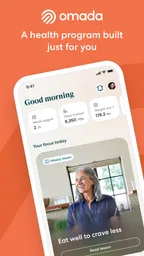
I think Omada is easiest to understand as a companion to a health program, rather than a general-purpose medical reference or a stand-alone habit tracker. Its role is to help people stay involved with the program they are taking part in. That distinction matters: if you want a place to look up symptoms or manage every aspect of your care, this may not be the right fit. If you already use an Omada program and want its experience on your phone, the app has a more focused purpose.
Finding your way through a program
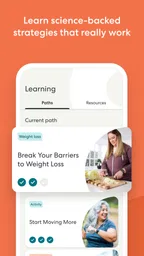
The app is made by Omada Health and sits in the medical category. In practice, I would judge it less like a broad health dashboard and more like a doorway back into a structured program. That can be useful when your goals, guidance, or ongoing activities are connected to Omada, but it also means the value you get depends on whether you have a reason to participate in that program.
For readability and navigation, a focused app has a potential advantage: it need not compete with a jumble of unrelated trackers, news feeds, and medical reference material. When I open a program companion, I want to be able to identify what deserves attention now and return to it without having to reconstruct my plan from memory. Omada’s purpose points toward that kind of continuity. Still, a simple purpose is not a guarantee that every screen will suit every reader; comfort depends on the text, layout, and controls as encountered on the person’s own device.
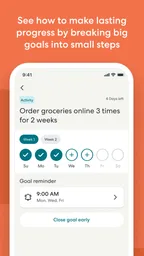
One practical way to make a program app easier to use is to treat it as a short check-in, not a task to complete in one long sitting. I’d open it at a regular, low-pressure moment, review what the program is asking of me, and decide on one next step. That rhythm can help someone who finds a busy health app overwhelming, while making it easier to notice when an activity is becoming a source of stress rather than support.
Omada has an average rating of 4.4 from around 27,000 ratings, alongside roughly 8,200 written reviews. Those figures suggest that many people have formed an opinion about the experience, but they cannot tell me whether it will be comfortable for a particular person or useful for a specific health goal. I would use them as context, not as a substitute for checking whether the program itself matches what I need.
What “easy to use” means here
For me, the most useful test is whether I can return after a busy day and quickly understand where I am in my program. A companion app should reduce the mental effort of keeping track, not create another system that needs constant tending. If I am trying to build a routine, I would make the phone’s role predictable: open Omada at a chosen time, handle the program’s current prompt, and then leave it alone until the next check-in.
This approach is especially relevant for people who switch between a phone and other ways of receiving health guidance. The app can serve as a convenient place to re-engage, but it should not become the only place where a user remembers important instructions. I would keep any clinician-provided directions or personal notes in a format that is dependable for me, rather than assuming every detail of my care belongs inside one program.
Motor and sensory considerations
People use health apps with very different levels of dexterity, vision, hearing, concentration, and comfort with touchscreens. I would not assume that a program companion automatically accommodates all of those needs. If small controls, long reading sessions, bright screens, or frequent interactions are difficult for you, try the app in the conditions where you expect to use it before relying on it for a daily routine.
A helpful personal test is to complete one ordinary check-in while seated comfortably, using your usual display settings and any device-level tools you already rely on. Notice whether you can move through the relevant screens without rushing, whether the wording is easy to follow, and whether you can recover if you tap the wrong place. If a family member or support person helps with technology, ask them to watch the process once and identify where you hesitate; that often reveals friction that is easy to miss when reading a feature list.
For sensory needs, I would also think about the environment rather than the app alone. A screen that feels readable at home may be difficult outdoors, and a notification that is useful at one moment may be distracting in a meeting or at bedtime. If alerts or prompts are part of how you use the program, choose a routine that does not depend on noticing every message immediately. The point is to make participation sustainable, not to turn every interruption into a test of attention.
There is a trade-off here. A phone-based program can make engagement more convenient than relying on memory or scattered paper notes, yet it still asks the user to interact with a screen. For someone with pain, fatigue, limited hand movement, or difficulty processing text, a conversation with the program team or a trusted support person may be a better first step than trying to force a daily app habit.
When and where it fits into everyday life
Consider a person who has a packed workday and tends to forget health tasks once the morning rush begins. A realistic routine might be to check Omada during a quiet break, use the program’s guidance to choose a manageable action for the rest of the day, and return later only if that is useful. The benefit is not that the phone magically changes a habit; it is that a consistent point of contact can make a structured program easier to keep in view.
Another useful case is someone who prefers to think through a health goal privately before discussing it with others. A mobile companion may feel more convenient than keeping a paper log in a bag or searching through messages for prior instructions. On the other hand, if a person has unreliable access to a phone, shares a device, or finds screen-based health work uncomfortable, a different way of participating may be more practical. I would make that choice based on the person’s daily circumstances, not on the assumption that an app is always the most inclusive option.
Omada is free to download, has an Everyone content rating, and has more than 500,000 installs. It was released on November 18, 2014, and its current version is 26.42.0, with Android 8.0 as the stated minimum operating-system requirement. These details help with basic compatibility and expectations, but an install count is not a measure of whether the app is accessible to a particular user or appropriate for every medical situation.
The best time to use a program app is usually the time when you can give it enough attention without making it compete with something important. If you are checking in while driving, caring for someone, or trying to handle a stressful moment, postpone the interaction until you can focus. For health tasks that need immediate attention, follow the appropriate care instructions rather than treating a program companion as an urgent-care channel.
How it compares with other ways to stay engaged
Compared with a general-purpose habit tracker, Omada’s appeal is its connection to an Omada program rather than the freedom to track anything you choose. A broad tracker may be better if you want to build your own categories, combine unrelated routines, or keep control over every reminder. A paper calendar may be better if screens create fatigue or if you prefer a visible prompt in a fixed place. A health professional’s direct guidance is the better choice when you need individualized medical advice or help interpreting a change in your condition.
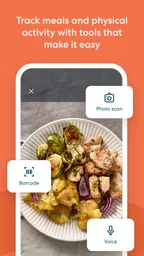
That focus is also a limitation. I would not choose the app simply because I want a calorie log, a medication organizer, a symptom encyclopedia, or a universal record of my health. Its purpose is narrower: to support engagement with an Omada program. If that program is not part of your care or goals, there may be little reason to install the app, regardless of its rating or reach.
A useful workflow is to decide in advance what you expect the app to do for you. For example, if your aim is to stay connected to a program, use it for that and keep unrelated tracking elsewhere. Splitting responsibilities can sound less tidy, but it avoids the common frustration of expecting one app to replace a clinician, a personal diary, and a reminder system all at once.
Where friction may remain
The largest potential barrier is not necessarily a button or a screen; it is the fit between the person and the program. Someone who wants a fully self-directed tool may feel constrained by a program-centered experience. Someone who prefers face-to-face support may not find a phone app sufficient. And someone who is already overloaded by health tasks may experience another check-in as extra work unless it clearly helps them follow through.
There is also a difference between being able to open an app and being able to use it comfortably over time. A person may manage a first session but struggle with repeated reading, remembering to return, or using a phone during a low-energy day. I would give myself permission to adjust the routine, ask for help, or use another method when needed. Consistency is valuable only when the method remains realistic.
Omada is a sensible option for people who are already connected to an Omada program and want a mobile way to remain engaged. I would recommend trying it as a focused companion, while being honest about whether its screen-based routine suits your abilities, schedule, and preferences. If you need a flexible general tracker, a low-tech alternative, or individualized medical direction, another option may serve you better. The most inclusive choice is the one that lets you participate comfortably and reliably—and for some people, that will be this app, while for others it will be a different format or a combination of support methods.
What we like
- Simple setup helps new users get started quickly.
- Personalized recommendations make workout choices easier.
- The exercise library offers options for different fitness levels.
- Progress tracking helps users stay aware of their activity.
- The interface works well for managing fitness goals.
What could be better
- Some features may require a paid subscription.
- Workout variety may feel limited to experienced athletes.
- Recommendations may need time to match personal preferences.
- A stable internet connection may be needed for some features.
- Tracking accuracy can depend on the connected device.





