
OctaApp - Donate Plasma review
 Analysis by Appsdrops
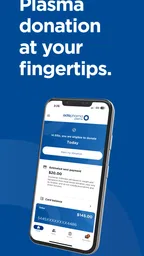
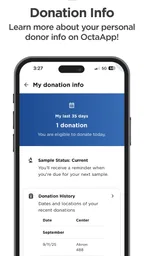
Plasma donation involves more than showing up at a center: you need a way to keep track of your donation information and have it handy when you need it. OctaApp is Octapharma Plasma Inc.’s medical app for that purpose, offering easy access to your plasma donation info. Its appeal is straightforward: it gives donors a mobile place to turn when they want to check in on donation-related details, rather than treating the app as a general health or lifestyle tool.
A practical starting point for plasma donors
If you donate plasma, having relevant information within reach can make the process feel easier to manage. That is the job OctaApp sets out to do. I see it as a companion to the donation experience, not a replacement for the in-person visit or a source of medical guidance. The app’s focus is narrow, and that can be a strength: it is built around plasma donation information instead of trying to cover every part of a person’s health routine.
The app is free, and it is rated for Everyone. It has an average rating of 4.4 from around 2,100 ratings, with over 100,000 installs. Those figures suggest that OctaApp has reached a substantial audience of donors, while the central question for any individual is still practical: does it make the information they need easier to access?
That framing matters because donor workflows have several stages. A person starts with questions or details to check, uses a mobile tool to find relevant information, and then carries that context into an interaction with a donation center. OctaApp’s stated role is to support the information-access part of that journey. The value is less about novelty and more about reducing the effort involved in keeping donation details close at hand.
Moving from intention to information
When I think about the first step in using a donor app, I start with the moment a person realizes they need to check something. Maybe they are preparing for a donation-related task or simply want to review their information. A useful app should make that first move feel natural: open it, orient yourself, and find the details that matter without turning a quick check into a project.
OctaApp’s purpose gives it a clear starting point. It is designed for easy access to plasma donation info, so donors do not have to approach it as a broad medical library. That focus helps set expectations. I would come to it for information connected with donating plasma, rather than assume it can answer every health question or manage every appointment and personal record.
A focused purpose also makes the app easier to understand before installing it. The name and description point toward donor support, and the developer is Octapharma Plasma Inc. For someone already connected with plasma donation, that context is immediately relevant. Someone unfamiliar with donation may find the app less useful until they have a reason to manage donation information.
Following the donor workflow
The most useful way to judge OctaApp is to follow the ordinary sequence around a donation. First, a donor has a reason to look up information. Next, they open the app and use it as a mobile point of access. Then, when they interact with the donation process outside the app, the information they have reviewed can help them feel more prepared. Finally, they return to the app when another donation-related question comes up.
That sequence sounds simple, and simplicity is exactly what I want from a companion app. A tool that supports a repeat activity should fit around the activity instead of demanding extra attention. OctaApp’s stated focus makes sense in that role: it is there to help donors reach their plasma donation information, not to compete with the actual donation experience.
There is an important handoff in this workflow between the app and the person or process at a donation center. A mobile app can help someone access information before or around that interaction, but the donor still has to take the next step in the real world. Thinking of OctaApp as a bridge for information keeps expectations grounded. It can support preparation and reference, while the donation process itself remains an in-person activity.
For regular donors, a dedicated place to look may also make the experience feel more organized. Instead of relying only on memory, they can turn to an app intended for donation information. That does not guarantee that every visit becomes effortless, but it can make the information side of the routine feel more direct. To me, that is the most believable benefit: a practical shortcut to the subject the app is built around.
Where the handoffs matter
Apps work best when the digital step connects cleanly with what happens next. In this case, the key handoff is from checking information on a phone to taking action in the donation setting. OctaApp belongs on the information side of that transition. A donor can use it as a convenient point of reference, then rely on the donation center and its staff for the in-person parts of the experience.
That distinction is useful for keeping the app in perspective. It is a plasma donation information app, not a substitute for a donor’s own judgment or professional advice. If a question is medical or requires a decision about eligibility, a person should treat the app as a supporting tool rather than assume that a mobile screen can resolve every situation.
The handoff also runs in the other direction. After interacting with a center, a donor may want to return to their phone to review donation-related information again. A dedicated app gives that information a natural home. The best version of this kind of workflow is one where the digital and in-person parts complement each other, with each doing the job it is suited for.
OctaApp’s value therefore depends on whether its information is relevant to the donor’s actual routine. For someone who wants a mobile way to access plasma donation info, the purpose is easy to understand. For someone looking for a broad suite of medical tools, that same focus may feel limited. I consider that a matter of fit rather than a flaw: the app is most compelling when its specific task is the task you need help with.
What the result feels like
The result of a well-used companion app is not necessarily a dramatic change. It may simply be that the donor knows where to look when they need donation information. That small improvement can matter in a recurring routine, especially when the alternative is searching through unrelated apps or trying to remember details from an earlier interaction.
OctaApp’s clear purpose is its strongest point. I like that the idea can be explained in one sentence: it provides easy access to plasma donation info. That clarity makes it easier to decide whether to install it. Donors who want that focused support can see a direct reason to give it a try, while people who do not need donation information have little reason to keep it in their everyday app lineup.
Its medical category is also a useful signal about the kind of role it plays. This is a specialized utility connected with donor information, not an entertainment app or a general-purpose organizer. That makes the experience easier to evaluate on practical terms: does it help you reach the information you came for, and does it fit naturally into your donation routine?
The app is currently version 5.4.0 and requires Android 7.0 or later. It was released on October 23, 2025. These details can help Android users check basic compatibility before they install it. The price is free, so there is no purchase cost to weigh against its usefulness. As with any app, the important decision is whether its purpose matches the way you handle plasma donation.
Where the flow can feel less smooth
A focused app can still feel like an extra step if a donor only needs donation information occasionally. Every additional tool asks the user to remember where something lives and when to open it. If you already have a routine that works, OctaApp may feel most useful when you have a specific reason to check donation-related details, rather than as an app you need to browse every day.
Another possible point of friction is expectation. The phrase “easy access” can make people imagine a complete end-to-end donation manager, but the app’s stated purpose is access to plasma donation info. I would approach it with that narrower expectation. A good experience depends on finding the information relevant to your situation, while questions that belong in a conversation with a donation center remain part of that separate handoff.
There is also the usual difference between having information on a phone and having the information needed for every real-world decision. The app can be a convenient companion, but convenience should not be confused with a guarantee that the whole donation process happens digitally. Keeping that boundary clear helps avoid frustration and lets the app do its intended job without being judged as something it is not.
For new users, the learning curve should be considered in terms of purpose rather than assumed complexity. If you understand that OctaApp is for donation information, you have a simple reason to open it. If you expect it to cover unrelated medical needs, its focused scope may not match your expectations. In my view, that is the main way the flow can break: not necessarily because the app has no value, but because someone expects a different kind of tool.
Who should consider OctaApp?
I would recommend considering OctaApp if you donate plasma through Octapharma and want a mobile place to access information connected with that activity. It is especially easy to understand for people who prefer having a dedicated app for a recurring task. Instead of treating donation details as something to hunt down only when a visit is close, you can make the app part of your personal information routine.
If you are only exploring plasma donation, the app may still be relevant as a starting point for donor-focused information, but it should not be mistaken for a complete substitute for guidance from the donation provider. And if plasma donation is not part of your life, there is little reason to install a specialized tool just because it sits in the medical category.
OctaApp has an average rating of 4.4 and has received 861 reviews. Ratings can offer a broad impression of how people respond to an app, but I would put more weight on whether its central task is useful to you. The purpose is specific, the price is free, and the intended audience is easy to identify. For the right donor, those are more meaningful considerations than a long list of unrelated features.
A focused companion with a clear role
Overall, OctaApp is best understood as a practical companion for accessing plasma donation information. Its appeal comes from a clear starting point, a straightforward role in the donor workflow, and a useful handoff between checking details on a phone and continuing the experience in person. I would not expect it to replace a donation center or answer every medical question; I would judge it by how conveniently it supports the information part of donating.
If you want a specialized plasma donation app
What we like
- Lets donors review nearby Octapharma Plasma centers.
- Shows center hours and contact details before a visit.
- Offers access to appointment scheduling features.
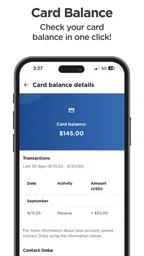
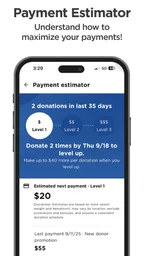
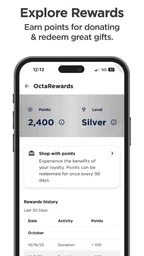
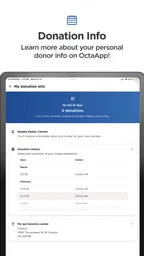
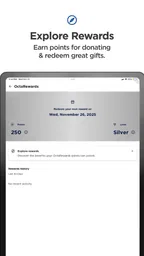
- Helps users keep track of donation activity.
- Provides a convenient way to manage donor account details.
What could be better
- Features may be limited to Octapharma Plasma donors.
- Center information may not reflect unexpected closures.
- Appointment options can vary by location.
- Some account tools may require sign-in.
- The app is not useful for finding non-Octapharma donation centers.





