NYSOH Mobile Upload review
 Analysis by Appsdrops
When New York’s health insurance marketplace asks you to provide paperwork, the hard part is often getting the right document from your phone to the right place. NYSOH Mobile Upload is built for that narrow task: it gives people using NY State of Health a mobile route for sending documents connected with their marketplace account. I see its value less as an all-purpose health app and more as a practical helper for a specific, sometimes time-sensitive step.
Focused help for a paperwork-heavy process
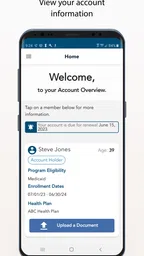
This is a medical-category app from MAXIMUS, but it is not a source of medical advice, a symptom checker, or a way to compare treatment options. Its purpose is administrative: upload documents to the NY State of Health health plan marketplace. That focus is helpful if you already know that NYSOH needs paperwork from you; it is not a reason to install it if you are looking for general healthcare tools.
The app is free, and its Everyone age rating makes it accessible to a broad audience. It has an average rating of 4.8 from around 13,000 ratings, with more than 100,000 installs. Those figures suggest that many people have found a reason to use it, though they cannot tell you whether your particular document will be accepted or whether the app fits your account situation.
In my view, the most useful way to approach it is as one part of a larger enrollment or coverage task. The app may make sending a document from a phone more convenient than moving it to a computer first, but the document still needs to be readable, relevant, and associated with the right marketplace request. The upload step can be simpler than the paperwork decision that comes before it.
Where the mobile route earns its place
A common situation is receiving a request for supporting documents while away from home. Perhaps you have a paper letter in front of you, or a file saved on your phone, and want to respond without waiting until you can sit down at a computer. A dedicated upload app can reduce that extra transfer step and make it easier to act while the request is still on your mind.
That convenience matters most for people who are comfortable handling files on a phone and who already know what NYSOH is asking them to provide. If the request is unclear, I would first read it carefully and confirm which document is needed rather than uploading whatever seems close. A quick submission is not necessarily a useful one if the file does not answer the marketplace’s request.
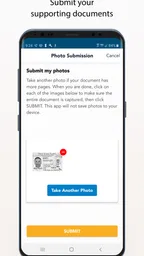
There is also a practical advantage to separating this task from everyday photo sharing. A document intended for a health coverage application deserves a deliberate check before it leaves your device. I would review the image or file for legibility, make sure the relevant page is included, and avoid capturing unrelated paperwork in the same frame. Those small checks can prevent an avoidable back-and-forth.
A workflow that rewards preparation
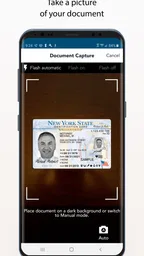
I would prepare the document before opening the upload process. If it is on paper, place it on a flat surface with good light and check that the text is sharp and the edges are visible. If it is already digital, locate the correct file first and give it a name you can recognize. These are not special app features; they are simple habits that make a mobile submission less error-prone.
For a multi-page letter, I would check that every requested page is present and in order. A single clear image may be enough for a short document, but a cropped page or a missing continuation sheet can leave the reviewer without the context they need. When a notice asks for a particular portion of a document, follow that instruction rather than sending extra pages without a reason.
After sending anything, keep the original document and the marketplace’s request until the issue is resolved. I would also make a note of when I submitted it and what I sent. This is useful if you need to follow up, especially when you are managing several household members or more than one request at a time. The app’s role is to transmit paperwork; keeping your own simple record helps you stay oriented afterward.
What its version history tells me—and what it does not
The current version is 3.3, and the app was released on October 27, 2019. That establishes that it is not a brand-new experiment, and the version number shows that it has been through releases since launch. However, a version number alone does not reveal which screens changed, whether a particular workflow was redesigned, or how any update affects a specific user.
For someone who has used it before, I would treat the current release as the version to assess rather than assuming that an old experience still describes it precisely. If the interface looks different after an update, take a moment to check the destination and document details before submitting. For a first-time user, the useful expectation is modest: this is a purpose-built upload channel, not a replacement for the wider NYSOH marketplace process.
The app supports Android 8.0 and later. That makes the minimum system requirement worth checking before relying on it, particularly if you keep an older phone in service. If your device does not meet that requirement, using the marketplace through another available route is more sensible than delaying a document submission while trying to make the app work.
How it compares with the usual alternatives
The main alternative is to use a computer and access the marketplace through its usual online process. That can be preferable when you are already working with several files, need to inspect a long document closely, or find phone-based file management awkward. A larger screen can make it easier to compare a request with the paperwork you plan to send.
On the other hand, a phone is often the quickest tool for a paper document that is already in your hands. You can capture it where you are instead of scanning it elsewhere and transferring the result. For a short, clearly requested item, that can make the mobile route feel more direct. The trade-off is that phone cameras, lighting, and file selection require care; convenience does not guarantee a clean submission.
I would not treat ordinary email or a general file-sharing service as an equivalent substitute for a marketplace upload. They may be familiar ways to send files, but a dedicated route tied to the NYSOH task is the more appropriate choice when the marketplace directs you there. If you are unsure which channel to use, follow the instructions associated with your request rather than guessing based on what is easiest.
Friction points to keep in mind
The app’s narrow purpose is also its biggest limitation. It is useful when the job is uploading a document, but it should not be mistaken for a complete account-management or insurance-shopping experience. If your real question is about eligibility, plan choices, a deadline, or what a notice means, an upload tool by itself will not answer it. In that situation, consult the relevant NYSOH materials or contact the appropriate support channel.
Mobile document handling can also be fiddly. A file may be difficult to find among downloads, photos, and messages, and a hurried camera image can be hard to read. I recommend checking the whole document before submission rather than assuming that a successful upload means the image is useful. When a page contains small print, glare, or folds, retaking it is usually worth the extra minute.
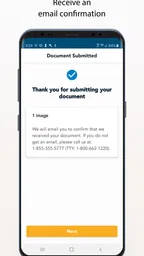
Another point to remember is that sending a file and resolving a request are separate steps. Keep an eye on any instructions or follow-up connected with your marketplace account, and do not assume the matter is complete just because you used the upload app. If a deadline is approaching or the request is confusing, prioritize clarifying the requirement instead of repeatedly sending alternate versions of the same paperwork.
Who I would recommend it to
I would recommend NYSOH Mobile Upload to New York residents who have an active document request related to the NY State of Health marketplace and prefer to handle that task on a phone. It is especially practical for someone who has a clear request, a ready-to-send file, and limited time to get to a computer. For that person, a dedicated mobile upload option can remove an unnecessary step from an otherwise paperwork-heavy process.
I would skip it if you have no NYSOH document to submit, want broad health-management features, or are trying to solve a question the marketplace has not answered. I would also choose a computer if you need to organize a large collection of documents, carefully review many pages, or find mobile file selection stressful. The best route is the one that lets you submit the right material clearly and follow the request’s instructions.
Overall, I think this app is worthwhile precisely because it keeps its job small. MAXIMUS has made a free mobile tool for a specific marketplace chore, and its strong average rating points to a generally positive response from users. I would use it as a convenient submission route, while staying attentive to document quality, account instructions, and any follow-up needed after sending.
What I would watch for next
For existing and new users alike, the meaningful question is whether future releases keep the upload process dependable and straightforward on supported devices. The version number provides a current reference point, not a promise about what will change next. I would watch for clear release notes in the app store and check that the app continues to meet your phone’s requirements before a time-sensitive submission.
My bottom line: if NYSOH has asked you for paperwork and you want to send it from your phone, NYSOH Mobile Upload is a focused option worth considering. Prepare the file, verify that it is readable and complete, and keep track of what you submitted. If your need goes beyond document transfer, use the marketplace’s broader resources or a more suitable route instead.
What we like
- Lets users submit requested documents from a mobile device.
- Can reduce the need to mail or fax paperwork.
- Offers a focused tool for sending documents to NY State of Health.
- Useful when a document deadline is approaching.
- Supports uploading files while away from a computer.
What could be better
- Requires an active internet connection to upload documents.
- Users may need to sign in with their NY State of Health account.
- Poor lighting can make photos of paperwork hard to read.
- Some file types or sizes may not be accepted.
- Uploading documents does not guarantee they meet program requirements.





