

NimbleRx review
 Analysis by Appsdrops
I judge a pharmacy app less by how polished it looks on the first day than by whether it keeps helping when a prescription needs attention again weeks later. NimbleRx is a free medical app from NimbleRx, Inc., built around making pharmacy tasks easier to handle from a phone. Its appeal is practical rather than entertaining: it is worth considering if you want a digital route into prescription-related errands, but it is not a substitute for a pharmacist or for every pharmacy’s own service.
What feels useful in the first week
When I try a pharmacy app, I want to know quickly whether it fits the way I already manage medication. NimbleRx makes most sense for someone who would rather check and handle prescription tasks digitally than rely on phone calls, paper reminders, or an extra trip just to ask what is happening. The benefit is not that every part of pharmacy care becomes effortless; it is that routine coordination can feel less scattered when the app is part of the process.
The first-week test is simple: can you use it for a real need, rather than opening it once out of curiosity? If you have a prescription to manage, setting aside a few minutes to see how the app fits that task is more useful than browsing without a purpose. I would start with one current prescription and confirm that the pharmacy and the information shown match what you expect. That small check can prevent an avoidable misunderstanding later.
The app has an average rating of 4.8 from around 38,000 ratings, and more than 500,000 installs. Those figures suggest that many people have found it worth trying, though popularity cannot tell you whether it will fit your particular pharmacy or medication routine. I treat them as context, not a promise: the decisive question is whether the app supports the pharmacy relationship you actually use.
One practical point is to keep the app in its proper role. A digital interface can make routine steps more convenient, but questions about a dose, side effects, interactions, or a change in how you feel belong with a qualified healthcare professional. I would use NimbleRx to support the administrative side of obtaining medication, not to make clinical decisions or to delay asking a pharmacist for help.
Make the first setup serve a real routine
Rather than trying to move every medication task into a new app immediately, I would begin with the prescription that creates the most friction. Maybe it is the one you regularly forget to check, or the one that requires you to coordinate a pickup around work. A focused trial helps reveal whether the app genuinely saves effort. If it does, you can expand your use; if it does not, you have avoided building a habit around a tool that adds another step.
It is also sensible to check that your phone can run the current release before relying on it. NimbleRx is listed at version 26.765.1 and supports iOS 8.0 or later. Compatibility is useful to know, but an older minimum operating-system requirement should not be read as a guarantee that every older device will feel fast or receive the same experience. For sensitive tasks, I would use a device that is current enough for you to keep its security updates up to date.
Where the value shows up month after month
A pharmacy app earns a lasting place only if it makes repeat tasks easier. Prescription needs are often cyclical: a person may have a quiet stretch, then suddenly need to deal with a refill or another pharmacy errand. In my view, that irregular rhythm is exactly why a useful app should be easy to return to. It should reduce the effort of getting oriented, rather than demand constant attention just to justify its place on the phone.
Consider a realistic workday: you realize during a short break that a prescription needs attention, but you cannot comfortably call the pharmacy right then. A phone-based option may let you deal with the administrative task at a more convenient moment. The value is not merely saving a call; it is having a clearer next step when the errand would otherwise sit in your memory until you are free. I would still check any time-sensitive details directly rather than assuming an app interaction has completed every part of the process.
Another useful workflow is to treat the app as a prompt to verify, not as the sole record of your medication plan. If a prescription changes, you move pharmacies, or a clinician gives you updated instructions, compare what you see in the app with the current direction from your care team. That habit is a small safeguard, especially for people managing more than one prescription. Digital convenience works best when it is paired with deliberate checking.
Compared with calling a pharmacy, the app may suit people who prefer handling straightforward tasks on their own schedule. Compared with a pharmacy’s own app or a patient portal, the better choice depends on where your prescription is actually managed and which service has the information you need. I would not install several pharmacy apps just in case. Choose the one that connects to your real routine, and keep the phone number or in-person option available for questions that need a human answer.
The recurring value is strongest for people who already use a compatible pharmacy workflow and have occasional administrative tasks to manage. If you rarely need prescription services, the app may sit untouched for long stretches; that does not automatically make it a bad app, but it does mean its value is convenience on demand rather than something you use every day. I would judge it by whether it removes friction when the need arises, not by how often I open it.
Keep the maintenance burden small
For a medication app to remain useful, maintenance should be modest. I recommend checking the pharmacy and prescription details whenever something changes, instead of assuming old information will stay correct. If you stop using a medication, switch pharmacies, or update your contact details, take a moment to make sure the app reflects the new situation where applicable. This is more reliable than trying to reconstruct what happened months later.
There is also a useful distinction between an app that supports a task and one that becomes your entire medication system. If you take several medicines with different instructions, a pharmacy app may not replace a personal medication list or the advice you receive from a clinician. I would keep a clear, current record in whatever format works for you, and use NimbleRx as one practical channel for pharmacy-related steps. That avoids depending on a single app for information it may not be designed to organize.
With 2.2 thousand reviews, the app has attracted substantial written feedback as well as ratings. I would read recent comments for patterns relevant to my own situation, such as whether people describe a smooth experience with the kind of pharmacy task I need. Individual experiences can vary, so I would not treat a single complaint or enthusiastic review as a definitive guide. A useful test remains trying the app with a low-risk, ordinary task before depending on it for something urgent.
Because NimbleRx is free and rated for Everyone, there is no purchase decision or age restriction to weigh in the same way as with some paid apps. Still, “free” does not mean you should install it without considering privacy and device habits. Prescription-related activity is personal. I would review the app’s permissions and privacy information during setup, use a secure phone lock, and avoid sharing account access casually. Those are sensible precautions for any tool connected to healthcare errands.
When convenience turns into fatigue
The main source of fatigue is having to manage an app that does not match your actual pharmacy arrangements. If your pharmacy does not work with the service you need, or if your usual process is already quick and dependable, adding another account and another place to check can create more work than it removes. I would confirm that the app fits the specific pharmacy workflow I intend to use before making it part of my routine.
Another possible frustration is expecting a digital tool to eliminate every conversation. Some questions are inherently better handled by a person: a confusing instruction, a concern about a medication, or a time-sensitive issue where you need confirmation. If you find yourself repeatedly checking the app without getting a clear answer, switch to direct contact instead of letting the convenience layer slow you down. The right channel is the one that resolves the problem safely, not necessarily the one that keeps you on your phone.
People who strongly prefer face-to-face service may also find little reason to change. If you value discussing prescriptions in person, or if a family member helps coordinate your medication and does not use your phone, a digital-first routine may not be a natural fit. Likewise, someone looking for medical guidance, symptom tracking, or a complete health record should not assume a pharmacy-focused app covers those needs. NimbleRx is most compelling when the task is pharmacy administration, not broader healthcare management.
To avoid notification and checking fatigue, I would use the app when there is a concrete task rather than opening it habitually. Keep the steps that matter—confirming details, handling an outstanding errand, and checking changes—without turning every quiet day into a reason to monitor the app. The point is to make the pharmacy task easier to remember and complete, not to create a new stream of attention demands.
My long-term verdict
After the novelty fades, NimbleRx’s strongest case is that it can remain a convenient tool for recurring pharmacy needs without needing to become the center of your healthcare routine. I would recommend trying it if you already have a pharmacy task that is awkward to manage by phone or in person and the app fits that pharmacy’s process. I would skip it if your current arrangement is simpler, if you need clinical advice rather than administrative help, or if maintaining another digital account would be more trouble than it saves.
The developer, NimbleRx, Inc., has kept the app in a medical role, and that is how I would evaluate it: by whether it helps with practical prescription errands over time. Its 4.8 average rating is encouraging, but ratings cannot settle whether it works for your individual routine. The best approach is to test one ordinary task, make sure the resulting details are clear, and keep a direct route to your pharmacist for anything that needs explanation or confirmation.
My lasting-space test is straightforward: after a month, does the app save you a step when you need pharmacy help, without asking for extra attention when you do not? If the answer is yes, it has earned its place as a quiet utility. If it becomes one more place to check or creates uncertainty about what has been handled, go back to the pharmacy’s direct channel. The most useful role for NimbleRx is dependable convenience for real pharmacy tasks, with a person still available when the situation calls for one.
As a free app in the medical category, NimbleRx is an easy option to consider, but I would make the decision based on fit rather than install count alone. Its Everyone content rating makes it broadly accessible, while the practical benefit depends on your pharmacy habits. For someone who wants to manage routine steps from a phone and is willing to verify important changes, it can be a sensible part of a medication routine. For someone who values direct contact or needs more comprehensive health tools, another route may be better.
What we like
- Prescription refills can be requested from a phone.
- Delivery can save trips to the pharmacy.
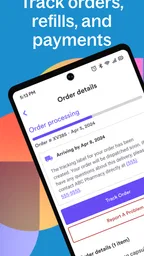
- The app helps track prescription orders.
- Users can find participating local pharmacies.
- It offers a convenient way to manage pharmacy needs.
What could be better
- Availability depends on participating pharmacies in your area.
- Not every prescription may qualify for delivery.
- Delivery timing can vary by pharmacy.
- Some features may require sharing personal health information.
- Pharmacy services and costs can differ by location.





