



NewsBreak: Local News & Alerts review
 Analysis by Appsdrops
I find local-news apps useful only when they help me answer practical questions: what is happening nearby, whether a developing story affects my plans, and which reports deserve a closer read. NewsBreak is built around that kind of everyday check-in. It is a free news and magazines app from Particle Media Inc., with a focus on local coverage and alerts rather than a single newspaper’s point of view. Its appeal is easy to understand, though the experience depends on getting the setup and notification balance right.
Getting past the first setup hurdles
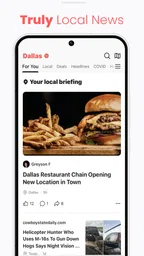
The most important early choice is the area you want the app to follow. Local coverage is only useful if the location or community selected makes sense for your routine. If the first stories feel irrelevant, I would check the location and local-news choices before assuming the app has nothing useful to offer. Someone who commutes across neighboring towns may want a different news mix from someone who mainly wants updates close to home.
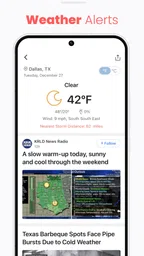
Alerts are another point where expectations matter. The app’s focus on local headlines can make notifications useful for a quick glance, but frequent interruptions can become tiring. I’d start with a restrained notification setup and pay attention to which alerts actually help me decide what to do. If a headline is interesting but not urgent, opening the app when convenient is often better than letting every update break into the day.
There is also a difference between installing a news app and building a useful news habit. I would give the feed a few visits at different times rather than judge it from one session. A morning check might help with local developments before leaving home; an evening check can be better for catching up without rushing. This small routine makes it easier to spot whether the stories are consistently relevant or just occasionally appealing.
NewsBreak has an average rating of 4.6 from around 641,000 ratings, and it has been installed over 50 million times. Those figures suggest a broad audience, but they do not guarantee that its coverage will fit every neighborhood. Local news varies by place, so I’d treat my own feed as the test that matters. If the area is covered well, the app can become a convenient starting point; if not, a local paper or broadcaster may serve that community better.
Make the feed work for your day
A useful approach is to separate quick scanning from deeper reading. I use a news feed to notice topics, then pause on stories that might affect a route, school schedule, public event, or neighborhood decision. Headlines are good signposts, not substitutes for reading the article. When a story matters, checking its details and context is worth the extra minute, especially if the headline is brief or emotionally charged.
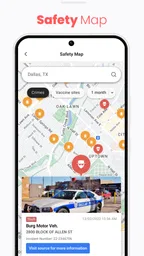
A realistic example: before heading out, I might check for a nearby incident or a change affecting an area I plan to visit. If an alert appears, I can open the story and decide whether it changes my plans. I would not rely on a headline alone to establish that a road is closed or a service is unavailable; for time-sensitive decisions, I’d confirm through the relevant local authority or service as well. That extra check is a sensible habit with any news app.
For readers who follow several communities, the trade-off is relevance versus volume. A broader area can surface more stories, but it may also make the feed feel less personal. A narrower focus can be easier to scan, yet it may miss developments just outside the selected neighborhood. I’d choose based on how far I normally travel and adjust only when the mix feels consistently off, rather than continually changing settings after every unusual headline.
When a headline or alert seems missing
If I do not see a story I expected, I would first consider timing and scope. News feeds change as new coverage appears, and a story may be associated with a nearby area rather than the one I currently follow. I’d check the selected location and look through the relevant news section before concluding that something is broken. A local app can only be as useful as the coverage available for the places and subjects it is showing.
If alerts stop appearing, I would work through simple checks rather than repeatedly reinstalling the app. I’d confirm that notifications are enabled both in the app and in the phone’s system settings, then make sure the device itself is not silencing alerts through a focus or do-not-disturb setting. After that, I’d reopen the app and check whether the stories are updating. These are general troubleshooting steps, not a promise that every missing alert has the same cause.
When the feed feels repetitive, I would avoid treating every repeated topic as a technical fault. A developing local story can generate multiple updates, and several outlets may cover the same event from different angles. I’d open the story rather than relying on separate headlines to understand whether there is genuinely new information. If the repetition remains distracting, narrowing the topics or reducing alerts is a more practical response than trying to make the feed deliver a completely different news landscape.
For a story that will not open or a page that seems stuck, I’d try the ordinary recovery steps: return to the feed, reopen the item, and check whether the connection is stable. Closing and reopening the app can also help with a temporary display problem. If the same issue continues across multiple stories, updating the app through the app store is a reasonable next check. NewsBreak is currently version 26.43.1, and it supports devices running OS 8.0 or later; keeping the app and operating system compatible can prevent avoidable friction.
Separate app trouble from news and network limits
Not every gap in local coverage points to a malfunction. A small community may simply have fewer stories published at a given moment than a large city, and a developing event can take time to receive fuller reporting. If a claim is urgent or consequential, I would compare it with a trusted local outlet or an official source rather than assuming one feed is complete. That is especially important for emergencies, closures, and public-service information.
Connection quality can also affect how quickly a feed loads or an article opens. If the app appears frozen, checking another app or page can help distinguish a broader connection issue from a problem limited to NewsBreak. I would avoid making repeated changes to account or location choices until I know the basic connection is working, since that can make troubleshooting harder without addressing the actual cause.
There is a broader editorial limitation too: a personalized feed is convenient, but convenience is not the same as a comprehensive picture. I would use NewsBreak as one way into local reporting, not as my only source for a complicated issue. For a major community decision, reading more than one account can reveal differences in emphasis, missing context, or details that a short alert cannot convey.
How it compares with other ways to follow local news
Compared with a single local newspaper’s app, NewsBreak is more appealing if I want a central place to scan local headlines rather than commit to one publication’s feed. A newspaper app may be the better choice for a reader who values that outlet’s reporting and wants a more direct relationship with it. NewsBreak’s broader, quick-check style is convenient, but I would still visit a publication directly when I want sustained coverage of a specific issue.
Compared with general national-news apps, its local focus is the main reason to keep it installed. A national feed is better for major events and wider context; a neighborhood-oriented feed is more useful for developments close to home. I would not expect either kind of app to replace the other. If local stories are not relevant to your daily life, or you prefer a carefully curated set of national sources, a conventional newspaper app or a few trusted publishers may be a better fit.
NewsBreak is free to download, with optional in-app purchases ranging from about ten cents to nearly sixty dollars per item. I would look carefully at any purchase screen and decide whether an optional item matches my needs rather than assuming it is required for basic news reading. The app is rated for teens, which is worth keeping in mind for families deciding what news experience is appropriate on a shared device.
Who I’d recommend it to
I’d recommend NewsBreak to someone who wants a quick, flexible way to keep an eye on local headlines and is willing to tune the app to the places they care about. It is especially practical for people whose plans regularly cross neighborhood or town boundaries, because a timely headline can prompt them to check a development before setting out. The key is to use alerts selectively and follow important stories beyond the headline.
I would skip it if you want a quiet, tightly controlled reading experience, dislike notifications, or expect every local issue to receive the depth of a dedicated newsroom. I’d also choose another source when I need authoritative, time-critical instructions or a complete account of a complex story. The app can help me notice what deserves attention, but it should not be the final word on high-stakes information.
Particle Media Inc.’s app has been available since June 17, 2016, and its current version is 26.43.1. That history and its large audience make it a familiar option in the news-and-magazines category, but my practical verdict comes down to fit: set the right area, keep notifications under control, and use the feed as a starting point. For everyday awareness of nearby stories, that is a useful role; for depth, certainty, or a calmer inbox, I’d pair it with another source or choose a different tool.
What we like
- Personalized feeds make it easy to follow nearby news.
- Local alerts can surface urgent updates in your area.
- Coverage includes topics beyond breaking news.
- The interface makes browsing stories straightforward.
- Users can explore news from multiple local sources.
What could be better
- Coverage quality varies by location.
- Some stories may repeat information from other outlets.
- Frequent alerts can feel distracting.
- Personalized feeds may narrow the range of viewpoints.
- Availability of local reporting depends on your area.




