


Bloomberg: Finance Market News review
 Analysis by Appsdrops
I reach for Bloomberg when I want to understand what a market move might mean, not just see that it happened. The app is built around business and finance news, so its strongest use is following the connections between company developments, economic events and investment decisions. In my experience, that focus makes it more useful as a deliberate check-in than as a stream of headlines to scroll through without a plan.
What it feels like to keep up with markets
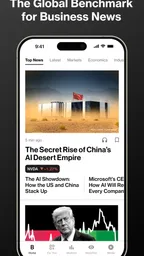
Bloomberg is a free news and magazines app from Bloomberg LP CM, with a financial perspective that sets it apart from broad news readers. Its coverage is aimed at people who care about business, economics, stock markets and investing. That makes it a natural companion for a commute, a morning coffee or a quick pause between tasks when I want to see which stories are shaping the day.
The app has a 4.0 average from around 80,000 ratings, and it has been installed more than 10 million times. Those figures suggest a well-established audience, but they do not tell me whether it suits every reader. The more useful question is whether I want a publication with a strong financial lens or a general-purpose news app that gives equal space to many subjects.
My main expectation is not that every story will load or update instantly in every situation. News apps depend on a connection and on the way a particular story is presented, so I treat Bloomberg as a convenient way to follow developments rather than as a guaranteed real-time trading terminal. If a decision depends on an exact market quote or a timely execution, I would check a dedicated brokerage or market-data tool as well.
A focused rhythm rather than endless browsing
The financial emphasis changes how I use it. Instead of opening the app to fill spare time, I can arrive with a question: What is driving a company’s share price? Is a policy story likely to matter to business? What has changed in the wider economy? That simple habit helps me read with more purpose and makes the app’s subject focus feel like an advantage rather than a limitation.
One useful workflow is to read a headline, then pause before treating it as a complete explanation. A market story often has a short-term trigger and a longer background, and I find it sensible to use the article as a starting point for understanding rather than as a standalone investment instruction. Bloomberg is best for context and reporting; it should not replace my own research or a professional financial adviser.
For example, on a workday morning I might check the news before a meeting about a company or industry. A relevant business story can help me understand why colleagues are discussing a change in outlook, while an economics article may put that company’s situation in a broader frame. That is a more realistic strength than expecting an app to tell me exactly what to buy or sell.
When several stories compete for attention
Heavy use is most likely when markets are moving or several major business stories land close together. In those moments, the challenge is not simply opening an article; it is deciding which update matters and avoiding the temptation to treat each new headline as a fresh conclusion. I would use Bloomberg to establish the main developments, then return to the stories that affect my interests instead of refreshing constantly.
That approach also helps with a common downside of finance coverage: a fast-changing story can make ordinary fluctuations feel more dramatic than they are. I try to distinguish a meaningful shift in the underlying story from a headline that merely reflects the latest turn. Bloomberg’s business orientation is useful for that kind of reading, but it cannot remove the uncertainty inherent in markets.
If I am checking the app repeatedly during a busy day, I also need to be honest about the trade-off. More updates can mean more context, but they can also fragment attention. For casual readers, a short, scheduled check may be more useful than keeping financial news open throughout the day. People who need alerts tied to a specific portfolio or trading workflow may prefer a dedicated finance tool for that job.
Reliability and what to do when a story does not load
I judge a news app’s reliability by whether it fits into a routine without demanding constant effort. Bloomberg’s role is clear: bring business and market reporting to a mobile reader. Still, a reliable experience can depend on network conditions, device performance and the size or complexity of the content being opened. I would not assume that a slow page means the service itself is failing; first I would check my connection, close and reopen the app, and try again.
For readers who move between Wi-Fi and mobile data, it is sensible to open an important article while the connection is strong rather than wait until a weak-signal moment. I would also avoid relying on an article already being available offline unless I had checked that behavior in the app. That is a practical distinction: a news reader can be useful on the move without automatically functioning as a dependable offline archive.
When I return after being interrupted, I prefer to resume with the story that prompted me to open the app instead of starting over with every headline. That small habit makes recovery from distractions easier, even if the app itself cannot control interruptions from the phone or network. If an item seems stuck, restarting the app is a reasonable first step; for time-sensitive trading information, I would switch to a source designed specifically for live execution rather than wait on a news article.
Device fit, access and subscription trade-offs
The app is rated for Everyone 10+ and requires Android 7.0 or later. That makes it relevant to a broad range of Android users, though an older device can still feel less responsive than a newer one, especially when several apps are open. I cannot infer a phone’s speed from the operating-system requirement alone, so I would judge performance on the actual device and keep enough storage and memory available for everyday use.
Bloomberg is free to install, while in-app purchases range from $29.99 to $399.99 per item. That wide spread is a reason to look carefully at the purchase screen and the terms attached to any option before committing. A reader who only wants occasional headlines may find the free starting point sufficient, while someone who relies on extensive financial reporting should decide whether paid access fits their needs and budget.
The app has been available since March 17, 2014, and that long presence gives it a recognizable place in mobile financial news. It does not, by itself, guarantee that every feature will suit a particular phone or reading style. I would install it for the reporting focus, then test the way it behaves during my normal routine before making it part of a daily workflow.
How it compares with other ways to follow news
Compared with a general news aggregator, Bloomberg is more useful when the business angle is the reason I opened my phone. A broad reader may be better for someone who wants equal attention to local events, culture, sport and lifestyle. Bloomberg’s narrower focus is a strength for investors, business readers and people whose work depends on economic developments, but it can feel one-sided if those subjects are only a small part of what they follow.
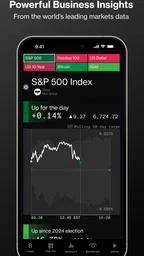
Compared with a brokerage app, Bloomberg is more suited to understanding a story than placing a trade. A brokerage can be the better choice for checking account-specific positions and carrying out transactions; a dedicated market-data service may be more appropriate when precise, time-sensitive figures are the priority. I see Bloomberg as a reporting and context tool, not a substitute for either of those roles.
It also differs from simply following headlines on social platforms. A feed can surface breaking topics quickly, but it often leaves the reader to sort out relevance and background. Bloomberg’s value is the chance to spend time with business coverage in one place. The trade-off is that its perspective is less comprehensive for people whose news interests extend well beyond finance and companies.
Who will benefit, and who should look elsewhere
I would recommend Bloomberg to someone who regularly asks how economic news affects companies, markets or investment choices. It can also suit a professional who wants a focused reading habit, or a curious reader who wants business reporting without having to assemble every story from scattered sources. Its best use is not predicting the next market move; it is helping me understand what is being reported and why it may matter.
I would skip it if my main goal were broad, locally tailored coverage, a simple list of live prices, or a tool for managing trades. It may also be more than I need if I only read finance news a few times a year and do not want to consider in-app purchases. In those cases, a general news app, a market-data product or a brokerage app may be a better match, depending on the task.
My performance verdict is that Bloomberg makes the most sense as a focused, regular reading companion, not as a tool I would trust to do every finance-related job. Its subject matter gives it a clear purpose, and a short, intentional check-in can make that purpose practical in daily life. I would keep expectations grounded around connection and device limits, use another service when timing or trading precision matters, and choose it if business and market reporting are a meaningful part of what I want to read.
For me, the deciding point is whether I value context enough to return to financial journalism consistently. If I do, the app offers a direct route into that coverage; if I only want general headlines or transaction tools, its focus is less compelling. That is why I would recommend it selectively: strong for readers who want to follow the business world, but not a universal replacement for every news or investing app.
What we like
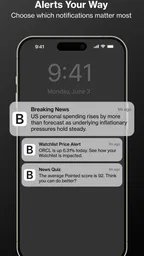
- Customizable alerts can flag market moves and company news.
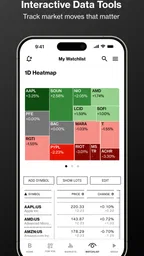
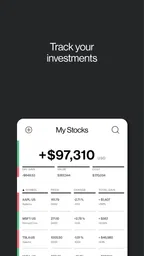
- Watchlists make it easy to follow selected stocks.
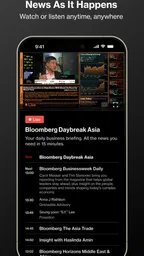
- Audio and video reports offer alternatives to reading.
- Coverage spans global markets and several asset classes.
- Search helps locate articles and financial topics.
What could be better
- Some articles and features may require a subscription.
- The volume of news can feel overwhelming at first.
- Frequent alerts may become distracting without careful settings.
- Market data can be delayed depending on the feature.
- A Bloomberg account may be needed for some functions.





