







SmartNews: Live News & Rewards review
 Analysis by Appsdrops
I find SmartNews easiest to understand as a quick-reading place to check what is happening, rather than a newsroom I would rely on for every detail. It brings together coverage of politics, elections, entertainment, sports, and local stories, so I can scan several subjects without opening a separate publication for each. Its value depends on how comfortably that broad feed fits the way you read: a useful starting point for some people, but not a substitute for focused reporting or more customizable news tools.
Reading and finding a story
SmartNews: Live News & Rewards is a free news app from SmartNews, Inc. Its central appeal is convenience: instead of choosing one newspaper or broadcaster and staying within its coverage, I can use it to browse a mix of current topics. That makes it suitable for a short check-in when I want a general sense of the day, or for moving from a national headline to something closer to home.
The experience is most useful when I treat the feed as a doorway, not the whole reporting process. A headline can help me spot a story worth following, but a quick glance is not the same as understanding its background. For contentious political news, election developments, or claims that may affect a decision, I would open the story and compare its account with other reporting. The app’s breadth is handy; it also means readers need to be deliberate about depth.
News apps can become tiring when they make every visit feel like a race through an endless stream. SmartNews is a better fit for a defined routine: check the main headlines in the morning, look for local developments later, then leave. I recommend deciding what you want from each visit before opening it. That small habit helps prevent a quick update from turning into aimless scrolling, especially when the topics are emotionally charged.
The app has an average rating of 3.8 from around 702,000 ratings, and it has passed 50 million installs. Those figures suggest a widely used product with mixed reactions, not a guarantee that its presentation will suit every reader. I would use the app for discovery and convenience, then judge the individual article and source on their own merits.
Making the feed work for your reading habits
A useful way to read a broad news feed is to separate scanning from careful reading. On a busy day, I might skim headlines to decide what deserves attention, then return to one or two stories when I have time to follow the details. This is especially practical for sports and entertainment, where a brief update may be enough, while a policy change or election result often calls for more context.
That distinction also matters if a reader finds dense screens tiring. Short visits with a clear purpose can be easier to manage than trying to absorb every headline at once. If you prefer large blocks of uninterrupted text, a publication’s own app may be more comfortable; if you want a cross-topic overview, SmartNews offers a more convenient place to begin. I would test it during an ordinary day rather than decide from a single burst of browsing.
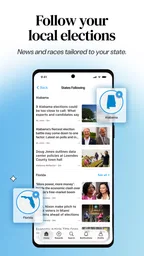
For local news, I would use the feed as a prompt to investigate: a neighborhood issue may appear alongside national coverage, but the practical details can matter more than the headline. If a story affects travel, school, public services, or a community meeting, check the article itself and seek the relevant local source before acting. This is a sensible workflow for any aggregator, and it prevents a short summary from carrying more weight than it should.
Motor and sensory comfort in everyday use
News reading involves repeated small actions: opening a story, returning to the feed, moving between subjects, and deciding when to stop. I would pay attention to whether that rhythm feels manageable for your hands and attention. Someone who finds frequent tapping uncomfortable may prefer to choose a small number of stories and read them in one sitting, rather than constantly switching between headlines.
For readers sensitive to busy screens or a steady stream of updates, the main practical question is not whether the app has a particular accessibility certification; I make no such assumption. It is whether the actual presentation feels calm enough for you. Try reading a few articles in a quiet moment and notice whether the feed encourages useful browsing or makes it harder to concentrate. If visual density is a problem, a publication with a simpler reading layout may be a better match.
Likewise, people who rely on assistive technology should check the app directly on their own device before making it part of a daily routine. Comfort can depend on the device, operating system settings, and the individual reader’s needs. I would not assume that a news aggregator handles every reading or navigation preference equally well. If a task is difficult in the app, opening the original publisher’s article through a familiar reading setup may be a more workable alternative.
When and where it is useful
SmartNews makes the most sense in brief, ordinary gaps: before work, during a lunch break, or while waiting for an appointment. In a realistic morning routine, I might check the headlines for a major political development, scan for a local item that could affect the day, and leave sports or entertainment for later. That is more useful than trying to read every category simply because it is present.
It can also help when your interests change from day to day. One visit might be about an election; another might be about a team or a local event. A broad news app reduces the need to keep several publication apps in mind, though it may not offer the depth or familiar editorial voice of the outlets you already trust. For readers who follow a few specific journalists or specialist subjects closely, dedicated sources are likely to remain essential.
In a noisy or distracting setting, I would keep the task narrow: look up a particular development, read one article, and return to it later if needed. When concentration is limited, the feed’s range can be both a benefit and a trap. A single place to browse is convenient, but an assortment of subjects can pull attention away from the story you came to understand.
What the broad approach cannot solve
The main trade-off is editorial focus. An aggregator can make discovery easier, but seeing multiple kinds of coverage together does not automatically tell me which account is most complete or which source best fits a particular question. For breaking news, I would avoid treating an early headline as the final word. For health, law, money, or other consequential topics, I would seek authoritative specialist guidance rather than rely on a quick news read.
There is also a difference between finding a headline and building a dependable reading habit. If you want a carefully curated set of stories from one publication, a single-outlet app may feel more coherent. If you want a highly controlled reading environment, a dedicated reader or a publication’s own app may offer a better fit. SmartNews is most compelling when variety and speed matter more to you than a single editorial identity.
The app is free to download, with in-app purchases listed at $3.99 to $4.99 per item. I would consider that before treating every part of the experience as cost-free, and check the purchase details in the app store if an optional item matters to you. Its content rating is Teen, so it is intended for teen audiences and older; that is not the same as a promise that every news topic will be suitable for every young reader. Families should decide what supervision and discussion make sense for their circumstances.
Who I would recommend it to
I would recommend SmartNews to someone who wants a convenient scan across politics, local coverage, sports, and entertainment, and who is comfortable following a headline to its source when the details matter. It is also a reasonable option for readers who do not want to begin each news check by choosing one publication. Its wide reach and substantial audience make it a familiar choice, though popularity alone should not determine whether it suits your reading needs.
I would steer away from it if you want one consistent newsroom’s perspective, deep specialist reporting in a narrow field, or a deliberately quiet reading experience. It may also be a poor fit if the feed’s layout or repeated navigation feels uncomfortable on your device. In those cases, try a trusted publisher’s app or a simpler reading tool instead. The better choice is the one you can use comfortably and critically, not the one with the largest collection of headlines.
SmartNews was released on March 26, 2013, and has grown into a familiar way to browse current stories. That history and its audience do not remove the need to check sources, but they do help explain why it may be useful as a general news entry point. I would keep it alongside, rather than instead of, the sources I turn to for reporting I need to understand in depth.
My verdict is that SmartNews: Live News & Rewards is a practical option for flexible, short news sessions, especially when a mix of national and local subjects is more useful than a single publication’s focus. Its inclusive value depends on the reader and context: check how the interface feels with your own settings and assistive tools, keep visits purposeful if a busy feed distracts you, and use specialist or original sources when accuracy and detail matter most. For the right reader, it is a convenient starting point; for everyone, it should remain a starting point rather than the last word.
What we like
- The clean layout makes headlines easy to scan.
- Topic choices help tailor the feed to your interests.
- Offline reading keeps saved stories available without a connection.
- A range of news sources offers varied perspectives.
- The app is free to download and use.
What could be better
- Ad placements can interrupt browsing.
- Some stories open on external publisher websites.
- The feed may repeat similar headlines.
- Rewards availability can vary by location.
- Personalization may take time to reflect changing interests.





