


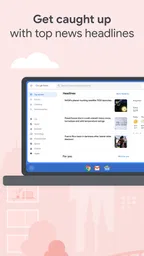

Google News - Daily Headlines review
 Analysis by Appsdrops
I reach for Google News when I want a quick picture of what is happening without checking a row of separate news apps. Its main strength is bringing coverage from different publishers into one reading space, with a feed shaped around topics and stories that matter to me. That is convenient, but it also means the experience depends on how well the app’s selection matches my interests and how much variety I want in my news.
How it feels to check the headlines
As a news and magazines app from Google LLC, it is built for browsing rather than for replacing every newspaper or broadcaster I follow. I can open it for a brief scan, notice a developing story, and decide whether to read further. The free price makes it easy to try as a daily companion, though the reading experience can take some adjustment if I prefer a publication’s own layout and editorial voice.
The basic expectation is a feed that gets me to relevant stories quickly, not a promise that every item will appear instantly or that every source will cover a subject the same way. In ordinary use, the app’s value is less about a dramatic speed boost and more about avoiding the effort of opening several outlets one by one. I find that especially useful during small gaps in the day, when I have a few minutes but not enough time for a deeper news session.
Google News launched on June 27, 2012, and its long history is reflected in how familiar the central idea feels: gather current reporting, make it browsable, and let readers follow their interests. The app has a four-point-zero average from around two million ratings, alongside roughly fifty-eight thousand written reviews. Those figures suggest broad use, but they do not tell me whether its mix will suit a particular reader; the quality of the feed is personal.
A useful rhythm for everyday reading
My most practical routine is to treat the home feed as a starting point, not as a complete account of the day. I scan a few headlines, open the stories that seem important, then look for additional coverage when a topic deserves more context. Seeing reporting grouped around a common event can help me notice that outlets emphasize different details, although I still need to read beyond the headline before forming an opinion.
A realistic example is checking the app over breakfast before deciding what deserves attention later. I might skim local items first, then look at a national or international story that is already developing. The benefit is convenience: I can move from a broad scan to a more focused read without rebuilding my search from scratch. The trade-off is that a personalized feed can make familiar interests easier to see than unfamiliar ones, so I try to deliberately explore beyond my usual subjects.
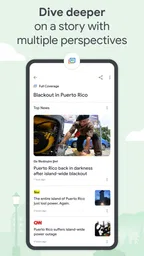
For a more useful session, I would avoid judging an article from its headline alone. When a story matters, I open the coverage options and compare how different publishers frame it. This is a small but worthwhile habit: aggregation can make several reports easy to find, but it does not make those reports interchangeable or guarantee that they offer the same depth. The app works best when I use its convenience to discover coverage, then apply my own judgement to what I read.
When the feed gets busy
Heavy use changes the experience from a quick glance into a long sequence of headlines, and that is where focus becomes the main constraint. A busy news day can surface many updates about the same major event. That repetition is understandable when coverage is evolving, but it can make a feed feel less varied than it first appears. I find it helps to choose a story and read a small number of reports with different perspectives rather than opening every near-duplicate headline.
Personalization is useful when it brings recurring interests within easy reach, but it can also narrow the feeling of discovery if I only follow what I already know. I would periodically check topics outside my normal routine and pay attention to local coverage instead of letting a few familiar subjects dominate every visit. This is not a guarantee that the app will surface every blind spot; it is simply a more deliberate way to use a personalized news feed.
Another practical trade-off is that a combined reading space cannot make every publisher’s article feel the same. Moving from one outlet’s reporting to another can mean encountering different writing styles, context, and presentation. If I want a consistent reading experience or the full set of features offered by a particular publication, its own app may be a better home for that habit. Google News is more appealing when I value discovery and comparison across sources.
Reliability and getting back to a story
I think of reliability here as the usefulness of the reading routine, not as a guarantee that a news feed will always behave identically. Headlines and coverage change as events develop, and a story that looked prominent earlier may no longer be the first thing I see later. When I need to return to an important item, I make a note of the publisher or search for the topic again rather than assuming the same placement will persist.
For a developing event, I use the app to orient myself and then check the article’s source and publication context. That approach matters because aggregation is not a substitute for evaluating reporting. A headline may be brief, an article may be updated, and two outlets may describe the same event with different emphasis. I appreciate having those differences within reach, but I would not treat a single feed position as a judgement of importance or credibility.
If the app feels slow or a story does not open as expected, I would first try a simple recovery: return to the feed, reopen the item, or search for the subject again. I cannot promise that those steps solve every interruption, but they avoid losing the thread of what I was trying to read. I also avoid leaving a large pile of open reading sessions as a substitute for a saved routine; a focused search or a fresh scan is often easier to manage.
Google News is popular at a very large scale, with over one billion installs, but that reach should not be confused with a guarantee of identical performance on every phone or network. The app is free and rated for Teen audiences. Those details make it broadly accessible, while the actual comfort of reading still depends on a person’s device, connection, and tolerance for a constantly changing stream of headlines.
Choosing it for your device and habits
On a device where I mainly want to check headlines and read a few articles, the app’s central workflow makes sense. If I use an older or more constrained phone, I would keep my sessions focused and avoid assuming that a large, continuously refreshed feed will feel as light as a simple text reader. I cannot infer exact battery use, storage demands, or speed from the app’s general description, so I would judge those in my own routine rather than rely on blanket claims.
It is also worth thinking about how you prefer to read. Someone who wants one publication’s full editorial package may be happier with that publisher’s app. A person who mostly wants quick updates from a specific broadcaster may prefer its own alerts and presentation. By contrast, someone who wants to move among local, national, and world coverage without manually opening several sources is more likely to benefit from Google News.
Compared with searching the web each time a question comes up, a dedicated news feed can reduce repeated effort by keeping current coverage in one place. Compared with following a handful of publications directly, it offers a broader starting point but less control over a single outlet’s complete experience. Neither approach is universally better. I see this app as a useful front door to the news, while publisher apps and direct searches remain valuable when I want a particular source, a specific detail, or deeper reporting.
Who will get the most from it
I would recommend it to readers who like a quick daily overview, want to encounter coverage from more than one publisher, and are willing to make their own choices about what deserves a closer read. It is also handy for someone who wants a low-friction way to keep an eye on local and wider stories during short breaks. The app is less suited to people who find constant headlines stressful, want a strictly chronological feed, or prefer a carefully bounded reading list with no algorithmic personalization.
It may not be the right choice if you already have a strong relationship with one publication and rarely want to read elsewhere. In that case, the publisher’s own app can provide a more consistent voice and a clearer sense of its complete coverage. Likewise, if you need a deep research workflow, a headline aggregator is only a starting point; I would move to primary reporting and other sources rather than expecting one app to answer every question.
My performance verdict is measured: Google News is most effective when I use it for orientation, discovery, and comparison, not when I expect it to be a perfect archive or a complete substitute for individual newsrooms. Its broad reach and free access make it easy to incorporate into a routine, while personalization and repeated coverage call for active reading habits. If you want a practical way to see what is being covered and choose where to spend your attention, I think it is worth trying. If you want one fixed editorial voice or a quieter, tightly controlled reading experience, another option may fit you better.
What we like
- Topic controls help tailor the feed to your interests.
- Full Coverage presents multiple perspectives on major stories.
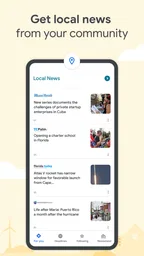
- Local news can keep you informed about your area.
- Saved stories make articles easier to revisit later.
- A clean layout makes headlines quick to scan.
What could be better
- The feed may repeat stories from different publishers.
- Some linked articles require a subscription to read.
- Personalized recommendations can narrow your viewpoint.
- News availability varies by region and publisher.
- Notifications can become distracting if left enabled.





