
MyZio review
 Analysis by Appsdrops
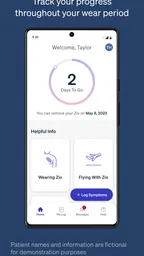
Starting with a heart monitor can feel like a lot to manage, especially when you are also trying to remember what you felt and when. MyZio is a focused medical app for recording symptoms alongside the Zio monitor experience. I see its value less as a general health tracker and more as a practical way to keep a clearer account of how you feel while using that monitor.
That distinction matters. If you are looking for an app that interprets heart symptoms, offers a diagnosis, or replaces a conversation with a clinician, this is not the right tool for that job. Its useful role is narrower: helping you log what happened so the information can be considered in the context of your monitor. For a first-time user, the best expectation is a simple supporting task, not a stream of medical conclusions.
What to expect from a monitor companion
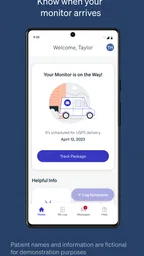
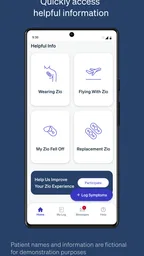
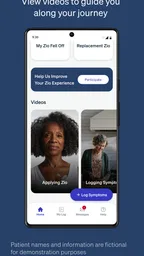
MyZio is a free medical app from iRhythm Technologies, Inc. Its audience is people using a Zio monitor, rather than anyone who simply wants to keep a broad diary of wellness. That makes it more specialized than a standard notes app or a multipurpose symptom tracker, even if those alternatives can also record how you feel.
The app has a 4.6 average from around 18,000 ratings, and it has been installed over 500,000 times. Those figures suggest it is a well-used companion, but they do not tell you whether it fits your particular monitoring instructions. I would treat the guidance from the clinician or care team handling your monitor as the authority on when and how to record symptoms.
In practical terms, a symptom log is most helpful when it is made close to the event. Waiting until evening to reconstruct a busy day can blur the timing and details. A quick entry, made when you are able, is more likely to preserve what you actually noticed. The app’s purpose makes that small habit more useful than trying to write a polished account afterward.
It is also worth keeping the scope clear. A log is a record, not a verdict. If a symptom feels urgent or alarming, do not wait for an app entry to tell you what to do; follow the medical advice you have been given and seek appropriate care. MyZio can support communication, but it should not become a reason to delay it.
Before you begin
MyZio is listed for Everyone and requires iOS or Android version 8.0 or later. The current version is 2.3.0-rc4, and the app was released on July 12, 2017. Those details are useful when checking whether an older phone can run it, but compatibility alone does not ensure that the app is the right fit: the essential question is whether you are using the Zio monitor and have been directed to log symptoms with its companion.
I would have the monitor and any instructions you received nearby before opening the app. That avoids guessing about the process or what your care team expects. If someone else is helping you set things up, it can also help to agree who will make entries and how you will avoid duplicate or conflicting notes. That is a simple household detail, but it can make the record easier to trust.
Getting through the first setup
For a reassuring first run, approach setup as a short preparation step rather than something to complete in a rush. Install the app from your usual app store, open it, and follow the prompts presented there. Keep the information from your monitor instructions available, and enter only what the app asks you to provide. I would not guess at any clinical detail or substitute an assumption for instructions from your care team.
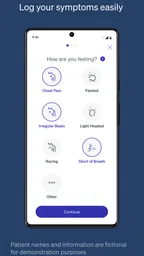
Once you reach the point where you can make a symptom entry, take a moment to understand the fields and the way the app asks you to describe an event. The key is consistency. If it asks for a time or a description, use what you remember rather than trying to make the account sound medically precise. A plain description of what you experienced is more useful than a label you are unsure about.
There is a useful trade-off in keeping the process modest. A detailed journal can capture context, but it can also become a chore and lead people to stop recording altogether. With a monitor companion, I would prioritize making a timely, understandable entry over writing a long narrative. If the app gives you room to add detail, reserve that effort for information that genuinely helps explain the moment.
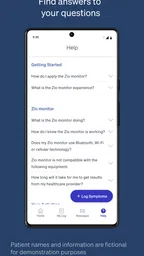
Do not assume that setup is complete just because the app opens. Make sure you understand how to reach the symptom-logging action and where to find any confirmation the app provides after an entry. If a screen or instruction is unclear, pause and check the app’s own guidance or ask the care team rather than tapping through based on a guess. That is especially sensible when the information relates to a medical monitoring period.
Your first useful entry
A realistic first success is not an elaborate report. It is recording one event accurately enough that you can later remember what it referred to. Imagine noticing an unusual sensation while doing ordinary errands. When you have a safe moment, open MyZio and record the symptom using the app’s available prompts. If you cannot enter it immediately, make a brief personal note of the time and follow the app’s instructions when you can; do not invent an exact time later if you are unsure.
This workflow offers a practical tip: separate what you felt from what you think it means. For example, describe the sensation in everyday words and note the situation around it if that context is relevant. Avoid diagnosing yourself in the entry. That keeps the record closer to observation and leaves interpretation to the people reviewing the monitoring information.
A second helpful habit is to record episodes consistently, including ones that seem minor, when your instructions call for logging symptoms. People often remember the most dramatic moment and overlook smaller events that may help provide context. Consistency is not the same as entering every passing thought; use the instructions you were given to decide what belongs in the log.
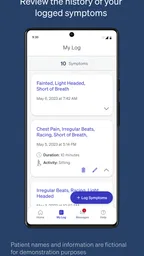
A third useful point is to keep the monitor’s role and the app’s role distinct. Wearing or using the monitor and logging a symptom are related parts of the process, but a phone entry should not be treated as proof that the monitor captured an event or that a clinician has reviewed it. If you need to know whether an entry was saved or what to do after a technical problem, check the app’s visible confirmation and the instructions provided with your monitor.
Common points of confusion
The most common misunderstanding is expecting the app to explain a symptom as it happens. MyZio is a companion for symptom logging, not a live diagnosis service. A recorded event may be useful in the wider monitoring process, but the app should not be treated as a substitute for medical advice or a way to assess an emergency.
Another potential source of confusion is assuming that a symptom log works like a general health diary. A broad tracker may be better if you want to record sleep, exercise, meals, or ongoing wellbeing in one place. MyZio is more appropriate when your task is specifically connected to the Zio monitor. Using a separate journal for unrelated health notes can be simpler than trying to make this app serve as an all-purpose record.
It is also easy to overthink wording. You do not need to turn a personal observation into technical language. If you are unsure how to describe an event, use straightforward terms and follow any prompts rather than selecting a label just because it sounds more clinical. If the app’s wording does not match your experience, seek clarification from your care team instead of forcing the event into a category you do not understand.
Forgetting to log an event is another realistic problem. If that happens, do not fill in details from memory as though they were exact. Follow the app’s process and your monitor instructions, and be honest about what you remember. A slightly incomplete but truthful account is preferable to a precise-looking entry based on a guess.
Finally, a phone problem is not the same thing as a medical problem, and an app problem should not interrupt care. If you cannot use the app or are uncertain whether a symptom entry went through, rely on the instructions you have for your monitor and contact the appropriate support or care team. I would avoid repeatedly submitting the same event unless the app or its guidance tells you to do so, since duplicate entries could make the record harder to interpret.
Who will find it useful—and who may not
I would recommend MyZio to someone who has a Zio monitor and wants a dedicated place to record symptoms as part of that experience. It is particularly useful for people who find it difficult to recall timing after a full day, or who prefer guided logging to scattered notes on paper or in a phone’s general notes app. Its specialized purpose can make the task feel more straightforward than building a tracking system from scratch.
It may be less suitable for someone who is not using the Zio monitor, wants a comprehensive personal health dashboard, or expects automated interpretation. In those situations, a general symptom diary may be more flexible, while a conversation with a clinician is the better choice for medical guidance. The right alternative depends on the job: broad self-recording and monitor-linked logging are not interchangeable.
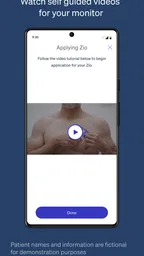
MyZio is also not a replacement for a written instruction sheet if you need reminders about how to handle the monitor. I would keep those directions accessible rather than trusting memory or assuming the app covers every practical question. That small extra step helps keep the app in its proper supporting role.
Making the next step easier
After your first entry, the best next step is to make logging part of a calm, repeatable routine. Use it when you notice a symptom and are able to enter it safely, then check that you understand how the entry appears in the app. You do not need to review the record constantly; the aim is to create a useful account, not to encourage worry or turn every sensation into an investigation.
If you are supporting a family member, help them learn the basic path to an entry without taking over the meaning of what they report. The person experiencing the symptom should describe it in their own words where possible. A helper can assist with navigating the phone, but should avoid adding interpretations that the person did not express.
My overall view is that this is a narrowly focused, sensible companion rather than a feature-packed health app. Its strongest point is the clear connection between symptom logging and the Zio monitor; its limitation is that this focus will not satisfy people looking for broader tracking or on-the-spot answers. For a first-time user, success means setting it up with the monitor instructions close at hand, recording an event plainly, and knowing when to turn to a clinician instead. If that is the task you need help with, MyZio is a reasonable tool to keep in your routine.
What we like
- Shows appointment details in one convenient place.
- Provides access to health records from a mobile device.
- Makes it easier to contact participating care providers.
- Can help users keep track of upcoming visits.
- Offers a digital alternative to some routine phone calls.
What could be better
- Features may vary depending on the user's healthcare provider.
- Some records may not appear until a provider shares them.
- Account setup may require information from a participating clinic.
- Not all appointment types may be available to manage in the app.
- Using its features requires a reliable internet connection.





