
MySafeRide - Manage your rides review
 Analysis by Appsdrops
Arranging a ride connected to a health plan is a practical task, but the process can feel like one more thing to manage when you already have appointments and schedules to think about. MySafeRide is built around keeping that job focused: it helps health plan members book and manage rides in one app. I see its appeal in that straightforward purpose. Rather than trying to be a general travel service, it concentrates on a specific need and gives members a digital place to handle ride arrangements.
A focused ride-management tool for health plan members
MySafeRide is a free medical app from SafeRide Inc. It has an average rating of 3.9 from 974 ratings, with 514 written reviews and more than 100K installs. It was released on December 13, 2024, and its current version is 1.2.2. The app is rated for everyone, and its listed minimum operating system requirement is version 7.0. Those details give a useful snapshot, while the day-to-day value comes down to whether the app fits into the way you arrange your health-related rides.
The baseline workflow
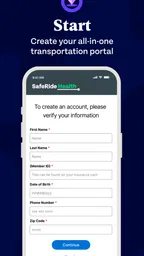
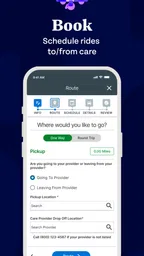
The simplest way to approach MySafeRide is to treat it as a dedicated place for booking and managing rides associated with your health plan. Start with the immediate task: open the app when you need to arrange a ride, follow the available booking flow, and return to it when you need to manage that ride. Keeping the purpose narrow makes the app easier to understand. You are not choosing restaurants, comparing holiday routes, or organizing every kind of trip; you are handling rides tied to your plan.
That distinction matters because transportation for an appointment is often part of a larger routine. There may be a calendar reminder, preparation for the visit, and a return trip to think about. MySafeRide’s stated focus is useful precisely because it brings ride booking and management together around that health-plan context. In my view, a focused tool is most helpful when you use it consistently instead of treating it as an app you open only after plans become urgent.
For a first-time user, I would keep the opening session simple. Get familiar with the app’s main flow, see where ride booking begins, and notice how the app presents the options relevant to managing a ride. Avoid rushing through screens just to finish. A little attention at the start can make later sessions feel more routine, especially if you are arranging transportation alongside other appointment preparations.
The app’s purpose also helps set expectations. It is designed to simplify booking and managing rides for health plan members, not to replace every other part of arranging care. I would think of it as one practical step in the process: the place to handle the ride itself, while appointment details and personal reminders can remain part of whatever system you already use. That clear division can keep a useful tool from becoming cluttered with expectations it was not built to meet.
Settings worth checking
Before relying on a new app as part of a recurring routine, it is sensible to look through the settings and account-related screens that are available to you. In MySafeRide, I would focus on understanding the choices the app actually presents, particularly anything that affects how you use it for booking or managing rides. This is not about assuming that a particular setting exists; it is a reminder to become familiar with the controls and information visible in your own version of the app.
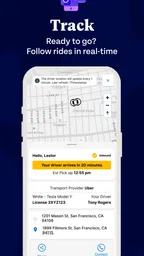
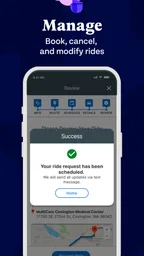
It is also worth checking that you are comfortable with the way the app displays your ride information. A quick review after making an arrangement can help you feel confident that you are looking at the right trip and understand what the app shows about it. When an app is supporting an appointment routine, clarity is more valuable than exploring every screen at random. I prefer to learn the basic layout first and return to other areas only when I have a reason to use them.
Another good habit is to check that the app remains usable on your device. The listed minimum operating system requirement is 7.0, so compatibility is a sensible part of setup. If you share a device or use accessibility settings at the system level, it can be helpful to confirm that the app is comfortable for your own way of using a phone. Those are general preparation steps, not a promise that the app includes a specific accessibility feature or device option.
Because MySafeRide is linked to health-plan rides, I would make a point of keeping my use organized and deliberate. Open the app when you are ready to book or review a ride, take time to read the information shown, and avoid making assumptions based on a previous trip if the current arrangement is different. A repeatable check is easy to remember: look at the ride you are handling, make sure you understand the details presented, and then close the app once you have finished the task.
Faster patterns for repeat use
Experienced users often get speed not from hidden shortcuts but from doing the same useful steps in the same order. With MySafeRide, that could mean opening the app as soon as a health-related appointment becomes part of your schedule, rather than postponing the ride arrangement until the day arrives. The app is intended to simplify booking and managing rides, and pairing it with an existing appointment-planning habit is a natural way to make that purpose work in everyday life.
A small personal routine can help too. I would keep the app easy to find on my phone, then make a habit of checking it when I review upcoming appointments. That is a device-level organizational choice, not a claim about a built-in shortcut. The value is simply that fewer steps between remembering the ride and opening the app can make it easier to act while the appointment is still fresh in your mind.
For repeat use, consistency is more useful than speed for its own sake. Take the same approach each time: identify the ride you need to arrange or manage, use the app’s available flow, and review what it displays before moving on. When a trip is part of a busy day, this steady pattern can reduce the chance of overlooking the ride-management task among other preparations. It also makes the app feel less like a separate project and more like one familiar part of planning.
If you support a family member with their appointments, it can help to agree on a clear routine for who handles the app and when. That is a personal coordination practice rather than a feature of MySafeRide. Keeping responsibilities clear can prevent duplicated effort and make it easier for everyone involved to know whether the ride has been addressed. As with any health-related planning, the people involved should rely on the information shown in the app and the arrangements they have personally confirmed.
I would also avoid turning the app into a place to store assumptions. If an upcoming ride resembles one you arranged before, use the current booking and management flow rather than relying on memory alone. Repeating a familiar process may feel slower than guessing, but it is a more dependable habit. MySafeRide’s focused role makes it a good candidate for that kind of deliberate routine: open it, handle the ride at hand, and review the result.
Understanding the limits
The app’s promise is specific: MySafeRide helps health plan members book and manage rides. That focus is a strength, but it also means I would judge it on that job rather than expecting it to act as a full appointment planner or general transportation marketplace. Keeping expectations aligned with its stated purpose makes the experience easier to evaluate. If your main need is organizing a ride connected to your health plan, the app has a clear reason to be on your phone.
It is equally important not to assume that a digital booking flow removes the need to pay attention. Read the information the app presents, keep your own appointment schedule in view, and review a ride when you manage it. The app can support the process, but careful use still matters. This is especially true when an appointment or travel plan changes: approach the current arrangement directly instead of relying on an old note or a remembered pattern.
MySafeRide’s average rating of 3.9 reflects a range of user experiences, not a guarantee that every member’s experience will feel the same. Ratings can be a useful starting point, but they do not tell you whether the app matches your particular needs or how comfortable you will find its workflow. I would give more weight to trying the core task for yourself and seeing whether the booking and management experience suits the way you plan rides.
There is also a practical limit to any single-purpose app: it is most useful when it fits into a broader routine rather than trying to replace one. Keep your appointment details where you normally manage them, and use MySafeRide for the ride-related part. That division is straightforward and avoids expecting one app to handle more than its stated role. For members who already have a reliable planning habit, adding a dedicated ride tool can be a modest but worthwhile improvement.
Who is likely to appreciate it?
MySafeRide is most relevant to health plan members who want an app centered on arranging and managing rides. If you prefer to handle practical tasks on your phone and like having a dedicated place for a specific responsibility, its focused design may appeal. It may also suit people who benefit from connecting ride planning with a regular appointment-checking routine instead of keeping transportation in a separate mental to-do list.
People who want a broad travel app should look at the purpose first. MySafeRide is not presented as an all-purpose trip planner; its role is tied to health-plan members and their rides. That does not make the app less useful, but it does make the audience more specific. I appreciate products that explain their job through a clear focus, because it is easier to decide whether they belong in your routine.
The install base of more than 100K suggests that many people have chosen to try the app, while its written reviews offer a place to hear different reactions. I would treat that context as background rather than a substitute for checking the app’s fit with your own needs. A clean personal routine, a compatible device, and a clear reason to use the app are more important than downloading it simply because it is available.
A practical mastery verdict
MySafeRide makes the most sense when you use it as a dependable part of appointment planning: open it when you need to book or manage a health-plan ride, learn the screens you use, and review the information each time. That approach avoids invented shortcuts and keeps the process grounded in what the app is meant to do. For experienced users, mastery is less about discovering a hidden trick and more about making the same careful steps easy to repeat.
My overall impression is that MySafeRide has a clear, useful purpose for the people it serves. It concentrates on health plan ride booking and management, and that makes it easier to fit into a practical routine without asking it to take over your whole schedule. The app is free, rated for everyone, and has an average rating of 3.9, so it is accessible to consider and has attracted a substantial group of users.
If arranging transportation for health-related appointments is something you handle regularly, I think it is worth seeing whether MySafeRide’s workflow feels natural on your device. Start with one booking or management task, pay attention to how the app organizes the process, and then decide whether it saves effort in your routine. Used with realistic expectations and a consistent habit, it can be a focused companion for managing rides rather than another app that demands attention without a clear job.
What we like
- Keeps ride details organized in one place.
- Makes it easier to review past rides.
- Can help users keep track of ride-related information.
- Useful for people who rely on rides regularly.
- A focused interface keeps ride management straightforward.
What could be better
- Its usefulness depends on entering ride details consistently.
- Some features may require an account.
- Ride information may need manual updates.
- It may offer limited value to occasional riders.
- Users should check how their ride data is stored.





