
MyQuest for Patients review
 Analysis by Appsdrops
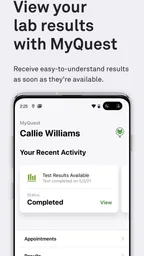
I would treat MyQuest as a practical companion to Quest Diagnostics, not as a substitute for a clinician or a complete medical record. Its core appeal is straightforward: it gives patients a way to view lab results on a phone. That can make a stressful wait feel more manageable, but health information needs context, and a screen full of numbers rarely tells the whole story. My advice is to use it for access and organization while relying on your healthcare provider to explain what a result means for you.
Convenient access, with the right expectations
This is a medical app from Quest Diagnostics Incorporated, the laboratory company whose services it supports. The distinction matters: MyQuest is most useful when your lab work is connected to Quest. If you mainly use a different laboratory, your regular patient portal or that lab’s own app may be a better fit. It is free, rated for Everyone, and has a 4.6 average from around 51,000 ratings, with more than a million installs. Those figures suggest broad use, but they do not guarantee that the app will suit every patient or every care arrangement.
The app has been available since March 27, 2014, and its current version is 6.0. I would approach it as a focused access point rather than expect it to replace every tool used in a healthcare relationship. Its value depends on whether your tests and care are handled through Quest and whether you want to check results on a smartphone instead of waiting to use another channel.
That focus is also a useful boundary. A lab result may be visible before you have had a chance to discuss it with a clinician. Seeing it sooner can help you prepare questions, but it can also leave you staring at an unfamiliar flag or value without knowing whether it is urgent, expected, or meaningful in light of your medical history. I would not make a treatment decision or change medication based only on what appears in a results view.
What the app is best at
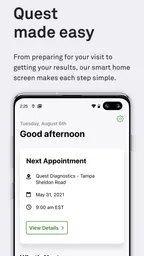
For someone who has an upcoming appointment, the most helpful workflow is to check for results before the visit, note anything unclear, and bring those questions to the clinician. That is more useful than repeatedly refreshing the app and trying to interpret each line alone. If you are managing several health concerns, you can also use access to your results as a prompt to keep your own notes about when a test was done and what you want to ask next.
Consider an ordinary situation: you have blood work before a follow-up appointment and are busy during the day. Rather than needing to be at a computer, you can check your phone when it suits you and see whether results are available. If something catches your attention, write down the test name and your question. This turns the app into a preparation aid, not a source of self-diagnosis.
It may also be handy for people who travel, work irregular hours, or help coordinate appointments with family. A phone is often easier to reach than a folder of paperwork, especially when you need to remind yourself what to discuss. Still, anyone accessing another person’s health information should take care with shared devices and accounts; convenience does not remove the need to keep sensitive information private.
Trust starts with what you can actually verify
MyQuest handles a sensitive subject: laboratory results are personal health information. I think the sensible way to judge any health app is to separate what is visible to the user from assumptions about what happens behind the scenes. The app’s purpose is clear, and its association with Quest Diagnostics is relevant to that purpose. But the name of a healthcare company alone should not be treated as proof of particular security measures, data-sharing practices, or privacy settings.
Before relying on it, I would read the current privacy information presented in the app store and during account setup, then review any notices shown in the app itself. Pay attention to what information is requested, what choices are offered, and whether the wording explains how to manage the account. These are practical checks, not a reason to assume either that the app is unsafe or that every concern is automatically handled.
The same care applies to permissions. A phone may request access to device functions for different reasons, but I would grant only what is necessary for the task I want to perform and understand the explanation shown at the time. If a permission request seems unrelated to checking lab results, pause and inspect the prompt rather than approving it automatically. The exact controls available can depend on the app version and the device, so the current screens are more useful than assumptions based on another person’s phone.
Take care at sign-in and on shared devices
Account access is a particularly sensitive moment because it connects a personal device to medical information. I would use a password I do not reuse elsewhere, avoid signing in on a public or borrowed phone, and make sure I can recognize when I have finished using the app. If you share a phone with family, think about whether notifications or an open session could reveal information to someone else. Those habits are useful even when an app offers its own account protections.
If you are helping a parent or another adult, agree on how they want you to assist before handling their account. A family member may welcome help finding results but still want control over who sees them. Keeping that conversation explicit is better than assuming that shared caregiving means unrestricted access. For a child’s care, follow the account and consent options presented through the appropriate channels rather than trying to work around them.
When setting up an account, take a moment to check that the personal details you enter are accurate. A mismatch can create avoidable friction when you are trying to connect with the right patient information. If something does not line up, use the support route provided by Quest rather than creating multiple accounts or repeatedly submitting details. That is a cautious approach to identity-sensitive information and can save time later.
Results need context, not just a convenient screen
One non-obvious trade-off of faster access is that it can move the emotional part of receiving a result earlier, without bringing the explanation along with it. A value outside a reference range can look alarming, while a result within range does not necessarily answer every clinical question. If you feel worried, contact the clinician who ordered the test or the care team responsible for your follow-up. If you have severe or rapidly worsening symptoms, seek appropriate urgent medical help rather than waiting for an app update or a routine message.
Another useful habit is to avoid comparing your results casually with a friend’s or with numbers found online. Tests can differ in purpose and interpretation, and a clinician considers more than a single figure. I would use MyQuest to locate the result and identify what I want clarified, not to decide that two patients should have the same outcome or that a result has a particular diagnosis attached to it.
For appointments, a short note made before you call can be more effective than trying to remember every concern while speaking with a busy office. Record the test name, the part you do not understand, and the question you want answered. That simple workflow makes the app more useful without pretending it provides medical interpretation. It also helps keep the conversation focused on your own care rather than on broad searches that may not apply to you.
When another option may work better
If your healthcare provider uses a patient portal that combines lab results with appointments, prescriptions, messages, and visit notes, that portal may be a better everyday home for your care. MyQuest is more appealing when you specifically want a mobile route to Quest-related results. If your tests are processed elsewhere, start with the service your provider or laboratory uses; installing this app will not make it a universal record for every test you have taken.
Some people are also more comfortable discussing results in a call or appointment than viewing them alone. That is a valid preference. If early access increases your anxiety, you can wait until you have a clinician available to discuss the results, rather than checking repeatedly. The app should support your care routine, not pressure you into monitoring every update the moment it appears.
On the other hand, people who prefer having health information close at hand may find a phone-based option more convenient than email, paper notices, or a desktop portal. The right comparison is not simply which interface has the most features; it is which channel reliably connects you to the lab information you need while fitting your privacy preferences and care relationship.
A cautious recommendation
I would recommend MyQuest to patients whose laboratory work is connected to Quest and who want a convenient way to check results on a smartphone. It is a focused medical app, rather than a replacement for a clinician’s explanation or a universal health-record system. Its free price lowers the barrier to trying it, while its Everyone content rating makes clear that it is not presented as age-restricted entertainment; adults should still supervise how younger family members access sensitive health information.
My overall view is positive but measured. The strongest reason to use it is practical access: check for results, prepare questions, and keep your follow-up moving. The main caution is that visibility is not the same as interpretation, and trust should be based on the privacy information and choices you can review rather than on assumptions. If you are comfortable using a dedicated Quest-related app and can keep your account private, it may fit neatly into your routine. If you need a broader portal, prefer clinician-mediated updates, or use another laboratory, a different route may serve you better.
What we like
- View lab results and health records in one place.
- Receive notifications when new results are available.
- Access the portal from a phone or tablet.
- Send secure messages to participating care teams.
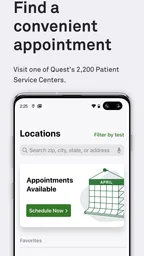
- Manage appointments with supported providers.
What could be better
- Features depend on your healthcare provider's participation.
- Some records may not appear in the app.
- Account setup may require identity verification.
- Certain tasks may redirect to a web browser.
- The app is less useful without an active MyQuest account.





