
myPhonak review
 Analysis by Appsdrops
I think myPhonak makes the most sense when it becomes part of a routine rather than an app you open once, tap around in, and forget. It is a medical app from Sonova AG, built for people using compatible Phonak hearing aids who want to adjust their listening experience and keep an eye on hearing-related health information from a phone. The useful question is not whether it replaces an audiologist; it does not. It is whether it makes the small, repeated decisions of daily hearing easier to manage. In my view, that is where it earns its place.
Start with a dependable everyday routine
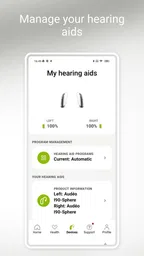
On first use, I would treat the app as a companion to the hearing aids, not as a substitute for learning their basic controls. Pairing and setup are the first practical hurdle, and the exact experience depends on the hearing-aid model and phone. Once the connection is working, the most helpful habit is to check that the aids are connected before relying on an adjustment. A phone control is only useful if it is communicating with the devices you intend to change.
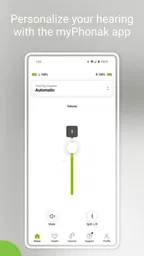
For a normal day, I would begin with the programmed listening option that already feels comfortable, then make modest changes only when the environment calls for them. That might mean easing into a busy café, making a small adjustment while walking beside traffic, or returning to a familiar setup after a meeting. Small, deliberate changes are easier to evaluate than several adjustments made at once. If something sounds worse, you can retrace your steps instead of wondering which change caused it.
A realistic example is a workday that moves from a quiet home office to a shared meeting room and then to a noisy commute. Rather than repeatedly experimenting, I would notice what is difficult in each setting, make one adjustment if needed, and give it a little time. The app is most valuable when it helps you connect a change with a specific listening problem. That turns casual fiddling into a repeatable personal routine.
It also helps to remember that a phone screen cannot tell you everything about your hearing. If a change causes discomfort, makes speech harder to follow, or seems necessary in every situation, I would not keep compensating indefinitely through the app. I would note when the issue occurs and bring that observation to a hearing-care professional. The app can make those observations more organized, but it is not a clinical assessment.
Check the connection and your starting point
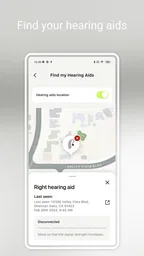
Before making an adjustment, I would confirm that the hearing aids appear connected and that the intended device is the one being controlled. This is especially useful if you have more than one paired device or have recently changed phones. Bluetooth connections can be interrupted by ordinary things such as moving out of range or restarting a device, so a quick connection check can save time and avoid confusing a connection problem with a sound-setting problem.
I would also keep a simple mental baseline: how familiar speech sounds in a quiet room, whether the aids feel balanced, and what settings I normally return to. That baseline does not need to be a formal journal. A short note on the situation and what helped is enough to make later adjustments more purposeful. For example, “meeting room, several speakers, clearer after a small change” is more useful than a vague memory that the app seemed better one day.
Settings are most useful when checked in context
The app’s personalized approach is a good fit for people whose listening needs change over the course of a day. Still, I would resist the temptation to search for one perfect setting that solves every room. A choice that helps with one speaker in a quiet space may not be ideal in a group conversation or outdoors. My practical rule is to adjust for the problem in front of me, then return to a comfortable starting point when the situation changes.
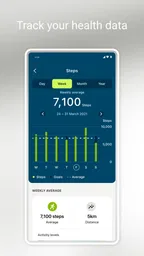
If the app presents health information, I would treat it as a way to notice patterns, not as a diagnosis or a score to chase. The value of tracking comes from asking a useful question: does a change in my routine coincide with a change in how I use or experience my hearing aids? A snapshot can be interesting, but repeated observations are more informative. I would avoid drawing medical conclusions from a single reading or assuming that an app view captures every factor affecting hearing.
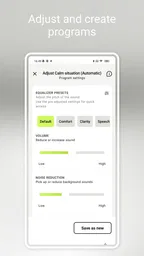
One useful trade-off is between personalization and consistency. Exploring settings can help you find a more comfortable experience, but changing several things frequently makes it harder to learn what works. I would try one adjustment at a time, use it in the situation it was meant to address, and then decide whether it genuinely helped. That measured approach is less exciting than constant tweaking, but it produces a clearer sense of what to keep.
Build faster habits without expecting magic shortcuts
Experienced users can make the app feel faster by standardizing the parts of the routine they control. I would check the connection at the same point each morning, use a familiar starting setup, and make changes only when there is a clear reason. If a particular environment repeatedly calls for the same response, remembering that pattern reduces the need to explore the interface from scratch every time. The habit itself becomes the shortcut.
It is also worth deciding in advance when not to use the phone. If you are crossing a street, carrying bags, or speaking with someone face to face, attention matters more than fine-tuning. I would make adjustments before entering a demanding environment or wait until there is a safe pause. This is a simple but often overlooked advantage of having a routine: you can handle the fiddly part at a convenient moment instead of reaching for the screen when it is least practical.
For someone who regularly visits the same places, a brief record of what worked can be more useful than repeatedly starting over. Keep the note focused on the environment and the result rather than trying to document every control. A crowded restaurant, a one-to-one conversation, and a quiet evening at home are meaningfully different listening situations. Thinking in those terms helps you choose a sensible adjustment without assuming the app can automatically understand every room or conversation.
When an adjustment does not help, I would return to the previous comfortable state rather than layering on more changes. This gives you a clean comparison and prevents a confusing collection of tweaks. If the same difficulty keeps returning, that is a good reason to discuss it with your hearing-care professional. The pattern may be more useful to them than a long list of unstructured experiments.
Where the app has limits
myPhonak is not the right choice for someone who does not use compatible Phonak hearing aids or who expects a phone app to replace professional fitting and care. It is also not an all-purpose hearing test. People who simply want a generic sound equalizer for headphones may find a standard audio-control option more relevant, while someone seeking a medical evaluation should consult a qualified professional rather than interpret app information as a diagnosis.
There is a practical learning curve, too. A person who is uncomfortable with smartphone settings may prefer help during setup, especially if connection steps are unfamiliar. And if you only make occasional adjustments, the app may feel less essential than it does to someone who moves between varied environments each day. Its strongest case is for regular hearing-aid users who want an accessible way to personalize their experience and keep relevant health information close at hand.
The app also depends on the wider setup working smoothly: the phone, the hearing aids, and their connection all have to cooperate. If the controls seem unresponsive, I would first check connection status and the phone’s Bluetooth state rather than repeatedly changing settings. That distinction matters because troubleshooting a connection issue by altering sound preferences can leave you with a worse setup once everything reconnects.
Who will get the most from it
I would recommend it most readily to someone who already uses compatible Phonak aids, notices that different places call for different listening choices, and is willing to build a simple routine. It can be particularly useful for people who want to make everyday adjustments without handling the hearing aids directly each time, or who value having hearing-related information available alongside those controls. The app’s medical focus also makes it a more natural fit than a generic audio tool for this particular audience.
It is less compelling for a person who rarely changes settings, prefers physical controls, or does not want to manage hearing technology through a phone. It may also disappoint anyone expecting automatic, flawless adaptation to every conversation. I see it as a useful layer of control and awareness, not a guarantee that noisy places will become effortless. That distinction makes the app easier to judge fairly.
There is a substantial user base behind it: myPhonak has a 4.5 average from around 139,000 ratings and more than 1 million installs. Those figures suggest it is widely used, but they do not tell me whether it will suit a particular hearing-aid model or personal routine. Compatibility and comfort matter more than popularity, so I would make those the deciding factors.
A measured verdict for daily use
myPhonak is free, rated for Everyone, and its current version is 7.5.2; it first appeared on April 16, 2018, and requires Android 10 or later. Those details make it straightforward to consider as a companion app, but the real test is whether it fits the hearing aids and phone you already use. I would check compatibility before building a routine around it, then give the basic connection and controls a calm, practical trial.
My overall take is positive, with sensible expectations. The app can make personalized hearing adjustments and health information easier to access, and a steady workflow can make those tools more useful than random experimentation. Its limits are just as important: it is tied to Phonak hearing aids, depends on a reliable connection, and cannot replace professional care. If you use compatible devices and want more control over everyday listening, I think it is worth trying. If your priority is diagnosis, universal headphone tuning, or a completely hands-off experience, another route will serve you better.
What we like
- Lets users adjust compatible Phonak hearing aids from their phone.
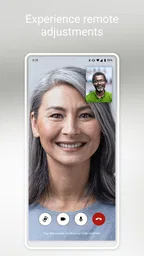
- Provides remote support from a hearing care professional.
- Offers hearing diary tools to track listening experiences.
- Includes a battery status indicator for supported hearing aids.
- Supports personalized hearing programs for different situations.
What could be better
- Feature availability varies by hearing aid model and region.
- Some functions require an internet connection.
- Remote support depends on a participating hearing care professional.
- Bluetooth pairing may need troubleshooting with some phones.
- App updates or phone changes can require reconnecting hearing aids.





