


MyLabcorp review
 Analysis by Appsdrops
Choosing a lab-results app is less about finding the one with the most features and more about finding the one that fits the way you already handle healthcare. I’d consider MyLabcorp if Labcorp is where your tests are ordered or processed and you want a convenient place to check results and arrange appointments. It is a free medical app from Labcorp, and its focus is practical: helping you manage parts of the lab-testing process from your phone.
That focus is also its main boundary. This is not a substitute for a clinician, a general medical reference, or a complete record of care across every provider. The app makes the most sense when you have a reason to interact with Labcorp; without that connection, a provider’s patient portal or a broader health-record tool may serve you better.
Deciding whether it fits your healthcare routine
Before installing, ask yourself where your lab work happens and what you want to do on your phone. If you need to view Labcorp results, book an appointment, or keep those tasks in one place, MyLabcorp is aimed at that routine. If you rarely use Labcorp, or you mainly need messaging and records from a doctor’s office, an app tied to that office may be more useful.
The app is listed in the medical category and is developed by Labcorp. It is free, has an Everyone content rating, and is available on Android and iOS. Its current version is 11.3.1. Those details make it approachable to try, but the more important question is whether the lab and appointment tasks it supports match your needs.
There is a useful distinction between a lab app and a healthcare-provider portal. A provider portal is often the natural place to look for a clinician’s notes, care instructions, or a broader view of treatment. MyLabcorp is more specifically suited to the lab side of the experience. I would not choose it expecting every part of a medical relationship to be represented there.
For someone comparing options, the first decision criterion is therefore straightforward: use the app associated with the organization handling the task. If Labcorp is handling your testing, this app can reduce the need to move between a browser, appointment paperwork, and your memory. If another lab or provider is involved, their own patient tools may be the more direct route.
What makes it useful in ordinary life
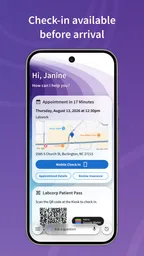
The strongest case for MyLabcorp is a small, recurring convenience rather than a dramatic change in how you receive care. Instead of treating an appointment and its results as disconnected errands, you can use one Labcorp-focused app for the pieces it covers. That is especially handy when you are managing testing around work, family commitments, or a busy week.
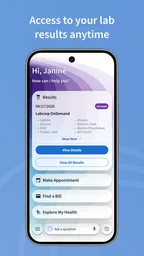
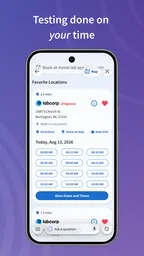
Picture a familiar situation: your clinician asks you to arrange lab work, but you do not want to sort out the appointment while standing in a pharmacy queue or between meetings. Being able to book from your phone gives you a practical place to handle that step. Later, when results are available, returning to the same app can make them easier to find than searching old messages or trying to remember which service handled the test.
A less obvious benefit is continuity of attention. When appointment booking and result checking sit in the same Labcorp-oriented tool, it is easier to connect the administrative steps in your own mind: where you planned to go, what you were waiting for, and where to check afterward. That does not make the app a medical record for everything, but it can make this specific slice of care less scattered.
I would also use it as a prompt to prepare for a conversation, not as the conversation itself. If you see a result that raises a question, note what you want to ask and bring it to the clinician responsible for interpreting it. A lab result can be affected by context that an app cannot fully supply, including your symptoms, history, and the reason a test was ordered.
Results are useful, but interpretation still matters
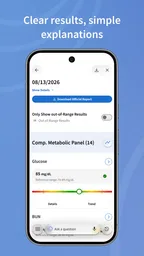
Seeing lab results on a phone can be reassuring when you are waiting, but it can also invite over-reading. A number on its own does not explain what it means for a particular person. I would avoid treating a result as a diagnosis or changing medication or care based on an app screen. Use the information to stay informed, then rely on an appropriate healthcare professional for interpretation and next steps.
This distinction matters most when a result looks unfamiliar or differs from what you expected. Rather than repeatedly refreshing the app or comparing a number with general information online, I would write down the question and contact the clinician who ordered the test. MyLabcorp’s value here is access to the lab-related information, not replacing the professional judgment around it.
One practical tip is to check the app when you have enough time to follow up, rather than opening it in the middle of an already stressful moment. If you do find something you want clarified, you can make a note and raise it through the appropriate care channel. That small habit helps keep convenience from turning into unnecessary worry.
Booking and results: a focused workflow
For appointment booking, the app is most useful when you already know that Labcorp is the right place for the test and you want to handle scheduling without starting from scratch elsewhere. I would still keep any instructions from the clinician close at hand, because the appointment is only one part of preparing for lab work. If you have been given specific directions, follow those directions rather than assuming the app replaces them.
For result checking, the useful workflow is to return to the app when you are ready to review the information and then decide whether you need to ask the ordering clinician anything. This can be more orderly than relying on memory or searching across unrelated apps. It is not, however, a reason to expect that every test or every provider relationship will appear in one place.
That is one of the app’s important trade-offs: it can simplify a Labcorp-related task while leaving the rest of your healthcare activity elsewhere. If you see several clinicians who use different portals, you may still need to switch between services. I would treat MyLabcorp as a focused tool in a larger routine, not as a universal dashboard.
When another option is a better fit
If your priority is a complete view of care from one doctor’s office, the office’s own portal may be a better first stop. It is more likely to be the place you already use for that provider’s communications and records. If your lab work is handled somewhere other than Labcorp, the other organization’s app or portal is likely to be more relevant than installing this one just in case.
A general health-record app may suit someone who wants to gather information from multiple sources, provided those sources work with it. That broader approach can be convenient, but it is a different job from handling Labcorp appointments and results. I would compare options by asking which one actually connects to the records and services I need, rather than choosing based on a promise of breadth alone.
There is also a reasonable case for skipping an additional app. If you only have an occasional test and already have a reliable way to book and follow up, another login may add more maintenance than value. MyLabcorp is most compelling when you expect to use its Labcorp-specific functions more than once or when having those tasks together removes a genuine source of friction.
Privacy and access are worth considering in ordinary, practical terms. A medical app contains information you may not want casually visible on a shared device. Before relying on it, make sure you can access your account comfortably and that your phone is secured in a way that suits you. I would also avoid leaving a result open on a screen someone else can see.
What switching to the app involves
Trying MyLabcorp does not require a purchase, since the app is free. Still, switching your routine has a small cost: you need to install it, sign in or set up access, and remember to check it instead of relying on your previous habit. I would make that change only if the app is likely to replace a more awkward step, such as searching for appointment information or wondering where to view a result.
If you already use a provider portal, there is no need to abandon it. The two tools can serve different purposes: keep the provider portal for that clinician’s side of care and use MyLabcorp for Labcorp-related activity. This split is not perfectly seamless, but it is often more realistic than expecting one app to contain everything.
MyLabcorp has an average rating of 4.6 from around 22,000 ratings, and it has more than 1 million installs. It was released on April 19, 2018, and has about 2,000 written reviews. Those figures indicate that it has reached a substantial audience, but they do not tell me whether it will fit your particular lab or provider arrangement. Your own use case matters more than popularity.
My recommendation
I recommend MyLabcorp to people who already deal with Labcorp and want a straightforward mobile route for appointments and results. Its focused scope is a strength when those are the tasks you need, and the free price makes it easy to try without committing money. I would keep expectations grounded: it can help organize lab-related steps, but it cannot replace a clinician’s explanation or make other healthcare portals unnecessary.
I would skip it if you do not use Labcorp, if your main need is communication with a different provider, or if maintaining another account would be more trouble than the occasional convenience is worth. In those cases, the portal connected to your clinician or testing organization is the more sensible choice.
For me, the deciding point is whether the app removes a real inconvenience from a real routine. If you often need to arrange Labcorp appointments or check Labcorp results, MyLabcorp is a practical tool to keep on your phone. If not, there is little reason to add it simply because it exists. Used for the right part of care, it can make a narrow but useful job easier while leaving medical decisions where they belong: with you and your healthcare professional.
What we like
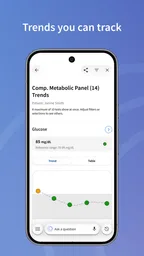
- View lab results and track changes over time.
- Manage appointments through the app.
- Access test details and preparation instructions.
- Find nearby Labcorp locations.
- Use secure sign-in to protect health information.
What could be better
- Some results may take time to appear in the app.
- Features may vary by location and test type.
- An active Labcorp account is needed for many tools.
- Appointment availability depends on the selected location.
- The app is less useful for people who do not use Labcorp.





