
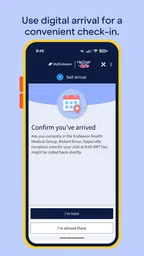
MyEndeavor review
 Analysis by Appsdrops
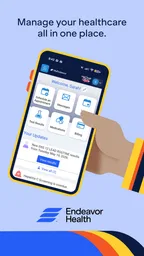
When I need to handle a health-related task, I want the app to save me a trip or a phone call—not add another layer of work. MyEndeavor is Endeavor Health’s medical app, and its value is tied to how well it fits into care already connected with that health system. I would think of it as a companion for managing that relationship, rather than a general-purpose health tracker or a substitute for urgent medical help.
What to expect when opening it
The name and purpose are straightforward, but the first useful question is whether you already receive care through Endeavor Health. If you do, having a dedicated app may make sense as a place to start when you want to engage with that care on your phone. If you do not, it is unlikely to be as relevant as a broad health app or the digital tools offered by your own provider.
It is free, open to users of all ages, and developed by Endeavor Health. Its average rating is 4.1 from around 4,100 ratings, with roughly 570 written reviews. Those figures suggest a generally favorable reception, but they cannot tell you whether a particular task will work smoothly for your account or device. I would use the rating as background, not as a guarantee of speed or reliability.
For speed, I would set practical rather than dramatic expectations. A healthcare app can feel quick when it gets you to a familiar task without detours, but the experience may also depend on account setup, connectivity, and the service behind the screen. I would not judge it by whether every page appears instantly; I would judge it by whether the task I opened it for is clear and easy to complete.
Where it fits in a healthcare routine
The strongest reason to keep MyEndeavor handy is convenience around care that is already part of your life. Instead of treating it as something to browse casually, I would open it with a specific purpose: check the app for the task I need, complete what it allows me to do, then confirm that the intended action actually went through. That simple habit matters more in healthcare than in a social or shopping app, where a missed tap is usually easy to fix later.
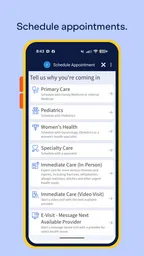
A realistic use case is preparing for an appointment during a busy day. I might open the app before leaving home, make sure I have the information I need, and avoid searching through old messages at the last minute. That can reduce small sources of stress, even if it does not replace a call when a question needs a person’s judgement. If the task is time-sensitive or confusing, I would not assume that leaving the app open means the clinic has received or acted on anything.
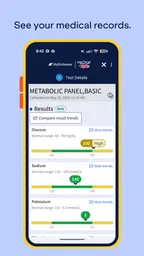
One useful workflow is to make the app part of a short pre-visit check rather than waiting until the appointment is already underway. I would review the relevant details, note anything I still need to ask, and keep those questions outside the app in a place I can readily find. This is especially helpful when someone is helping a family member: the app can be one part of preparation, but it should not be treated as a complete record of every conversation or instruction.
Busy moments and the limits of an app
Healthcare apps are most valuable when they reduce friction during ordinary, low-pressure moments. They are less reassuring when you are trying to solve a complicated issue quickly. If I were feeling unwell and unsure whether a symptom could wait, I would contact an appropriate medical professional or emergency service rather than rely on an app to decide what to do. MyEndeavor is a medical app, but that does not make it an emergency triage service.
Heavy use can also mean juggling more than one task: checking information, switching to another app to look at a calendar, then returning to finish what you started. A practical tip is to avoid beginning a healthcare task while distracted or on an unstable connection. Give yourself a moment to finish, look for a clear confirmation, and keep a note of anything that remains unresolved. This is not a workaround for a known flaw; it is a sensible way to avoid uncertainty when handling important information on any phone.
Compared with a general health app, a provider-linked app has a narrower job. A broad tracker may be better for logging habits or bringing together information from different sources, while a health-system app is more relevant when you need to interact with that particular care network. The trade-off is focus: if your healthcare is spread across unrelated providers, one dedicated app may not become your single control center. I would keep using each provider’s approved channel for its own care instead of assuming everything will appear in one place.
Reliability, follow-through, and recovery
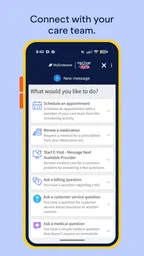
For a medical app, reliability is not just whether it opens. It also means knowing what happened after you submit or update something. When the result matters, I would look for an on-screen confirmation and, if the app does not make the status clear, follow up through the relevant clinic or support channel. That may sound cautious, but it prevents the common mistake of treating a tap as proof that a request has been received.
If a screen seems slow or an action appears to stall, I would first check the connection and avoid tapping repeatedly. Multiple attempts can create confusion about whether a request was sent once or more than once. If the app closes or you lose your place, reopen it and verify the status before trying again. This is a general recovery approach, not a claim that MyEndeavor is prone to crashing.
I would also distinguish a temporary loading pause from a genuine account or service problem. Reopening the app may help with the former, but repeated sign-in trouble or unclear task status is better handled through the provider’s support route. Do not put off care because you are waiting for an app screen to cooperate; use a direct contact method when the issue is important or urgent.
These habits make the experience more dependable without overstating what an app can promise. I would not use it as the only place to preserve information I may need during a visit. Keeping essential questions or instructions in a separate, accessible note gives me a backup, particularly if my phone battery is low or I cannot get online when I need to refer to something.
Device fit and setup considerations
The current version is 11.8.3, and the Android release dates back to December 31, 2015. It requires Android 11 or newer, so the first practical check is your device’s operating-system version. If your phone cannot meet that requirement, the app is not an option on that device; you will need another way to reach your care provider rather than expecting an older Android phone to run it.
For a phone that does meet the requirement, I would still leave room for normal differences in performance. Older hardware, limited storage, or a weak network can make any app feel less responsive, and healthcare tasks are particularly frustrating when you are rushing. I would install or update it while connected to a stable network and not wait until the moment I need to complete something important. That is a practical precaution, not evidence that the app is unusually demanding.
I cannot infer battery use, memory demand, or offline behavior just from the fact that this is a healthcare app. So I would not count on it working without a connection or assume it will keep every task available in the background. If you need information during travel or somewhere with poor reception, check what you can access beforehand and arrange a backup through your provider when necessary.
Who will get the most from it
I would recommend trying MyEndeavor if you receive care through Endeavor Health and prefer handling routine interactions on your phone. The app has reached more than 100,000 installs, which shows that many people have chosen to download it, though that alone says nothing about how well it matches your personal needs. The free price removes a purchase decision, but the more important question is whether your care and the tasks you need are supported by this provider-specific tool.
It is a weaker fit if you want one app to organize care from several unrelated systems, or if your main goal is tracking fitness, symptoms, or general wellness. It is also not the right option for someone who needs immediate medical advice, has an unsupported Android version, or strongly prefers speaking with staff for every routine task. In those situations, a direct call, another provider’s app, or a broader health tool may be more useful.
My overall view is measured: MyEndeavor is best approached as a practical doorway into Endeavor Health, not as an all-purpose medical assistant. I would keep it if it reliably helps with the care tasks I actually use, and I would judge its speed by successful follow-through rather than the impression of a fast loading screen. For the right patient, that focused role can be worthwhile; for everyone else, its connection to one health system is also its main limitation.
What we like
- Provides a clear place to organize personal goals and progress.
- Can help users stay focused on long-term plans.
- Personal tracking makes achievements easier to review.
- Useful for turning broad ambitions into manageable steps.
- A dedicated goal app can keep planning separate from daily notes.
What could be better
- Its usefulness depends on consistently updating your goals.
- Users seeking team collaboration may find it too personal.
- Goal tracking can feel demanding without regular progress.
- It may not suit people who prefer flexible unstructured planning.
- Some users may need additional tools for detailed project management.





