
myAir™ by Resmed review
 Analysis by Appsdrops
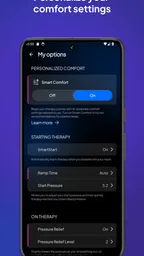
When someone begins PAP therapy, the first few weeks can feel like a lot to manage: getting used to the equipment, building a routine, and working out whether a rough night was a one-off or part of a pattern. I see myAir™ as a companion for that adjustment, not a replacement for the PAP device or advice from a clinician. Its value is in keeping the experience centered on the person using therapy rather than making them piece together every question on their own.
Useful expectations for a PAP companion
Resmed developed this free medical app for people using its PAP therapy ecosystem. It is rated for Everyone, and its focus is narrower than that of a general health tracker: it is meant to support the start and continuation of PAP treatment. That distinction matters. If you want a broad dashboard for exercise, meals, and unrelated health records, this is not trying to be that. If your main concern is making PAP part of your night, the focused approach is more sensible.
I would set expectations around guidance and routine rather than instant answers. An app can make it easier to pay attention to how therapy is going, but it cannot tell you why every difficult night happened or decide whether your treatment needs to change. The best use is to bring a little more structure to your own observations and, when needed, to conversations with your care team.
It has an average rating of 4.0 from around 37,000 ratings, with roughly 12,000 written reviews and over a million installs. Those figures suggest that many people have tried it, but they do not guarantee that it will suit every device setup or personal routine. I would treat it as a practical tool to try alongside therapy, not as proof that the app itself will make PAP effortless.
Where it can fit into an ordinary routine
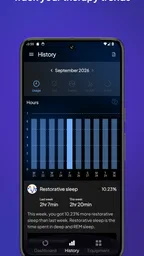
Picture someone who wakes after a restless night and cannot remember whether the mask felt uncomfortable before falling asleep or only near morning. A companion app can give that person a consistent place to check in, rather than relying entirely on memory. The useful habit is to look at the therapy record at a regular time, notice a question worth asking, and avoid making a big conclusion from one night alone.
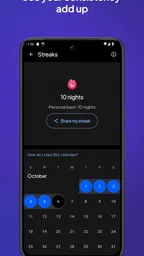
That regular check-in is particularly helpful during the early adjustment period. Instead of opening the app only when something seems wrong, I would make it part of a calm morning routine: review what is available, note any recurring concern, then move on with the day. This makes the app less like a source of nightly judgment and more like a simple support for continuity.
There is also a trade-off in that approach. Frequent checking can make a person more attentive, but it can also encourage overinterpretation. A single poor night is not necessarily evidence that therapy is failing. I would look for a repeated pattern before changing habits, and take treatment questions to a clinician rather than treating a screen as a diagnosis.
Busy moments and the limits of quick feedback
The most useful time for a PAP companion is often not during a crisis but when life gets busy. Travel, a late bedtime, or a change in the usual sleeping arrangement can disrupt a routine. In those moments, a familiar place to review therapy can help a user stay engaged instead of abandoning the process because a few nights felt inconvenient.
Still, the app should not be mistaken for a live troubleshooting service. If the equipment is uncomfortable, a person is struggling to breathe, or a serious health concern arises, a mobile app is not the right place to wait for reassurance. I would use it for reflection and organization, while turning to the appropriate clinician or equipment support for issues that need direct attention.
For someone who likes to inspect information repeatedly, the temptation is to check after every night and hunt for a precise explanation. I think a better workflow is less reactive: check at a set time, keep a brief note of meaningful discomfort or routine changes, and compare several nights rather than treating each one as a verdict. That habit helps separate a one-off disruption from something worth discussing.
This is also where the app’s narrow purpose is a strength and a limit. A general sleep tracker may appeal to someone who wants to compare many lifestyle signals in one place. A PAP-focused tool is more relevant when the main question is how the therapy routine is progressing. Neither approach replaces clinical interpretation, and people should choose the one that fits the questions they actually need to answer.
Reliability means more than opening quickly
For an app tied to a nightly treatment routine, reliability is about more than launch speed. It should fit naturally into a repeated check-in without becoming another chore. I would judge it by whether it helps me return to therapy information consistently and whether that information makes my next action clearer, not by expecting every screen to resolve a complicated treatment question.
I cannot responsibly promise a particular loading time or that every phone will behave the same way. Perceived speed and stability can depend on the device, connection, and current software environment. If the app feels slow on a given occasion, I would first distinguish a temporary phone or connection issue from a recurring problem before deciding that it is unusable.
For recovery after a missed check-in, the most practical approach is simply to resume the routine rather than trying to reconstruct every detail from memory. Missing a morning review does not mean the treatment itself has been lost. The app is most helpful when it supports a sustainable habit, not when it turns a missed tap into a reason to feel behind.
There is a broader reliability question too: does the app remain useful when the user’s routine changes? Someone who uses PAP consistently may get more value from reviewing patterns over time than a new user who is still learning basic equipment habits. In the first case, a brief review can help frame a conversation about recurring concerns. In the second, the priority may be learning the therapy routine with professional guidance, using the app as a supplement rather than the main teacher.
Device fit and who should choose another approach
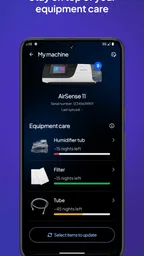
Because myAir is built around Resmed’s PAP context, compatibility is the first thing I would check before building a routine around it. A person using equipment outside that ecosystem may find a device maker’s own app or another suitable method more useful. The presence of a download does not make a companion app universal, and the right choice depends on the equipment actually used.
The app is also a poor fit for someone who does not want to engage with phone-based tracking at all. If checking therapy information increases anxiety, or if a user prefers to discuss progress directly with a clinician, there is no need to force an app into the process. A paper note about comfort and routine, or a conversation at a scheduled appointment, may be a better personal fit.
Phone constraints matter in everyday use. If a device is shared, rarely nearby in the morning, or difficult for the user to navigate, the convenience of an app can disappear. I would test the basic check-in in the actual setting where it will be used, rather than assuming that a feature is helpful just because it is available on a phone.
Privacy and comfort with health information are personal considerations, too. Before relying on any health companion, I would review its current permissions and privacy details in the app store and decide whether the information it handles feels appropriate for me. That is sensible for any medical app, especially one connected to an ongoing treatment routine.
How it compares with the usual alternatives
Compared with a generic sleep tracker, myAir is more relevant to PAP users because its purpose is tied to therapy rather than broad sleep habits. A general tracker may offer a wider picture of bedtime patterns, but that breadth can be less useful when the immediate challenge is sticking with PAP. Conversely, someone who wants one dashboard for many aspects of health may prefer a broader tool and use PAP information separately.
Compared with relying only on memory, a dedicated companion can make regular review easier and give a user a more organized starting point for a discussion. Compared with clinician follow-up, however, it is not a substitute: professional care is the better option for treatment changes, persistent discomfort, or symptoms that need medical attention. I would think of the app as the middle layer between nightly use and a more informed conversation, not as the authority above either one.
That distinction helps answer a common practical question: should a new PAP user install it immediately? If the person uses compatible Resmed equipment and wants help staying engaged, trying it early makes sense. If the main need is hands-on instruction, equipment adjustment, or diagnosis, installation alone will not solve that problem; the person should seek the relevant support and use the app only as an additional aid.
My performance verdict
Resmed’s app has a clear job: help PAP users stay connected to their therapy routine. I like that focused role more than a promise of a universal health dashboard, and I would recommend trying it to someone who uses compatible equipment and wants a structured way to review progress. The most useful strategy is to check consistently, look for patterns rather than reacting to one night, and bring persistent questions to a clinician.
Its limits are equally important. It cannot make uncomfortable equipment comfortable by itself, replace clinical judgment, or guarantee a smooth experience on every phone. Users who want broad sleep tracking, do not use compatible PAP equipment, or find health monitoring stressful may be better served by another option—or by no app at all.
Overall, I see myAir as a potentially helpful routine companion rather than a treatment solution in its own right. It is free, developed by Resmed, and has been available since April 17, 2018, giving it an established place in the PAP app landscape. My recommendation is straightforward: use it if its focused support makes your therapy easier to manage, but keep expectations grounded and let your care team handle decisions that require medical expertise.
What we like
- Tracks sleep data from a compatible ResMed device.
- Offers guided breathing exercises to support relaxation.
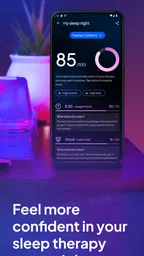
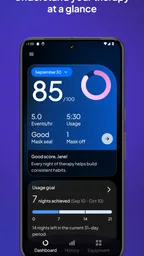
- Provides a sleep score to summarize nightly results.
- Includes coaching content for building healthy sleep habits.
- Lets users review sleep trends over time.
What could be better
- Requires a compatible ResMed device for detailed therapy data.
- Some features depend on an active internet connection.
- Sleep scores may oversimplify a complex night of sleep.
- Coaching content may feel generic to some users.
- App insights are not a substitute for medical advice.





