
My Molina review
 Analysis by Appsdrops
I judge a health-plan app less by how many screens it has than by whether it helps me handle a small, time-sensitive task without turning it into a phone call or a paper hunt. My Molina is Molina Healthcare Inc’s free medical app for members, built around managing health-plan needs from a mobile device. Its appeal is practical rather than flashy: it can be useful when you want to check your plan information while away from home, but it is most valuable when you already know what you need to find and have your member details ready.
A useful routine for everyday plan tasks
My baseline approach would be to open the app with one specific question in mind: am I checking something about my coverage, looking for a plan resource, or trying to manage a member-related task? That keeps a health app from becoming another place to wander through menus. Molina’s description frames the app as a way for members to manage health matters wherever they are, so I see it as a mobile companion to membership—not as a replacement for medical care or a general health-tracking tool.
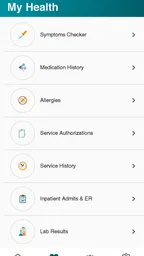
That distinction matters. If I am preparing for an appointment, the app can be part of the practical checklist alongside my appointment details and any questions for the clinician. It is not the clinician, and I would not rely on a plan-management app to assess symptoms or decide whether a health problem is urgent. For those needs, a medical professional or an appropriate urgent-care service is the better choice.
A realistic use case is checking plan-related information before calling a provider’s office. I would open the app while arranging the appointment, confirm the details relevant to my membership, and keep any questions it does not answer for the office or Molina’s member support. This order can prevent a call from becoming a vague search through paperwork. The app is most useful when it helps me arrive at that conversation better prepared, not when I expect it to settle every coverage question by itself.
In the medical-app category, many alternatives focus on one narrow job: tracking symptoms, organizing medication, storing records, or connecting patients with care. My Molina has a different purpose because it is tied to a specific health plan. That focus is a strength for Molina members who want a phone-based route to plan management. It is also the main limitation: someone who is not a Molina member, or who wants an independent medical organizer, should look elsewhere.
Make the first session count
When setting up any member app, I recommend doing the first sign-in when you have a few uninterrupted minutes and access to the information needed to identify your membership. That is more dependable than attempting enrollment in a parking lot or between appointments. I would also check that the phone is running an operating system the app supports; My Molina’s stated minimum is Android 5.1. The app is listed for Everyone, but that age label does not mean every child should manage a member account alone. A parent or caregiver should handle access appropriately.
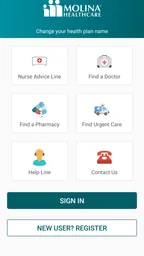
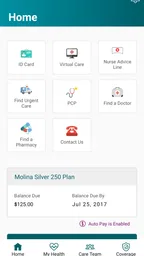
Once inside, I would take a short orientation pass rather than assume the home screen contains every useful destination. Look for the areas that match the tasks you actually expect to do, then note where those sections sit. I would avoid saving sensitive account information in an unrelated notes app just to make the workflow faster. A simple routine—open the app, sign in as needed, find the relevant member section, and verify the information before acting—is safer than improvising shortcuts that expose private details.
Settings to review before relying on it
I would start with the account and device basics: confirm that the membership information shown is the one you intend to use, make sure the app is updated, and use a phone lock that you are comfortable relying on. Health-plan details are personal, so the convenience of a saved session should be balanced against who can access the device. If family members share a phone, I would be especially careful about leaving an account open or letting someone else use the app under my sign-in.
Notifications are another setting worth considering, if they are offered on your device. I would allow only the alerts that help me act, and I would consider whether notification previews could reveal personal information on a locked screen. This is a general privacy habit rather than a claim that the app provides a particular alert control. The useful principle is to review both the app’s available settings and the phone’s notification display before treating a health app as a private space.
I also recommend checking the app-store page after an update if something changes in the way you use it. My Molina is currently listed as version 5.10.37, and the app has been available since March 2, 2016. That history suggests an established product, but an update number alone does not tell me how a particular screen behaves on every phone. If a task becomes confusing after an update, I would verify the app version and try again before assuming that my plan information itself has changed.
Faster habits without risky shortcuts
The best time-saving trick is not a hidden feature; it is preparing for the task before opening the app. For a provider call, write down the question you need answered and the information the office is likely to ask for. Then use My Molina to check the relevant membership details first. This keeps the app visit focused and makes it easier to tell whether you have found a clear answer or still need a person to explain it.
A second useful habit is to group related tasks into one brief session. If you are already checking plan information before an appointment, handle any other member-management item you know you need at the same time rather than reopening the app repeatedly. I would not turn that into a long session or assume that every task belongs in one place; the point is simply to reduce repeated sign-ins and context switching when the app supports the work you have in front of you.
For caregivers, a small shared routine can prevent confusion. Before helping another household member, confirm whose membership is being discussed and keep the conversation focused on that person’s needs. Do not assume that one family member’s app view automatically covers everyone else. The right account and permissions matter, and sensitive information should not be passed around casually just because a phone is nearby.
If you frequently need the same information, I would learn the route to it through normal use rather than rely on screenshots. Screenshots can become outdated, may expose personal details, and can be mistaken for current plan information. Returning to the app when you need a decision gives you a better chance of working from the information currently displayed. For something that will affect care or cost, I would still confirm any uncertainty with the appropriate Molina contact or provider.
Where a member app reaches its limits
The central trade-off is that My Molina is plan-specific. That can make it more relevant than a generic health app when the task concerns Molina membership, but it is not a universal dashboard for every doctor, pharmacy, or insurer a person may use. If your household has multiple plans, you may still need separate apps or contact routes. If you are comparing coverage across insurers, a member app is not the right tool for evaluating the market.
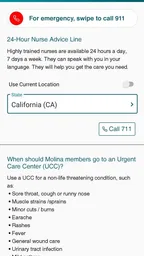
There is also a difference between seeing information and understanding what it means for a particular situation. A screen can help you locate plan details, yet a complicated coverage question may depend on circumstances that are easier to explain to a representative. I would use the app to prepare, then call or contact the appropriate support channel when the answer is unclear. For urgent symptoms, skip the administrative workflow entirely and seek medical help.
Like other account-based services, a mobile app is less convenient when you have sign-in trouble, a device problem, or limited access to a reliable connection. In that moment, a phone call or another official member-support route may be more dependable. I would keep the relevant membership information accessible through a secure alternative, rather than assuming the app will always be available at the exact moment it is needed.
My Molina has an average rating of 4.6 from around 3.9 thousand ratings, with about 890 written reviews and over 500 thousand installs. Those figures indicate that many people have tried it, but they do not tell me whether its current workflow will fit your particular plan or phone. I would treat the app’s real value as something to judge against your own recurring member tasks, especially how easily it helps you find the information you need.
Who will get the most from it
I would recommend My Molina to people who are Molina members and prefer to handle routine plan-related tasks on a phone. It is a sensible companion for someone who often needs to check membership information away from home, wants to prepare before speaking with a provider, or prefers a repeatable digital routine over keeping every detail in paper form. Since it is free, trying it does not require a purchase, though the practical benefit depends on whether its available functions match your needs.
I would skip it if you are not covered by Molina, want a general-purpose medical record, or expect an app to provide medical advice. I would also avoid making it your only route to important information if you are uncomfortable with mobile accounts or often have trouble accessing your phone. In those cases, the usual alternatives—direct member support, provider offices, or a separate health organizer—may be a better fit for the specific job.
My overall view is that this is a focused utility, not an all-in-one health platform. Molina Healthcare Inc has made a free app for members who want health-plan management within reach, and its 5.10.37 release is the current version I would look for when installing it. The strongest way to use it is to build a modest habit: check the right account, find the plan information relevant to the task, and verify anything consequential with a person when the app does not settle the question.
For a Molina member, that can save time and reduce the scramble before routine calls or appointments. For everyone else, the plan-specific nature makes it easy to pass over in favor of a broader tool. I would install it for practical member access, keep privacy settings in mind, and treat it as one useful part of managing care—not as a substitute for a clinician, clear coverage guidance, or a reliable backup when the phone is unavailable.
What we like
- View plan details and benefits in one place
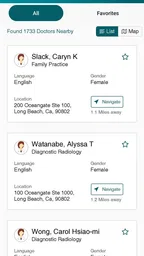
- Find nearby doctors and pharmacies
- Access digital ID cards without carrying a physical card
- Check claims and coverage information on the go
- Contact member support through the app
What could be better
- Features vary by plan and state
- Some tasks may require signing in again
- Account setup can require personal information
- App access depends on a stable internet connection
- Not all services are available to every member





