
My Invisalign - Official App review
 Analysis by Appsdrops
I would judge My Invisalign less by how impressive it feels on the first day and more by whether it remains useful once the novelty of starting treatment wears off. For someone using Invisalign, the app has a focused job: help keep treatment-related details in view through reminders, progress photos and answers to common questions. That makes it more practical than a general health app for this particular routine, although it is not a substitute for advice from an orthodontist.
In my view, the strongest reason to try it is simple: it gives Invisalign wearers a place to return to when they need a prompt or want to look back at their progress. The weaker case is someone who already has a reliable reminder system, keeps useful photos elsewhere and is comfortable asking their care provider questions directly. The app is free, so trying it is easy; whether it earns a lasting place on your phone depends on how much structure you want during treatment.
What makes the first week useful
My Invisalign is a medical app from Align Technology Inc., the company behind the Invisalign brand. Its purpose is narrower than a general dental-care app: it is intended for people following Invisalign treatment, rather than anyone looking for broad oral-health advice. That focus is helpful because the information and routines a wearer cares about are different from reminders for brushing or scheduling a routine check-up.
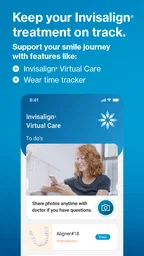
In the first few days, a treatment routine can feel like a collection of small things to remember. A reminder can help bring those tasks back into view, while progress photos give you a way to record how things look over time. The app also offers answers to questions, which can be useful when you want to check a basic point without searching through unrelated results.
One practical tip is to decide what you want the app to do before turning it into another daily obligation. If reminders are the main reason you installed it, make those the centre of your routine. If photos matter more, choose a consistent moment and setting for taking them. A record is much easier to compare when the photos are made under similar conditions, rather than captured randomly in different lighting or from different angles.
A realistic use case is checking the app during a busy morning before leaving home. Instead of relying on a vague intention to remember treatment tasks later, you can use the reminder function as a prompt and keep the relevant questions close at hand. The value is not that an app can make treatment effortless; it is that it can reduce the number of details you have to hold in your memory.
That distinction matters. A notification can remind you, but it cannot make a decision about your care or confirm that a concern is harmless. I would treat the app’s answers as a convenient starting point for common questions, not as a replacement for contacting the orthodontist responsible for your treatment when something needs individual attention.
Photos are most helpful as a record, not a verdict
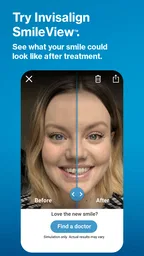
Progress photos can be motivating because gradual changes are difficult to notice when you see your smile every day. Looking back at an earlier image may make a slow process feel more visible. But photos are also easy to misread: changes in expression, camera distance and lighting can make teeth appear different even when the treatment itself has not changed in the same way.
I would use the photo feature as a personal visual timeline, not as a diagnostic tool or a way to decide whether treatment is on schedule. Keep the habit simple enough to maintain, and avoid treating each new image as a test you have to pass. If a photo raises a concern, a conversation with your care provider is more useful than repeatedly comparing pictures on a screen.
There is also a useful trade-off in keeping photos within a treatment-focused app rather than mixing them into a general camera roll: they are easier to associate with the treatment routine. On the other hand, anyone who already has a dependable way to organize personal progress pictures may find this feature less compelling. The best choice is the one that makes you more likely to keep a clear, consistent record without adding busywork.
Where the app fits beside usual alternatives
The usual alternative is not necessarily another medical app. Many people already rely on a calendar, phone reminders, notes or a direct message to their orthodontic practice. Those tools can be more flexible, and they may be enough if you only need a basic alert. My Invisalign’s advantage is that reminders, photos and treatment-related answers belong in one Invisalign-specific context rather than being scattered across unrelated apps.
That convenience has a boundary: a focused tool is useful only if its focus matches your needs. Someone seeking a complete dental-health manager, a way to book appointments, or personalized clinical guidance should not assume this app covers those jobs. I would keep using the care provider’s instructions and communication channels for treatment decisions, and use the app for the smaller routine-support tasks it is designed around.
Does it still matter after the first month?
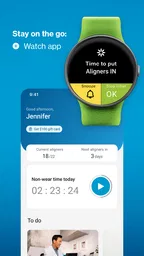
The app’s longer-term value comes down to repetition. Reminders are useful when they support an action you genuinely need to remember; they become background noise when they arrive at the wrong time or repeat something that has become automatic. I would review whether each reminder still helps rather than leaving every prompt enabled out of habit. A smaller number of relevant nudges is more likely to stay useful than a stream of alerts that you start dismissing without reading.
Progress photos have a different rhythm. They do not need to become a daily ritual to be worthwhile. Taking them occasionally, under similar conditions, can make the record easier to interpret and less demanding to maintain. This is one of the less obvious strengths of the app’s combination of tools: reminders support immediate habits, while photos serve a slower, reflective purpose. They work on different timescales, so there is no need to force them into one repeated routine.
The question answers can also offer recurring value, especially when a familiar uncertainty comes up again. Still, I would not open the app expecting every personal situation to have a definitive answer. General information can orient you, but treatment is individual. If the question is about what you personally should do, your orthodontist’s instructions matter more than a general explanation in an app.
In day-to-day use, I would make the app part of an existing moment rather than inventing a new one. For example, checking a reminder when you are already planning the day is easier to sustain than remembering to open a separate app at an arbitrary time. That small adjustment can be the difference between a tool that quietly supports treatment and one that feels like another task to manage.
The maintenance burden is modest, but real
No reminder system maintains itself. You need to notice whether prompts are still relevant, and you need enough consistency for progress photos to be useful. The maintenance is not complicated, but it asks for attention. If your routine is already stable, the app may gradually become less necessary; that is not a failure. A useful support tool can help you establish a habit and then recede as the habit becomes familiar.
There is a balance to strike between checking in and over-monitoring. Opening an app every day to look for signs of progress can make slow change feel frustrating. The photos are more valuable when they help you look back over a meaningful stretch of treatment than when they encourage constant scrutiny. I would avoid using them to judge small day-to-day differences, particularly if lighting or camera position varies.
Storage and organization are worth thinking about in practical terms, too. If you take photos, keep your approach consistent and make sure you are comfortable with where you keep personal images. The app’s role is to make tracking convenient; the decision about how much personal documentation you want is yours. People who prefer not to take or store progress photos can still find value in reminders and answers, rather than feeling that every feature must be used.
Why some people may lose interest
The main source of fatigue is repetition. A reminder that feels helpful in week one can become an interruption later, particularly if you have already built the routine. Another possible source is expecting the app to show visible progress quickly. Photos can make gradual change easier to reflect on, but they cannot make treatment move faster, and they should not be treated as proof that everything is going as planned.
There is also a mismatch risk. This is not a broad health companion, and its usefulness is tied to Invisalign treatment. If you are not an Invisalign wearer, the central purpose is unlikely to fit your needs. Even for wearers, people who prefer to keep all reminders in a single calendar or who rarely consult app-based guidance may see little reason to return after the initial setup.
The app has an average rating of 3.5 from around 15,000 ratings, alongside roughly 1,600 written reviews. It has passed one million installs, which suggests that many people have at least tried it, but popularity alone does not guarantee it will suit your routine. I would read that rating as a reminder to keep expectations grounded: the app may be helpful as a focused companion, but it is not essential for every wearer.
It is free and rated for everyone, and it was released on February 26, 2018. Those details make it approachable to try, but they do not change the basic decision: install it if treatment reminders, a dedicated photo record or quick answers would solve a real problem for you. If you only want a general alarm, your phone’s built-in tools may be simpler and just as effective.
Who should keep it, and who can skip it
I would recommend giving My Invisalign a try if you are starting treatment and want a dedicated place for routine prompts, visual progress tracking and common questions. It is particularly suited to someone who likes having treatment-related tools together and benefits from a gentle structure. The app’s medical focus is clear, and the developer is Align Technology Inc., making it specifically tied to the Invisalign experience rather than a general-purpose dental reference.
I would be less enthusiastic for someone who already follows a consistent routine, dislikes notifications or expects detailed personalized clinical advice. In those cases, the app can add steps without adding much value. A calendar reminder may be the better option for a single task, while direct contact with your orthodontic team is the better route for a personal treatment concern.
It is also worth remembering that the minimum operating system is version 9. If your device cannot run that system or a newer one, the app will not be a practical option on that phone. For compatible devices, the low commitment of a free download makes a short trial reasonable; the important test is whether you still find the reminders or records useful once the first-week excitement has passed.
My long-term verdict
I see My Invisalign as a focused companion, not a treatment manager and not an app everyone needs to keep open indefinitely. Its best qualities are practical: reminders can support a routine, photos can preserve a useful visual record, and answers can help with basic questions. Its limitations are just as important: prompts can become noise, photos can invite over-checking, and general answers cannot replace care tailored to you.
For lasting value, I would use it selectively. Keep the features that solve an actual problem, adjust your habits as treatment becomes familiar, and do not feel obliged to use every option. If the app helps you remember what matters without making you think about treatment all day, it has earned its place. If it becomes another notification to dismiss, a simpler reminder or direct guidance from your orthodontist is likely the better fit.
Overall, I would recommend My Invisalign to Invisalign wearers who want a little more structure and a treatment-specific place to check in. I would not recommend relying on it as a source of personal medical decisions. Its lasting usefulness depends less on novelty than on whether its small tools fit naturally into your real routine—and that is a sensible standard for any app meant to support a long-term habit.
What we like
- View your treatment timeline and upcoming aligner changes.
- Receive reminders to wear and change your aligners.
- Track progress with photos and treatment milestones.
- Find guidance for common aligner care questions.
- Access your treatment information on your phone.
What could be better
- Some features may require an invitation from your provider.
- Available tools can vary by Invisalign provider.
- Progress tracking depends on taking photos consistently.
- The app cannot replace advice from your orthodontist.
- Notifications may be easy to miss if disabled.





