

Modivcare review
 Analysis by Appsdrops
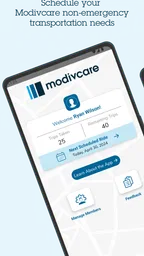
When a medical appointment depends on a ride arranged through Modivcare, keeping the trip organized matters as much as getting the address right. I see Modivcare as a practical companion for members who need to book and manage those trips, rather than as a general transport app. Its value is tied to a specific job: helping eligible members handle travel connected with their care.
That focus makes the app potentially useful, but it also sets clear limits. It is not a replacement for a taxi service, a map, or a medical provider’s scheduling system. If you are a Modivcare member and want a phone-based way to manage trip arrangements, it is worth considering. If you simply need a ride outside that membership and service context, a regular rideshare or local transport option is a better fit.
Built around managing medical trips
This is a free medical app from Modivcare, aimed at members who need to book and manage trips. That narrow purpose is a strength: the app is not trying to be an all-purpose travel planner. The trade-off is that its usefulness depends on whether you are a member and whether the trip you need falls within the service available to you.
For someone who already arranges medical transportation, a dedicated member tool can be more convenient than relying on calls and separate notes. Having a place to manage trip-related tasks on a phone may make it easier to keep arrangements in view. I would still treat the app as one part of the process, not as a guarantee that every ride request or change can be handled in exactly the same way.
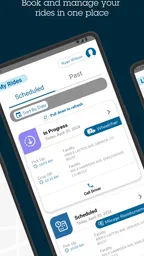
A realistic use case is a member preparing for a routine appointment several days ahead. They can use the app to manage the trip rather than leaving the details scattered across a calendar, a paper reminder, and a phone conversation. Before relying on it, I would confirm the trip is actually recorded and keep the appointment details easy to reach. That simple habit matters when transportation is linked to a time-sensitive visit.
Who is likely to find it useful
The clearest audience is a Modivcare member who expects to arrange more than an occasional medical ride and prefers handling practical tasks on a smartphone. It may also suit a family member or caregiver who helps someone keep track of transportation, provided they are working within the member’s account and the app’s intended process.
It is less compelling for a person who rarely needs arranged medical transportation, is not a member, or prefers to handle every detail by speaking directly with a representative. A phone app can make routine management more convenient, but it does not automatically make a complicated trip simpler. If a journey involves unusual timing, changing needs, or questions about eligibility, direct support may be the more sensible first step.
The audience distinction is important. Unlike a standard rideshare app, this one is not primarily about choosing a nearby driver and setting off immediately. Its purpose is member trip management. Someone comparing it with ordinary transport apps should compare the jobs they do, not just the fact that both involve rides.
How it fits into an everyday routine
For a regular appointment, I would use the app as a planning checkpoint: arrange or review the trip, then check that the date and destination match the appointment. I would also keep a separate reminder for the appointment itself. That reduces the chance of treating a transportation arrangement as proof that the clinic visit is still scheduled, or vice versa.
For a caregiver helping an older relative, the useful workflow is to make trip management part of the appointment-preparation routine. Confirm the visit, review the transport arrangement, and make sure the person travelling knows what to expect. This is not a hidden app feature; it is a practical way to avoid relying on memory when care and travel involve several people.
A second useful distinction is between planning and last-minute problem solving. A member who has time to arrange a trip can use a dedicated management channel as part of preparation. Someone already waiting outside with an urgent change may need a direct contact route instead. I would not assume that a mobile app is the fastest path for every exception, especially when a delay could affect care.
What the version history can—and cannot—tell you
The app was released on August 4, 2021, and its current version is 1.5.16. That establishes that the product has continued to a later numbered version, but a version number alone does not reveal which functions changed or whether a particular workflow improved. I would not read it as proof of a specific redesign, new booking option, or reliability improvement.
For existing members, the practical point is to keep the app current when updates are available through the app store. Current software is generally the sensible starting point when using a service app, but version details do not tell me how an individual’s account or trip will behave. If an important journey is approaching, checking the arrangement itself is more useful than assuming an update has changed the process.
The app is rated for Everyone and supports a minimum operating system of 7.0. That makes it relevant to a broad range of users and devices, though an older phone can still have its own limits around performance or software compatibility. The rating describes the audience suitability of the app; it does not mean every user will find the booking process equally easy.
Its reach is substantial for a focused member service: it has over 500,000 installs, around 30,000 ratings, and an average rating of 4.5. It also has around 11,000 written reviews. Those figures suggest that many people have engaged with it, but they cannot tell an individual whether the app supports their specific trip or resolves a particular service issue. I would treat them as context, not as a promise of a smooth experience in every case.
Where the app may feel limited
The biggest limitation is its specialized audience. A non-member cannot treat it as a general transportation app, and even a member should not assume that every ride need is handled like an on-demand car service. The app’s purpose is to manage trips within Modivcare’s member service, so the user’s circumstances and available arrangements matter.
Another point to keep in mind is that trip management and medical care are separate responsibilities. The app can help with the transportation side, but it should not be treated as a source for appointment instructions or clinical advice. I would keep the clinic’s details and any care-related questions with the provider, while using Modivcare for the member trip task.
There is also a practical access trade-off. A smartphone-based process is convenient for people comfortable with apps, but it may be less comfortable for members with limited vision, dexterity, confidence using mobile software, or inconsistent access to a device. In those cases, getting help from a trusted caregiver or using an available direct support channel may be preferable. A digital tool should reduce effort, not become another barrier to attending care.
Compared with the usual alternatives, Modivcare is more specialized than a taxi or rideshare app and more portable than relying only on paper reminders or phone records. A rideshare may be better for an independent, immediate trip that does not depend on a member transportation arrangement. A call may be better when the request is unusual or needs clarification. For a routine member trip, the app is the more natural place to start if you want to manage the arrangement digitally.
What I would check before depending on it
Before using the app for an important visit, I would make sure I can access the right member account and that the trip details correspond to the appointment I intend to attend. I would avoid waiting until the day of the visit to explore the process for the first time. That small amount of preparation gives you time to find another way to get help if something does not look right.
If plans change, I would check the app promptly and use the appropriate support route if the change is not straightforward. The key trade-off is convenience versus certainty: a self-service tool can make routine management easier, but a complicated change may call for a person who can clarify what is possible. Keeping the appointment office informed separately is also sensible when transportation trouble could affect arrival.
For someone helping a member, I would agree in advance who will check the trip and who will respond if a detail needs attention. That avoids two people assuming the other has handled it. It is a small workflow improvement, but it can matter more than installing another reminder app when several people are coordinating one appointment.
My view for current and prospective users
Modivcare makes the most sense when you are already part of its member service and want a dedicated place to manage medical transportation. Its focused role is more useful than a generic ride app for that particular task, while its specialization means it is not a universal solution. I would recommend trying it for routine trip management, then keeping a direct support option in mind for exceptions.
The developer is Modivcare, and the app is free. For an eligible member, that removes a purchase decision, but the more important question is whether managing trips on a phone suits their routine. People who prefer a person-to-person process, lack convenient smartphone access, or need transport unrelated to the service may be better served by another option.
As the app moves through later versions, the changes that would matter most to users are the ones that make essential trip tasks clearer and easier to manage. That is something to watch for, not something I can infer from a version number. For now, I would judge it by the practical basics: can you get into the member experience, manage the trip you need, and verify the arrangement before relying on it?
My overall recommendation is measured but positive for the right audience. If you are a Modivcare member who wants a mobile way to keep medical travel organized, it is a sensible tool to try. Just do not confuse trip management with an on-demand ride guarantee, or the app with your clinic’s appointment system. Used with those boundaries in mind, it can be a helpful part of getting to care.
What we like
- Trip details are easy to review before pickup.
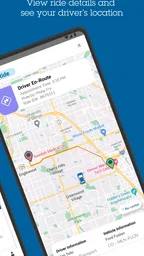
- The app can show driver location for eligible rides.
- Ride reminders help users prepare for scheduled trips.
- Support options are available within the app.
- Trip history makes past ride details easier to find.
What could be better
- Available features can vary by health plan and location.
- Some rides may not appear until they are arranged.
- Location updates depend on a reliable internet connection.
- Pickup times may change after a trip is scheduled.
- Account setup may require plan-specific information.





