
MEDITECH MHealth review
 Analysis by Appsdrops
When I open a healthcare app for the first time, I want to know what it can help me do—and whether I can get somewhere useful without a long setup detour. MEDITECH MHealth is best understood as a mobile way into MEDITECH’s patient and consumer health portal, rather than a general-purpose health tracker. That distinction matters: it is most relevant when your care provider uses MEDITECH’s portal and gives you a way to access it.
Developed by Medical Information Technology, Inc., this free medical app is for Everyone and has reached over one million installs. Its average rating is 3.0 from around 2,700 ratings, a mixed signal that fits an app whose usefulness depends heavily on whether it connects smoothly with your own care setup. I would judge it less as a standalone wellness product and more as a practical doorway to information and services made available through your healthcare organization.
What to expect from the mobile portal
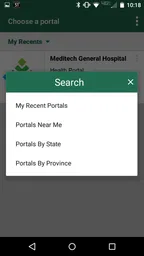
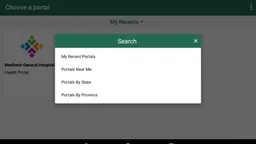
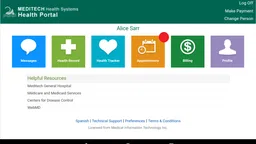
The main expectation to set is that installing the app is not the same as gaining access to a medical record. MHealth is the mobile version of MEDITECH’s Patient and Consumer Health Portal, so the experience is tied to that portal and the organization providing your care. If your clinic or hospital uses it and has enabled access for you, the app may be a convenient place to handle portal-related tasks. If not, installing it alone may not solve anything.
This makes it different from a typical health app that works independently from the moment you launch it. A step counter, medication reminder, or symptom journal can be useful without a relationship to a particular provider. MHealth’s value, by contrast, comes from its connection to a participating care organization. I see that as both its clearest strength and its biggest limitation: relevant information can be closer at hand, but only within the access your provider has arranged.
The app is not a substitute for urgent care or a conversation with a clinician. I would use it for routine portal access, not to decide what to do about a sudden or serious symptom. Its medical category can make the app sound broader than it is; the useful question is whether your provider’s portal is part of your care routine.
Before you install: check the connection to your care
Before spending time on setup, look for instructions from your clinic, hospital, or care team about its patient portal. Check the name they use and how they expect patients to sign in or activate access. That small check can prevent a frustrating first launch: a portal app cannot provide meaningful access merely because you know the name of your healthcare organization.
If you already use MEDITECH’s portal on another device, think about which tasks you actually want to do from your phone. For example, you might want to check information before an appointment or have portal access handy while away from home. Having a specific purpose makes it easier to tell whether the mobile version fits your routine, rather than expecting it to behave like a complete personal health record that gathers everything from every provider.
Make the first setup deliberate
After installing, follow the access instructions supplied by your care organization. Use the sign-in or activation route it identifies rather than guessing at account details or trying unrelated portal credentials. If you are helping a family member, keep their account and your own clearly separate; health information is personal, and using the correct person’s access matters as much as getting through the login screen.
I would do the first setup when I have a few uninterrupted minutes and can refer to any instructions from the provider. Avoid starting in a waiting room just before an appointment, when a login snag could add stress. If access does not work, pause and check whether the account has been activated and whether you are following the organization’s stated process. Repeatedly trying different details is unlikely to clarify which step is missing.
The current version is 1.20.0, and the stated minimum operating system is version 12. Before installing, check that your device meets that requirement. This is a practical first-time-user detail: if the app is unavailable or will not run on an older device, the issue may be compatibility rather than your portal account. In that case, use the access method your provider recommends instead of assuming that a fresh install will fix it.
Your first meaningful success
For a first session, I would define success simply: reach the portal and confirm that you are looking at the correct account. Do not begin by trying to explore every possible section. First establish that access works; then identify the one item or task that prompted you to install the app. This keeps the experience manageable and makes it easier to notice whether the information you need is actually available.
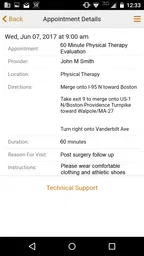
A realistic example is preparing for a routine appointment. The evening before, you open MHealth to check the portal information you expect to need, rather than waiting until you are in the clinic. If the relevant information is there, you can make a note of what you want to ask. If it is not, you have time to contact the provider or use its recommended alternative. The app’s value in that situation is convenience and preparation, not replacing the appointment itself.
Another useful habit is to treat the portal as a place to retrieve and review information, not as a reason to self-diagnose. Medical records can be difficult to interpret without context. If something you see raises a question, write it down for your care team rather than drawing a firm conclusion from a screen. That is a sensible way to get practical value while keeping the clinician involved in decisions that require medical judgement.
Where first-time users can get confused
The most common point of confusion is the difference between the app and the healthcare organization’s portal access. MHealth is the mobile route, but your provider’s setup determines whether you can use it for your care. If you cannot sign in, that does not automatically mean the app is broken; account activation, the organization’s process, or the credentials being used may be the issue. Start with the instructions from the provider, then ask its support team which access route applies to you.
It is also easy to expect a single app to bring together records from every doctor. I would not assume that. The app is tied to MEDITECH’s portal, so its usefulness depends on what your care organization makes available through that portal. If you receive care in several unrelated systems, you may still need their separate patient portals or other record-sharing arrangements. A general health organizer may be more suitable if your main goal is to collect notes from different sources in one place.
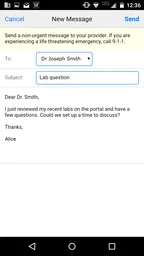
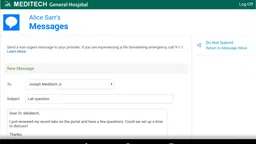
Another expectation to manage is that mobile access does not make every medical question a portal task. For a time-sensitive concern, contact a clinician or use an appropriate urgent-care service rather than waiting for an app interaction. For non-urgent questions, follow the communication options your provider has made available. The key is to distinguish convenience from clinical availability: having an app on your phone does not mean a clinician is monitoring it continuously.
Because healthcare portals can contain sensitive personal information, I would also be thoughtful about the device and account I use. Keep access to your own account, especially if a phone is shared, and sign out or secure the device in a way that suits your circumstances. These are sensible habits for any medical portal, not a claim about a particular security feature in MHealth.
Who will benefit, and who may prefer another route
I would recommend trying MHealth if your care organization uses MEDITECH’s patient portal, you have been given access, and you want to reach that portal from a mobile device. It may be especially helpful for someone who checks care information between appointments or wants to prepare questions before speaking with a clinician. The strongest case is a clear one: your provider has confirmed the portal is part of your care, and you want a more convenient way to reach it.
I would skip it, or at least delay installing it, if you do not know whether your provider uses the portal. It is also not the right fit if you are looking for a universal record vault, a fitness tracker, or an app that independently offers medical advice. In those cases, your provider’s preferred portal, a general organizer, or direct contact with a care professional may serve you better. The choice depends on the task, not on which app has the broadest-sounding description.
The app has been available since June 12, 2017, and its rating averages 3.0 across around 2,700 ratings. I take that as a reason to keep expectations practical rather than as proof that it will work poorly for everyone. Portal apps are unusually dependent on the surrounding healthcare setup, so one person’s smooth access and another person’s difficulty may reflect different organizations or account arrangements. The rating is useful context, but your provider’s instructions are more decisive for your own case.
A sensible next step after you get in
Once you have confirmed access, choose one repeatable reason to return. It might be reviewing portal information before a scheduled visit or checking something your care team has told you to look up. A small, specific routine is more useful than opening the app without a goal and expecting it to explain your whole care history. If a detail is unclear, note the question and raise it with the appropriate healthcare professional.
If you cannot get past setup, do not spend the afternoon reinstalling the app or guessing at accounts. Ask your provider whether you should have portal access, which sign-in process to use, and what support channel handles access problems. If the provider points you to a different portal or process, follow that direction. That is not a failure of your phone; it is the practical boundary of an app built around a particular patient-portal connection.
My overall view is that MEDITECH MHealth makes sense as a focused companion to a participating provider’s portal, not as a must-have for every patient. Its best quality is the possibility of bringing portal access into an everyday mobile routine; its main trade-off is that the experience depends on your healthcare organization and account being set up for it. Start by confirming that connection, aim for one successful portal visit, and keep the app only if that access genuinely makes managing your care more convenient.
What we like
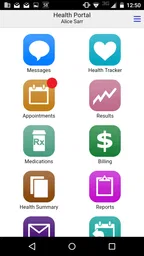
- Provides secure access to medical records from participating healthcare organizations.
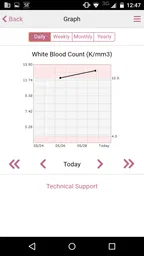
- Lets patients review test results and medication details on a mobile device.
- Supports appointment management through compatible patient portals.
- Offers access to care-team contact information and health summaries.
- Can display information from multiple linked MEDITECH portals.
What could be better
- Features vary depending on the healthcare organization using MEDITECH.
- An account from a participating provider is required to access records.
- Some information may not appear until a provider updates the portal.
- The app is not intended for urgent or emergency medical needs.
- Portal setup may require an invitation or registration details from your provider.





