





MDLIVE: Talk to a Doctor 24/7 review
 Analysis by Appsdrops
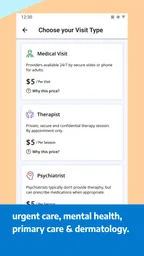
I’d think of MDLIVE: Talk to a Doctor 24/7 as a way to make a medical conversation easier to arrange, not as a replacement for every kind of care. Its appeal is clearest when someone in the household has a concern that merits speaking with a doctor but does not obviously call for an emergency-room visit. Having a medical app ready before that moment can reduce the scramble of deciding where to start.
That convenience matters in ordinary situations: a parent juggling work and a child’s sudden, non-emergency concern, an adult trying to fit a consultation around a busy day, or someone who wants to discuss a health question without first travelling to a clinic. I like the idea of keeping a telehealth option within reach, but I’d still treat the app as one part of a care plan. Serious symptoms need appropriate urgent or emergency care, not a wait for an app-based conversation.
Using one app in a shared household
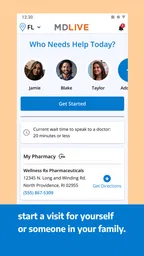
Shared devices can make medical access feel convenient, but they also call for a little care. A phone or tablet used by several people is not automatically a shared medical account, and I would avoid assuming that one person can arrange care for everyone else through a single login. Before relying on the app for a family member, I’d check whose account is active and make sure the person seeking care is the one represented in the conversation.
That boundary is useful even in a close household. Health questions can be private, and details meant for one person should not become part of another person’s session simply because they use the same device. I’d sign out or otherwise secure access when finished if the device is passed around, and I would be cautious about leaving medical information visible on a shared screen. These are sensible habits for any health service, rather than a claim about a particular account feature.
A realistic example is a household member noticing a new concern while the person who usually manages appointments is away. The app may offer a route to connect with a doctor, but the person needing advice should be involved directly whenever possible. If someone else helps with the device, their role is best kept to practical support—finding the app, helping with the phone, or being present at the user’s request—rather than speaking as though they were the patient.
Set up the boundaries before someone is unwell
When I’m setting up a medical app for a household, I prefer to do the unhurried parts in advance. Make sure the intended user can access the device, understands how to open the app, and knows where to get help if the sign-in process becomes a hurdle. It is much less stressful to discover a forgotten password or an unfamiliar screen on a calm afternoon than during a moment when someone already feels ill.
I’d also decide which device is appropriate for a consultation. A private phone may be a better choice than a shared living-room tablet if the conversation could involve sensitive details. If a shared device is the only practical option, it helps to choose a quiet place and give the user control over who can see or hear the exchange. The important point is not to assume that convenience removes the need for privacy.
For households coordinating care, a simple division of responsibilities can prevent confusion: one person can help locate the app or keep track of the next step, while the patient answers questions and makes decisions where they are able. If the patient wants a relative involved, that can be handled openly. I would not treat an app as a substitute for consent or assume that it includes special family-management tools.
Coordination without turning the app into a family record
MDLIVE is best approached as a way to seek a medical conversation, not as a household command centre. If several people use it, I’d keep a separate, clear understanding of who is seeking care and what follow-up belongs to whom. A shared family calendar or a private note may help people remember an appointment or a question to raise, but that is a household workflow, not something I’d assume the app itself provides.
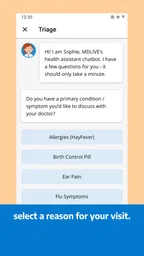
One practical tip is to write down the concern and a short timeline before starting a consultation. For example, note when a symptom began, whether it has changed, and any questions the patient wants answered. That preparation can make a brief conversation more focused and can help a family member support the patient without taking over. Keep sensitive notes somewhere appropriate and share them only with the people who need them.
Telehealth also has limits that matter when coordinating next steps. A clinician may need an in-person examination or another form of care, and a remote conversation cannot make every uncertainty disappear. I would use the consultation to clarify what to do next, then follow that guidance through the appropriate local care option. If symptoms are severe or rapidly worsening, waiting to coordinate through an app is the wrong trade-off.
Who it suits—and when another route is better
For an adult comfortable using a phone, this medical app may be a useful starting point when arranging a doctor conversation remotely is more practical than immediately travelling. It can also suit people who want a convenient option available outside the rhythms of a standard office visit. The app is free to download, and MDLIVE Inc is its developer. It has an average rating of 4.5 from around 18,000 ratings, with more than a million installs, which suggests many people have tried it; those figures are context, not proof that every consultation will fit every need.
The alternative is not always another app. A person with an established clinician may prefer to call that office, especially when continuity and existing records are important. A local clinic can be the better choice when an examination is likely to matter. For an emergency, the appropriate emergency service is more suitable than a telehealth app. I’d choose based on the urgency and the kind of assessment needed, rather than treating remote access as automatically faster or more complete.
There can also be friction before the medical conversation begins. A user may need to navigate account access, explain the concern clearly, and be comfortable discussing health matters through a digital service. Someone with limited connectivity, difficulty using a smartphone, or a strong preference for face-to-face care may find a phone call to a familiar clinic easier. Having a family member nearby can help with the technology, but it should not make the patient feel pressured to use a format they dislike.
Age, trust, and a sensible role for caregivers
The app’s content rating is Everyone, but that label is not the same as medical guidance about who should independently use a service or how care for a child is arranged. For a younger household member, I’d have a parent or responsible adult handle the practical steps and confirm that the consultation is appropriate. I would not infer special child accounts or caregiver permissions from the age rating alone.
Trust is easier when everyone knows what the app can and cannot do. It may help connect a user with a doctor, but it does not remove the need to describe symptoms honestly, ask questions, or seek in-person care when that is the better option. In a shared household, I’d also make sure the patient understands who is present and what information they are comfortable discussing in front of others.
The app has been available since July 11, 2014, and its current version is 6.10.1.0, with Android 8.0 as the minimum operating system. Those details are useful when deciding whether an older phone can run it, but the version alone does not tell me how smoothly it will work on every device. I’d install it and check access before depending on it in a time-sensitive situation.
My household verdict
I’d keep MDLIVE: Talk to a Doctor 24/7 in mind as a convenient option for a non-emergency medical conversation, particularly for adults who are comfortable using a phone and want another route to reach a doctor. For a household, its usefulness depends less on putting everyone on one device and more on clear account boundaries, privacy, and knowing who the patient is in each consultation.
My strongest recommendation is to prepare before anyone needs care: make sure the intended user can access the app, choose a private device or space where possible, and agree on how relatives can help without taking over. If a familiar clinician, a physical examination, or urgent treatment is the priority, I’d choose that route instead. Used with those limits in mind, it can be a practical addition to a household’s medical options rather than a substitute for them.
What we like
- Access care from home without traveling to a clinic.
- Appointments are available by phone or video.
- The app can help connect users with licensed providers.
- Prescription requests may be handled when clinically appropriate.
- Care options include support for common health concerns.
What could be better
- Availability may vary by location and provider.
- A virtual visit may not suit urgent or complex conditions.
- Consultation fees and insurance coverage can vary.
- A prescription is not guaranteed after a consultation.
- Some concerns may still require an in-person examination.





