




Lurnia: AI Language Tutor review
 Analysis by Appsdrops
I can see the appeal of Lurnia: AI Language Tutor most clearly in a shared household: one person wants to rehearse a few phrases before a trip, while another is trying to get more comfortable speaking a language they are studying. The app is an education tool from Astronex built around spoken practice with AI, so its most useful role is as a low-pressure place to try forming replies aloud. I would treat it as a personal practice aid, though, rather than a family language platform. That distinction matters when several people might reach for the same phone or tablet.
One device, different language goals
In an everyday household, a shared device often becomes a convenient study spot. Someone might open Lurnia while waiting for dinner, practise a short conversation, then pass the device to another person. That can make speaking practice easier to fit into a busy routine than arranging a lesson or waiting for a conversation partner. The benefit is especially practical for learners who understand some vocabulary but hesitate when they have to respond in real time.
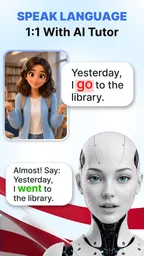
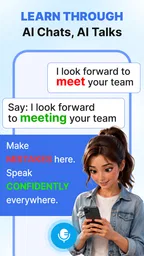
The app’s AI conversation focus gives the exercise a different feel from simply reviewing word lists. A learner has to retrieve language and make a response, which is useful preparation for situations such as ordering food, asking for directions, or greeting a colleague. I would use a session to practise the kind of exchange I expect to encounter, then note which replies feel difficult and revisit those later. That is a more purposeful approach than tapping through practice without a clear goal.
Shared-device use also brings a trade-off. If two people have different abilities or study aims, a conversation that suits one may be too difficult or too easy for the other. I would avoid treating a quick handoff as a seamless transfer of learning context: each person should be clear about which learner is practising and what they want to work on. The app is most helpful when each session has an individual purpose, not when the household expects one shared exercise to serve everyone equally.
For instance, one person could rehearse travel phrases during a quiet moment, while a student in the same home uses a separate session to practise ordinary conversation. Keeping those goals distinct helps people judge progress fairly. It also avoids the unhelpful comparison of one learner’s confidence or speed with another’s; speaking comfort depends on the person, the language, and the situation they are practising.
Keep practice personal on a shared screen
If you plan to share a device, decide on a simple handoff routine before starting. Finish the current practice, make sure the next person knows they are beginning their own session, and avoid assuming that another person’s conversation reflects your level. This is practical housekeeping rather than a claim about any particular account or profile feature. I would not rely on the app to create household boundaries for you; agree on those boundaries yourselves.
There is also a privacy dimension to speaking practice. People may feel self-conscious hearing themselves make mistakes, especially when another family member is nearby. A quiet corner, headphones where appropriate, or taking turns rather than talking over one another can make the experience more comfortable. If a learner is reluctant to speak in front of others, a shared device should not become pressure to perform. The point is to practise, not to turn a private learning effort into a family demonstration.
Before handing over a device, I would also check that the previous learner has finished and that the next person is comfortable starting fresh. This matters most when a household uses one screen casually throughout the day. A little coordination prevents one person’s unfinished activity from being mistaken for another’s and makes practice feel like an intentional choice rather than an interruption.
Coordinate goals instead of competing for progress
The strongest household arrangement is a light one: each learner chooses a small, concrete objective, then practises at a time that works for them. One session might focus on responding naturally to a greeting; another might be about keeping a basic exchange going. The useful question after practice is not “Who did better?” but “What can I say more comfortably now, and what still makes me pause?” That turns AI conversation into a guide for choosing the next practice target.
For a busy adult, a short speaking exercise can fit between chores or during a break without requiring another person to be available. For a student, it can provide a chance to say phrases aloud after studying them elsewhere. For a couple preparing for travel, each person could work on different situations and compare which expressions they want to remember. These are sensible uses of the conversational format, but they should not be mistaken for evidence that the app coordinates group lessons or tracks a household as a unit.
That distinction also answers a common practical question: can the app replace a teacher or a conversation partner? I would not make that trade. AI practice is convenient when nobody is free to talk, but a real tutor or fluent speaker can respond with human judgement, clarify cultural nuance, and adjust to the learner in ways that matter in a deeper lesson. Lurnia is better viewed as a way to get more speaking repetitions between those richer interactions, or as a starting point for someone who needs a less intimidating first step.
Likewise, it is not the best fit for a learner whose priority is a structured grammar course, detailed written correction, or classroom-style instruction. The central appeal is speaking practice, so someone who wants a broad curriculum should compare it with tools designed around lessons, reading, or grammar explanations. I would pair it with other study methods rather than expecting one conversation-focused app to cover every part of language learning.
Age, expectations, and trust
Lurnia is rated for Everyone, which makes its listed age context broad, but an age label should not be treated as a substitute for a parent’s judgement about a particular child. Speaking to an AI can feel casual, yet a young learner may still need help choosing appropriate goals, understanding that automated replies are practice rather than a human teacher’s authority, and staying focused. For younger users, I would be nearby at first and agree on when and why the app is being used.
For adults, trust is more about expectations. The AI format can make practice feel conversational, but I would use it to build confidence and test possible responses, not assume every exchange is a definitive lesson. When accuracy or an important real-world phrase matters, check it against a trusted learning resource or ask a qualified speaker. That small habit is useful with any AI language tool, especially when the learner is preparing for a high-stakes conversation.
Families should also talk plainly about account boundaries on a shared screen. Do not assume that switching users, preserving separate histories, or applying parental controls works a particular way unless you have checked the app directly. If separate personal spaces are essential to your household, verify the available options before making this the family’s main study tool. This is not a reason to avoid it; it is a reason to choose a setup that matches your expectations rather than hoping the app will manage them automatically.
What the price and audience suggest
The app is free to install, and its in-app purchases range from $2.49 to $84.99 per item. I would try the free experience first and decide whether the speaking workflow suits the learner before spending anything. In a household, that is especially sensible: one person may enjoy practising aloud while another prefers a book, a class, or written exercises. A purchase makes sense only if the person who would use it regularly finds the sessions valuable.
Lurnia has a 4.5 average from around 5,800 ratings and has been installed over a million times. Those figures suggest that many people have tried it, but they cannot tell me whether it will match a particular learner’s level, accent goals, or preferred teaching style. The developer is Astronex, and the current version is 1.6.0. It runs on Android 7.0 or later, so people with older compatible devices may be able to use it without needing a recent operating system.
At the time of its release on June 17, 2026, it entered a category crowded with flashcard tools, structured language courses, human tutoring, and conversation exchanges. Its clearest distinction is the emphasis on speaking with an AI rather than relying only on memorisation or waiting for another person. That is useful when the obstacle is finding an opportunity to speak. It is less compelling if the learner already has regular conversation partners and mainly needs systematic instruction or detailed feedback from a person.
How I would make it part of a routine
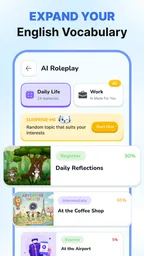
I would start each session with a real situation, not a vague goal such as “get better at the language.” Choose one exchange you expect to need, try responding without stopping to translate every word, and pay attention to where the conversation becomes awkward. Afterward, write down a small number of phrases or ideas to review elsewhere. This turns a conversational session into a practical loop: set a purpose, speak, notice a gap, and work on that gap.
Another useful approach is to repeat a scenario at a different time rather than constantly changing topics. If the first attempt feels hesitant, a later revisit can show whether the situation is becoming easier. I would not treat that as a formal measure of fluency; it is simply a way to notice personal progress. The advantage is that the learner can focus on retrieving language instead of spending every session discovering a new topic.
For two people in one home, taking turns can work better than practising side by side. Each person gets room to speak and can choose a relevant scenario without feeling watched. If they want to help one another, they can compare useful phrases afterward, but they should avoid interrupting the active exercise to correct every mistake. Too much commentary can make a low-pressure tool feel like an oral exam.
My household verdict
Lurnia: AI Language Tutor is worth considering if you want a convenient way to say more of a new language aloud, particularly when a human practice partner is not available. I like its clear role as a speaking companion: it gives learners a place to try responses and build the habit of talking rather than only recognizing words. The free starting point makes it easier to judge that fit before considering an in-app purchase.
I would recommend it to an adult learner who feels rusty, a traveller rehearsing everyday exchanges, or a student who wants extra speaking practice alongside a more structured course. I would be more cautious about making it the sole learning tool for a child, using it as a substitute for a teacher, or expecting a shared device to manage separate household identities and progress automatically. Those situations call for adult oversight, clearer boundaries, or a different kind of learning resource.
As a household choice, it works best when everyone treats practice as personal, takes turns thoughtfully, and keeps expectations realistic. If that sounds like your routine, the conversational format may make speaking feel more approachable. If your family needs coordinated lessons, dependable human correction, or clearly separated learner spaces, another option may serve you better. My view is that the app can earn a useful place in a home language routine, provided it is one tool among several rather than the whole plan.
What we like
- AI conversations provide practical speaking practice.
- Personalized lessons adapt to your language level.
- You can practice at your own pace.
- Immediate feedback helps identify mistakes.
- A convenient option for short daily study sessions.
What could be better
- AI feedback may miss context or nuanced errors.
- Speech recognition can struggle with accents.
- A stable internet connection may be needed for AI features.
- Advanced learning tools may require a paid plan.
- AI practice cannot fully replace conversation with native speakers.





