Local Weather:Weather Forecast review
 Analysis by Appsdrops
Local Weather: Weather Forecast is best understood as a practical check-in tool, not a weather station packed with specialist controls. I like its straightforward purpose: help me decide what to wear, whether to bring an umbrella, and how much confidence to place in the day’s plans. That focus makes it approachable, but it also means people who want detailed meteorological analysis may find it too basic.
A quick forecast that fits everyday decisions
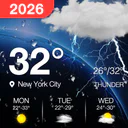
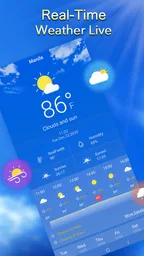
As a weather app, Local Weather: Weather Forecast is aimed at the small decisions that come up throughout the day. Its description presents it as a local forecasting assistant available around the clock, and that is the most useful way to approach it: open it when you need a current view of conditions and a forecast to guide ordinary plans.
That simplicity matters more than it might sound. Weather apps often compete by showing more layers, maps and controls, but extra information is not automatically helpful when I am standing by the door and deciding whether a light jacket is enough. A focused local forecast can be easier to consult than an interface that makes me dig through several screens first.
Enjoy Life Studio develops the app, which is free to install and rated for Everyone. Its average score is 4.8 from around 613,000 ratings, while its reach exceeds 10 million installs. Those figures suggest it has found a broad audience, though popularity alone cannot tell me whether its forecast will suit a particular town or a user who needs specialist weather information.
The current version is 2.0.1, and the app runs on Android 7.0 or later. I would treat those details as practical compatibility guidance rather than a promise that every device will feel equally smooth. If you are comparing it with other weather tools, the more important question is whether its simple local focus matches the way you check the weather.
Where its everyday value is clearest
The strongest use case is planning around routine, near-term choices: a walk, a commute, errands, or deciding whether an outdoor plan needs a backup. A forecast is most useful when it changes what I do, not when it merely fills a screen with numbers. Local Weather’s clear purpose makes it a reasonable first place to look before leaving home.
For example, imagine I have a morning appointment and an outdoor errand later in the day. I can check conditions before setting out, then look again before the second trip rather than assuming the morning weather will hold. That second glance is a small habit, but it is more dependable than making one decision early and treating it as valid all day.
A useful workflow is to check the forecast at the point of decision, not just when the day begins. If I am choosing between walking and taking a bus, I care about the conditions around that trip. If I am packing for several hours out, I care about the broader stretch of the day. Keeping those questions separate helps prevent a general daily forecast from being mistaken for a precise, minute-by-minute promise.
Another practical tip is to use a weather app as a planning aid, not as the sole authority for a high-stakes choice. For a casual outing, a local forecast may be enough to decide whether to bring an extra layer. For a long drive, a hike, or plans that depend on severe conditions, I would cross-check with a source that provides the specific warnings and detail I need. That is sensible use of any general-purpose forecast app, not a criticism unique to this one.
It is also worth thinking about how often you actually need to check. If weather affects your routine, keeping a simple forecast app available can save repeated searches. If you only look once every few weeks, a built-in weather feature may already cover your needs. The value here comes from having a clear, dedicated place to check, rather than from needing another app open constantly.
Simple focus, with a trade-off
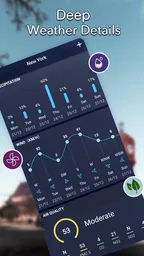
The app’s narrow promise is a strength, but it also sets a limit. A local forecast is not the same thing as a detailed weather workstation. Users who want to interpret radar, compare several forecast models, plan around specialized outdoor conditions, or inspect extensive historical information should look for an app that explicitly supports those tasks. I would not choose this one on the assumption that a clean local forecast automatically includes those advanced tools.
There is a similar trade-off between convenience and precision. Local forecasts can help with everyday preparation, but weather changes by neighborhood and over short periods. A broad forecast may not answer whether rain will reach one street during a short walk. When timing matters, I would check again close to departure and avoid treating a forecast as a guarantee.
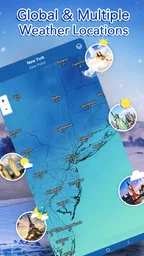
In a crowded category, many alternatives offer more layers of information or a different presentation style. A phone’s built-in weather app may be enough for a quick glance, while a specialist service may be better for detailed maps or alert-focused planning. Local Weather sits most comfortably between those choices for someone who wants a dedicated local check without making weather analysis a hobby.
There is also a modest cost consideration. The app is free, but in-app purchases range from $0.99 to $4.99 per item. I would keep that in mind if I prefer an entirely free setup: before paying for anything, decide whether the basic experience already answers your questions. A purchase only makes sense if it provides something you personally value, rather than simply because the option appears in the app.
The audience score is encouraging, but it should be read as a broad signal, not a guarantee of forecast quality in every location. A weather tool can feel useful in one region and less convincing in another, and an individual’s needs vary just as much. I would give it a short real-world test against the conditions I experience locally before relying on it for plans where accuracy is especially important.
Who is likely to get the most from it
I would recommend Local Weather to someone who wants a dedicated, uncomplicated way to check local conditions and make ordinary daily decisions. It makes sense for commuters, people who walk or cycle for short trips, and anyone who wants to think ahead about clothing or outdoor errands without navigating a specialist interface.
It may also suit people who are trying to make their routine more deliberate. Checking before leaving, then checking again before a later outdoor plan, is a straightforward way to avoid being caught out by changing conditions. The app’s central idea supports that habit, even though the user still needs to apply judgment rather than follow a forecast blindly.
I would steer away from it if your main reason for downloading a weather app is technical depth. Outdoor professionals, serious hikers, or anyone who needs detailed warning information may be better served by a more specialized alternative. Likewise, if your current phone weather tool already gives you the local view you need, switching may add little beyond another icon and another place to check.
Before installing, I would ask myself one practical question: do I want a simple local forecast, or do I need evidence to make a more demanding weather decision? If the first answer fits, this app is worth trying. If the second does, compare the specific tools and alerts offered by specialist options instead of assuming a general forecast will cover them.
My verdict on Local Weather
Local Weather: Weather Forecast earns its appeal through a clear, everyday role: it gives users a dedicated place to consult local conditions and plan around them. I value that uncomplicated focus, especially for routine decisions where a quick check is more useful than a dense dashboard.
Its limitations are part of the same bargain. A simple forecast should not be mistaken for specialist analysis, and the free download does not mean every optional purchase will be worthwhile for every user. The app is a better fit for practical day-to-day planning than for people who need advanced weather tools or highly specific assurances.
Overall, I would try it if I want an easy local forecast and do not need a technical suite. Its 4.8 average from roughly 613,000 ratings and more than 10 million installs give it a strong audience signal, but my recommendation is still based on fit: for basic weather decisions, it is a sensible option; for detailed or high-stakes planning, I would choose a more specialized source.
What we like
- Quick access to current conditions can help with everyday planning.
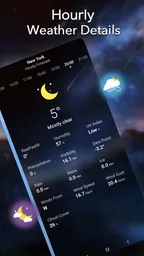
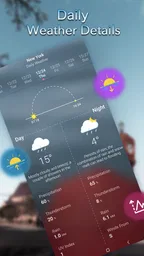
- Forecast details are useful for checking expected weather changes.
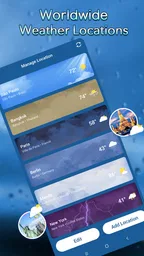
- Location-based updates reduce the need to enter a city manually.
- A compact layout can make key weather information easy to scan.
- Useful for checking conditions before outdoor activities.
What could be better
- Forecast accuracy may vary by location and weather conditions.
- Location access may be needed for automatic local updates.
- Frequent weather changes can make forecasts less dependable.
- Some features may require an internet connection.
- Weather information may be less detailed in smaller locations.





