


Local Weather - Radar & Widget review
 Analysis by Appsdrops
I can see the appeal of a weather app that aims to be useful without turning the forecast into a project. Local Weather - Radar & Widget is a free weather app from Huju Network Technology CO., Ltd., and its focus is straightforward: help you check what conditions are like where you are. In my view, that simplicity is a good starting point, but a weather app earns a lasting place on a phone only if it keeps answering the same everyday question quickly: should I change what I’m about to do?
Why it can click in the first week
Weather apps are easy to try because their purpose is immediately familiar. You open one before leaving home, planning a walk, or deciding whether to carry an umbrella. This one’s local focus makes it a natural candidate for those quick checks, rather than a tool you need to learn before it becomes useful.
That first-week appeal depends less on novelty than on whether the app fits your routine. If you check the forecast while getting dressed, the useful test is simple: can you find the information you need without getting sidetracked? If you usually check the weather only when plans are already underway, an app that is easy to revisit may be more valuable than one you open once and forget.
A realistic example is a changeable morning. You are about to leave for work, and you need to decide whether to walk, take transit, or bring a layer. A local forecast can give that decision some context, but it should be treated as guidance rather than a promise about the exact conditions on your route. I would still glance outside before setting off, especially when the sky looks different from what I expected.
The app’s name points to radar and a widget, but I wouldn’t assume those labels alone settle whether it suits you. What matters in practice is whether the available view helps you make a decision at a glance and whether you prefer to keep weather information on your home screen. People who like a clean, low-effort routine may appreciate that approach; people who want to inspect many layers of forecast detail may prefer a more specialized tool.
It has an average rating of 4.0 from 708 ratings, and it has passed 100K installs. Those figures suggest that people are finding it and using it, but they are not a substitute for trying it in your own area. Weather usefulness is local by nature: an app can feel dependable for someone’s daily commute and less helpful for a person whose plans depend on precise conditions elsewhere.
Make the first checks purposeful
Instead of opening the app repeatedly just to browse, I’d test it against a few real decisions during the first week. Check before leaving home, before an outdoor errand, and when you are deciding whether to shift a plan. This reveals whether its presentation is genuinely quick for you, and whether the forecast gives enough context to act on.
One practical habit is to compare what the app suggests with what you actually encounter, without expecting every change in the sky to match a forecast perfectly. That helps you learn when a quick glance is enough and when you should verify conditions through another source. It is a more useful test than judging a weather app by how polished its first screen feels.
What remains useful after the novelty
After the initial trial, the strongest reason to keep a weather app is repeated convenience. If it helps you make small decisions with less fuss, it can earn a place in your routine. If you find yourself opening it only because you installed it recently, that is a sign the app has not yet become meaningfully useful to you.
For regular use, I would focus on a few recurring moments: deciding whether to take a jacket, checking conditions before walking the dog, and reviewing the weather before a weekend outing. These are modest tasks, but they are exactly where a quick local check can save time. A weather tool does not need to dominate your screen to be worthwhile; it needs to be easy to remember and easy to consult when the answer matters.
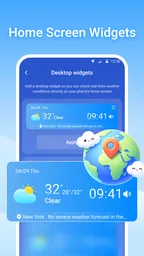
The widget angle may suit people who want weather information visible without opening an app. That can reduce friction if you already glance at your home screen throughout the day. The trade-off is that a widget is useful only if its information stays relevant to your habits and layout. If you prefer a minimal home screen or rarely look at widgets, it may add clutter rather than value.
For trips or plans that depend on conditions beyond your immediate area, a local-first app may not be the whole answer. I’d check the destination as well as home and use a second source when timing or location makes the forecast especially important. A quick local view is convenient for everyday choices, but it should not be confused with a complete planning system for a long drive, a hike, or an event with little room for weather-related changes.
How much upkeep it asks of you
The best maintenance routine for a weather app is usually a light one: keep the location relevant, open it when you have a real decision to make, and occasionally check that it still reflects the place you care about. If you move between home, work, and travel destinations, pay attention to which location the app is showing before acting on the forecast. That small check can prevent a perfectly reasonable forecast for the wrong place from being misleading.
I would avoid turning every forecast into a reason to repeatedly refresh or compare screens. Conditions change, and forecast precision varies with place and timing. A practical approach is to check once when planning, then check again closer to departure if the weather could affect what you carry or whether you go. This keeps the app useful without letting it create unnecessary worry.
The app is rated for Everyone, and the current version is 2.1.1.0. It supports devices running OS 9 or later, so it may be an option for people who do not have the newest phone, provided their device meets that requirement. It was released on Apr 14, 2026, and is free, which makes it easy to try as a low-commitment alternative to a weather app you already use.
Its maintenance burden is also shaped by how much you expect from it. If all you need is a quick local check, you can keep the habit simple. If you want detailed comparisons, long-range planning, or multiple specialized views, you may end up supplementing it with another service. That is not automatically a flaw; the key is being honest about whether one app is serving your needs or whether you are maintaining several tools out of habit.
Where weather-app fatigue can set in
Weather checking can become repetitive. If the app does not help you make a decision, opening it several times a day can feel like a loop rather than a benefit. I would treat that as a cue to narrow the habit: check at meaningful moments, such as before leaving or before an outdoor plan, and skip the checks that do not change what you will do.
Another source of fatigue is expecting a local forecast to answer every question. A neighborhood check may be enough for a short errand, but it is not necessarily enough for a route that crosses different areas or for a plan where conditions need close attention. In those cases, a more detailed forecasting service or a second source may be the better companion. The sensible trade-off is to use this app for convenience, not to rely on it as the sole authority for every weather-sensitive decision.
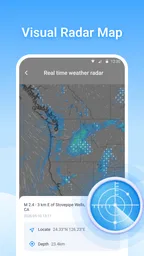
There is also a difference between information that is easy to see and information that is easy to act on. A radar-oriented view can be helpful when you are trying to understand changing conditions, while a simple glance may be better for routine planning. If the presentation feels too busy for your needs, or too limited for the decisions you make, that mismatch is a reason to move on rather than keep trying to make the app fit.
For readers wondering whether it can replace a built-in weather app, my answer is: possibly, if your needs are uncomplicated and its local view becomes part of your routine. If you already get fast, dependable answers from your phone’s default weather tool, switching may bring little lasting benefit. If you often need more specialized forecasts or broader trip planning, a dedicated alternative may suit you better. The right choice depends on the questions you ask most often, not on which app has the most appealing name.
A measured long-term verdict
I’d consider keeping Local Weather - Radar & Widget if it makes everyday checks feel quicker and helps you prepare without encouraging constant monitoring. Its free price and accessible everyday purpose make it easy to test, while its local emphasis is a sensible match for commutes, errands, and routine outdoor plans. The app’s reported average is 4.0, but my recommendation would still depend on how well it serves your own location and habits.
I would skip it if you want a specialist forecasting workspace, need weather information for complex travel, or already have a tool that answers your questions more clearly. I would also reconsider it if checking the forecast becomes an anxious ritual instead of a useful prompt for a simple choice. A weather app should reduce uncertainty enough to help you act, not persuade you that every ordinary plan requires another round of checking.
Overall, this is a reasonable free option for someone looking for a straightforward local weather companion, particularly if a home-screen widget fits naturally into their routine. Its lasting value is not something a first impression can prove; it comes from whether the app remains convenient after the first few days. Give it a week of purposeful use, note whether it changes practical decisions, and keep it only if that benefit continues. For me, that everyday usefulness—not novelty—is the test a weather app has to pass.
What we like
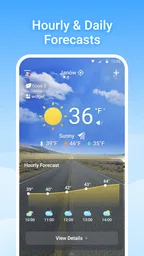
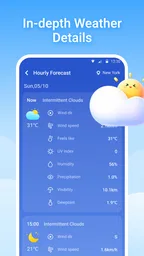
- Hourly forecasts help with planning the day.
- Radar maps make approaching rain easier to track.
- Home screen widgets offer quick access to local conditions.
- Severe weather alerts can provide useful advance warning.
- Multiple saved locations are handy when traveling.
What could be better
- Forecast accuracy can vary by location.
- Some features may require an internet connection.
- Frequent alerts may feel distracting.
- Widgets can use extra battery and data.
- Advertising may interrupt the experience.





