Local Weather: Live Forecast review
 Analysis by Appsdrops
I often check the weather for one small reason: to decide what to wear, when to leave, or whether an outdoor plan needs a backup. The annoying part is that a forecast can turn that simple decision into a tour through several screens, with details that are either too broad or too distracting. Local Weather: Live Forecast is aimed at making the nearby forecast easy to consult. Its value is less about replacing a specialist meteorologist and more about helping me make everyday plans with less fuss.
Less time hunting for a useful forecast
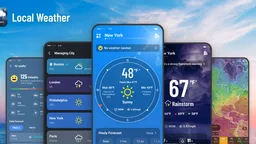
This is a free weather app from WINDWAVE LIMITED, and its focus is straightforward: local conditions rather than a sprawling collection of unrelated tools. I find that focus appealing when I only need a quick answer before heading out. If I want to know whether to bring a coat or postpone a walk, the best weather app is usually the one that gets me to a practical answer without making me interpret a wall of charts.
The app has an average rating of 4.6 from around 62,000 ratings, with about 3.7 thousand written reviews and over 10 million installs. Those figures suggest it has reached a broad audience, though they cannot tell me whether a forecast will be right on my particular street. Weather is inherently local, and the quality of a prediction can vary with the location and conditions. I treat any single forecast as guidance, not a promise.
That distinction matters if you are comparing it with the weather app already on your phone. A built-in app is convenient and may be enough for checking the day at a glance. A separate local-weather app makes sense when you want a dedicated place to check nearby conditions and would rather not sift through a broader news or map experience. I would judge this one by whether its current view answers your regular questions quickly, not by how many numbers it can put on screen.
Getting to a useful first check
On a first run, I would start with the location that matters most: home, work, or the place I am about to visit. A forecast tied to the wrong area can look polished and still lead to a bad decision, especially when conditions change across a city. If you are planning a trip, check the destination rather than assuming your home forecast applies there. That simple habit is more useful than repeatedly refreshing a reading for the wrong place.
It also helps to decide what kind of answer you need before opening the app. For a commute, I care about whether rain is likely around departure time. For a weekend plan, I care more about the general outlook and whether there is a sensible alternative. Keeping that question in mind makes a local forecast easier to use: I can look for information that changes my choice instead of scanning every detail just because it is available.
I would give the forecast a quick reality check when the decision has consequences. Look outside, consider what the sky is doing, and compare the forecast with conditions where you will actually be. That is especially sensible if you are heading beyond your immediate neighborhood. A phone can make checking easy, but it cannot make the atmosphere predictable. For ordinary errands, the app can narrow down a choice; for a long outdoor event, I would keep checking as the day approaches.
Where it earns its place in a routine
Imagine I am leaving for work and have a bag that is already full. Instead of carrying an umbrella every day “just in case,” I can check the local outlook before I leave and decide whether it is worth making room. The useful saving is small but repeated: fewer unnecessary items, less second-guessing at the door, and a clearer plan for the trip home. If the weather looks uncertain, I can choose a route or schedule that gives me more flexibility rather than treating the forecast as a guarantee.
For a walk or a school pickup, timing can matter more than the headline for the day. I use a local forecast to consider whether it is better to go now, wait a little, or bring an extra layer. The key is not to overread the detail. A forecast that looks favorable for one part of the day does not mean every nearby street will feel the same, and a short outdoor plan can be affected by conditions that a general daily summary smooths over.
It can also help when I am deciding whether to make an outdoor plan at all. If friends are meeting in a park, I would check before leaving and again closer to the event if the weather seems unsettled. That second check is a practical trade-off: it costs a few seconds, but it reduces the chance of committing based on a forecast viewed much earlier. For travel, I would check both the place I am leaving and the destination; local conditions are not interchangeable just because the locations are part of one trip.
These are deliberately modest uses. I would not rely on a general weather app alone to make safety-critical decisions or to plan demanding outdoor work. If the consequences of a sudden change are serious, use authoritative local guidance and keep a backup plan. For a routine walk, commute, or quick errand, though, a nearby forecast is often exactly the level of information I need.
Convenience without pretending weather is exact
The main friction this kind of app can remove is the effort of turning “What is the weather?” into a decision. I do not need a long explanation to choose between a light jacket and a heavier one, or to decide whether to move an errand earlier. A focused weather screen can make that check feel like a quick habit rather than a separate research task. I value that most when I am already busy and want the answer without opening several sources.
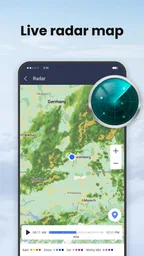
There is a trade-off between simplicity and depth. If you enjoy examining weather maps, comparing multiple models, or following specialist forecasts, a basic local check may feel limited. In that case, a dedicated forecasting service with tools designed for detailed analysis may be a better companion. On the other hand, if elaborate displays make it harder to find the one piece of information you need, a straightforward local app is likely the more comfortable daily choice.
Another useful habit is to avoid treating a forecast as a fixed schedule. Check it when you are making a decision, then revise your plan if the conditions outside disagree. This is particularly important for people who commute on foot or by bicycle, because a small change in rain or wind can matter more to them than it does to someone driving. The app can support that judgment, but the user still has to decide what level of uncertainty is acceptable.
The app is rated for Everyone and is free to install, with in-app purchases ranging from about one dollar to forty dollars per item. That makes the initial decision easy: try the free experience and see whether it fits your routine before considering anything else. I would not pay for an upgrade simply because a weather app offers one; I would first make sure that the everyday forecast is useful for my location and that any paid option solves a specific problem I actually have.
Who should choose it—and who may not need it
I would recommend Local Weather: Live Forecast to someone who wants a dedicated way to check nearby weather without turning a simple decision into a project. It is most appealing if you regularly plan commutes, walks, errands, or casual outdoor time and want a quick reference point. The app is on version 2.0.1, and its low-friction role is easy to understand: open it, check the local picture, and decide what to do next.
You may not need it if your phone’s built-in weather view already answers your questions and you rarely open anything else. I would also look elsewhere if your routine depends on highly specialized forecasting, detailed storm analysis, or tools for professional outdoor planning. In those situations, depth and expert sources matter more than the convenience of a quick local check. It is worth being honest about that before adding another app to a phone already crowded with utilities.
The practical question is whether a separate forecast saves you enough time to justify keeping it. I would try it during an ordinary week, using it for the decisions I already make: what to wear, when to leave, and whether an outdoor plan needs a fallback. If it helps me answer those questions faster without making me overconfident, it has earned its place. If I still reach for another service every time conditions matter, I would keep that service instead.
For me, the strongest case for this weather app is the repeated small convenience: fewer unnecessary checks elsewhere and a clearer starting point for everyday plans. Its limits are the limits of any local forecast viewed on a phone: conditions can differ nearby, and predictions are not guarantees. Used as a helpful guide rather than a promise, it can make routine decisions easier. That is a modest purpose, but it is a genuinely useful one.
What we like
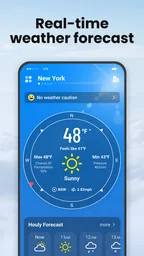
- Provides current conditions for quick weather checks.
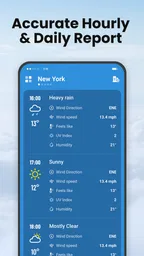
- Hourly forecasts help with short-term planning.
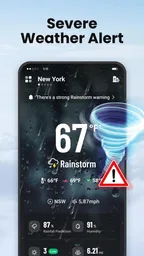
- Weather alerts can flag severe conditions.
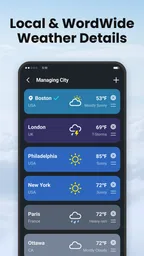
- Location-based forecasts reduce manual searching.
- A clear layout makes key information easy to scan.
What could be better
- Forecast accuracy may vary by location.
- Some features may require an internet connection.
- Frequent notifications can become distracting.
- Location access may raise privacy concerns.
- Advertising may interrupt the experience.





