Live Weather review
 Analysis by Appsdrops
Weather apps are easy to judge when everything works: open one, glance at the conditions, and get on with the day. The more revealing test is what happens when a forecast seems stale, a location looks wrong, or you need to make a quick decision before leaving home. Live Weather is a free weather app from Sri Chaitanya Mahaprabhu, built around checking the day’s conditions and live updates. I’d approach it as a straightforward source for a quick check, rather than assume it replaces a detailed forecasting service.
When a quick check turns into a setup puzzle
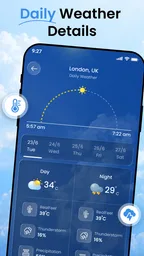
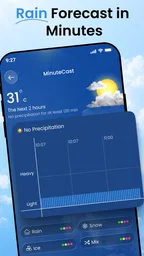
The app’s appeal is also where expectations need to stay realistic. Its short description is simply “Live Weather,” so I would not install it expecting a particular map, radar view, hourly timeline, widget, or severe-weather alert system. Those can be useful in other weather apps, but they should not be treated as confirmed features here. If your main need is a quick look at today’s weather, the basic purpose is clear; if you need to plan a long drive around changing conditions, you may want a second source with the specific tools you rely on.
A common first stumbling block with any weather app is location. If the displayed place is not where you are, first check whether you are looking at a manually selected location or expecting the app to identify your current one. If location access is part of your setup, review the device’s app permissions and confirm that location services are enabled. These are general checks, not evidence of a particular permission flow in this app; they help separate a device setting issue from a forecast issue.
It is also worth checking the simple things before concluding that updates have stopped: make sure the phone is online, reopen the app, and compare what you see after a short wait. A weather screen cannot refresh reliably when connectivity is interrupted. If the app still looks unchanged, restarting the device or checking whether an app update is available can be reasonable next steps. I would avoid repeatedly changing location settings without first noting what the screen currently shows, since that can make it harder to tell which change helped.
Start with the smallest useful checks
For an unfamiliar weather app, I prefer to test it in a low-stakes moment. Open it while you are at home, confirm that the displayed location makes sense, and check whether the conditions look plausible before relying on it for an important plan. This gives you a baseline. If the location is wrong, address that first; if the place is right but the forecast seems surprising, compare it with another trusted forecast rather than treating one screen as decisive.
That distinction matters because location and prediction are different problems. A forecast for the wrong town can look convincing while being irrelevant. A forecast for the right town can still differ from another service because weather estimates are not identical. When you are deciding whether to carry an umbrella, a small discrepancy may not matter much. When timing an outdoor event or making a safety-sensitive travel decision, it is sensible to consult a more detailed or authoritative source as well.
Live Weather is rated for Everyone, and its current version is 1.6. It supports Android 7.0 or later, which makes it an option for people using older Android devices that meet that requirement. On an iPhone, I would not assume availability: the platform details here point to Android compatibility, so check the app store for your device before planning to use it there.
Recover the routine before blaming the forecast
If the app opens but does not seem to refresh, I would work through a simple recovery sequence. First verify the phone’s connection by loading another app. Then close and reopen Live Weather, confirm that the intended location is selected, and give the screen time to update. If nothing changes, restart the phone and check for an available app update. This is a practical troubleshooting routine for a weather app; it does not depend on assuming that Live Weather has a hidden refresh control or a specific background-update feature.
One useful habit is to make the forecast part of a decision rather than a ritual. For example, before leaving for work, check the conditions once and decide whether you need a jacket or rain protection. If the weather is unsettled or the day’s plans are hard to change, make a second check closer to departure. That reduces the temptation to keep reopening the screen without gaining meaningful new information, and it gives you a natural point to verify whether the displayed conditions have changed.
If the app behaves differently after a device change or reinstall, treat that as a fresh setup rather than assuming every setting carried over. Confirm the location again and check the app’s access in the phone settings if needed. For persistent trouble, the next sensible step is to consult the app’s support information through the app store. I would not try to fix a basic display problem by granting unrelated permissions or installing unofficial software.
When the app may not be the cause
A weather reading can feel wrong even when the app is showing a forecast for the correct place. Conditions may differ across nearby neighborhoods, and a forecast is not a guarantee of what will happen at your exact doorstep. If the sky outside and the app disagree, look at the time the screen was last updated if that information is visible, check your connection, and compare with another reliable weather source. For urgent warnings, use official local alerts rather than relying on a general forecast screen alone.
There is another subtle source of confusion: the place name may be familiar while the selected location is not the one you intended. Someone living near a city boundary, travelling between towns, or checking weather for family elsewhere should confirm the location before interpreting the forecast. A quick glance at the place label is often more valuable than staring at a temperature number. If the location is correct and the forecast still differs from another app, that alone does not prove the phone or Live Weather is malfunctioning.
Connectivity can also complicate a check. A weak or unavailable connection may delay fresh information, while a busy day can make it easy to mistake an old screen for a current one. If you are heading out of range or preparing for a trip, check conditions while you still have a dependable connection and use another source if the information is critical. That is a sensible precaution for any internet-dependent weather check, not a claim about a particular offline mode in this app.
What it is good for, and where I would look elsewhere
In everyday use, I can see Live Weather fitting a simple routine: check the day before walking the dog, decide whether to bring an extra layer, or take a quick look before a commute. It is most suitable for people who want a direct weather check without making forecasting a hobby. The practical benefit is having a dedicated place to look, rather than relying on memory or stepping outside at the last minute.
For a more demanding workflow, the usual alternatives may be better. Many people choose a weather service with detailed hourly views, radar, saved places, or customizable alerts because those features help answer specific questions. I would pick one of those when planning a long outdoor activity, tracking a storm, or coordinating several locations. I would not assume Live Weather offers those tools simply because they are common elsewhere in the category.
There is a trade-off between simplicity and depth. A focused app can be easier to approach, but it may not answer every planning question. Before making it your only weather source, spend a few ordinary days checking whether its presentation gives you enough context to make the decisions you actually face. If you routinely need to compare several locations or time a departure around rain, keep a more detailed alternative available. If you mostly want a quick daily check, a lighter workflow may be all you need.
The app has an average rating of 4.6 from 149 ratings, with 100K+ installs. Those figures suggest that people have tried it and that its overall reception is positive, but they do not tell me whether its particular screen, update behavior, or location handling will suit your routine. I treat ratings as a reason to consider an app, not a substitute for checking the basics on my own device.
Who should give it a try
I would consider Live Weather if you use Android 7.0 or later, want a free weather app, and mainly need a quick look at today’s conditions. The developer is Sri Chaitanya Mahaprabhu, and the app’s Everyone age rating makes it suitable for a general audience. Those details help establish what kind of app it is, but the deciding question is still practical: does its view give you enough information for your everyday choices?
I would be more cautious if you need dependable, detailed planning tools for outdoor work, travel, or severe weather. In those situations, compare the app with a source that clearly provides the alerts and forecast detail you depend on, and keep official local warnings in mind. It is also not the right choice for someone specifically seeking an iOS download unless the app is listed for their device in the relevant app store.
My verdict is that Live Weather makes the most sense as a simple daily check, not as a one-stop forecasting command center. Its free price and broad Android compatibility lower the barrier to trying it, while a careful first check of location and connectivity can prevent the most common misunderstandings. Use it for the quick decisions it can reasonably support, and reach for a more detailed or official source when the stakes are higher.
What we like
- The interface makes current conditions easy to check at a glance.
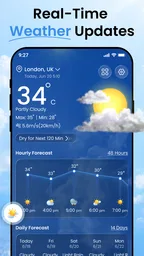
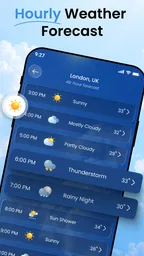
- Hourly forecasts help with planning outings throughout the day.
- Weather alerts can provide useful notice of changing conditions.
- Location support makes it convenient to check forecasts for different places.
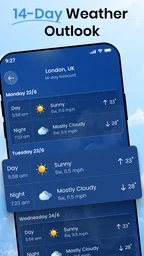
- The app offers a quick way to view upcoming weather trends.
What could be better
- Forecast accuracy can vary by location and weather conditions.
- Some features may require an internet connection to show current data.
- Frequent alerts may become distracting if settings are not adjusted.
- Background location access may affect battery life.
- The app may include advertising or optional paid features.





