Live Weather Radar Launcher review
 Analysis by Appsdrops
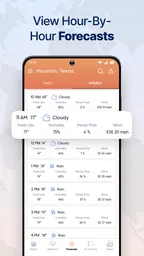
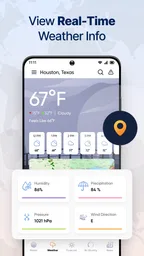
I know the small weather decision that can become surprisingly annoying: should I leave now, take a jacket, or wait out that patch of rain? A basic forecast can answer what the day may look like, but not always what is happening nearby. Live Weather Radar Launcher is aimed at that gap. It brings radar-focused weather information together with forecasts for rain, wind, air quality, storms, and hurricanes, so I can check more than a daily high and low before making plans.
What I like about that focus is practical rather than flashy. If I am about to walk, cycle, or drive, a view of changing conditions can be more useful than reading a long forecast. The app is free to download, though it offers in-app purchases, and it is developed by AtomApplications. Its 4.2 average from around 16,000 ratings suggests many people find it useful, but I would still judge it by whether its radar-oriented approach fits the way I make weather decisions.
When a quick weather check takes too long
Weather apps often make users choose between a simple glance and a deeper forecast. A compact daily summary is quick, but it can leave me wondering whether rain is actually approaching my area. A detailed forecast may offer more context, yet getting to the information I need can take extra taps. This app’s central appeal is that it treats radar as a starting point rather than an afterthought.
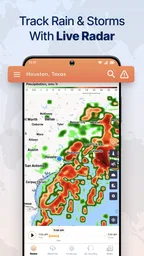
That can save time when the question is immediate: is the weather changing around me, and should I adjust what I am doing? A radar view gives a different kind of context from a single rain icon. I can use it to inform a decision, then consider the broader forecasts for wind or air quality when those matter to the plan. It is not a substitute for judgment, but it can make the first check more useful.
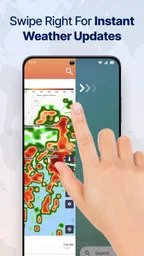
The launcher framing is worth considering. This is not simply a broad lifestyle weather app with radar tucked away among unrelated extras. Its identity is closely tied to live weather radar and related conditions. That makes it appealing if I regularly check the sky before heading out; it is less compelling if I only want a minimal forecast and rarely look beyond tomorrow’s temperature.
A first setup that stays useful
On first use, I would focus on making the app convenient to check rather than trying to inspect every weather layer at once. Start with the location or area that matters most to your routine, then explore the radar and forecast information that answers your usual questions. If you mostly commute, that may mean checking rain and wind. If you spend time outdoors, air quality and storm conditions may deserve more attention.
A useful habit is to compare the radar picture with the written forecast instead of treating either one as a complete answer. Radar helps me think about nearby conditions and movement; a forecast helps me plan beyond the immediate moment. For a walk later in the day, I would check both before deciding whether to leave early or bring a layer. That small workflow is more dependable than reading a single symbol and assuming it tells the whole story.
I also recommend keeping the app’s purpose narrow in your mind. It is a weather tool, not a guarantee that conditions will unfold exactly as shown. Weather changes, and a live-looking display can feel more certain than it really is. When a decision has real consequences—such as travel during severe weather—I would use the app as one source of awareness and follow relevant local guidance rather than relying on a phone screen alone.
Everyday situations where radar earns its place
Imagine I am getting ready to leave for an appointment and the sky looks unsettled. Instead of canceling immediately because a general forecast mentions rain, I can check the radar-oriented information and decide whether to leave now, carry an umbrella, or allow extra time. That is a modest decision, but it is exactly the kind of repeated moment where a focused weather app can earn a place on my phone.
For an outdoor workout, the useful question may not be simply whether rain is forecast today. I may want to understand whether conditions look workable near the time I plan to go, while also checking wind or air quality. The app’s combination of weather concerns gives me a reason to look beyond rain alone. My practical tip is to make the check shortly before leaving, not hours earlier, and to revisit it if the plan is flexible.
It can also help when coordinating a household errand. If someone is about to walk to a shop or pick up a child, a quick look at changing weather can support a more sensible choice about timing or clothing. In that situation, the value is not in studying charts; it is in reducing uncertainty enough to act. If the display becomes hard to interpret, I would step back and use the simplest relevant forecast information rather than overanalyzing the map.
What it streamlines—and what still takes judgment
The strongest workflow is to use the radar view as a prompt for a decision, not as an end in itself. Check the local picture, identify the condition that matters, and then decide what to do. That is more efficient than opening several unrelated sections or switching between multiple weather apps just to answer a basic question. The broader coverage of wind, air quality, storms, and hurricanes can also make it less necessary to start a separate search whenever the concern changes.
Still, more kinds of weather information do not automatically make an app easier. A newcomer may need a moment to learn which view is useful for which question. Radar is especially relevant to near-term awareness, while air quality or wind may call for a different kind of planning. I would avoid checking every category by habit; choosing one or two that match today’s activity keeps the experience quick and prevents the app from becoming another stream of details to monitor.
There is also a difference between a radar-focused tool and a conventional forecast app. Many familiar weather apps prioritize a clean daily outlook, hourly conditions, or a simple glance at the temperature. Those may be better for someone who wants the least possible interaction. Live Weather Radar Launcher makes more sense when visual awareness of weather and several condition types are part of the user’s routine. I would keep a simpler alternative if all I need is a fast answer about whether to wear a coat.
Who should choose it, and who may prefer something else
I would recommend trying it if you often make plans around changing weather and want radar to be easy to reach. Walkers, commuters, people arranging outdoor errands, and anyone who likes to check more than a daily forecast are the clearest fit. Its focus can reduce the friction of opening a general-purpose app and hunting for the map, especially when the decision is time-sensitive but ordinary.
I would be more cautious if you want a weather app that stays almost invisible. Someone who checks the forecast once in the morning and never revisits it may get more value from a very simple daily summary. Likewise, if you need highly specialized professional meteorological analysis, a consumer radar launcher should not be assumed to meet that need. The right choice depends on whether accessible, everyday situational awareness is enough for you.
The app is free to install, with optional in-app purchases priced from $1.99 to $9.99 per item. I would begin with the free experience and decide whether the way it supports my routine justifies paying for anything offered inside it. That is a sensible approach for a weather utility: use it during the kinds of days when radar matters, rather than buying on the assumption that extra spending will automatically make forecasts more dependable.
A grounded verdict for a radar-first weather app
Live Weather Radar Launcher is a focused choice for people who want to check more than a generic daily outlook. It brings attention to radar alongside rain, wind, air quality, storms, and hurricanes, and that combination can make a quick weather check more relevant to real plans. I value it most when it helps me make a small decision sooner: leave now, shift an outdoor activity, or prepare for conditions before they become a nuisance.
It has a 4.2 average rating, and more than a million installs, which indicates that it has found a broad audience. It is rated for Everyone, was released on November 2, 2023, and its current version is 3.19.2, with Android 10 as the minimum operating system. Those details make it straightforward to assess compatibility, but the everyday fit matters more: I would choose it for radar-led checks, not merely because it is another weather app.
My overall recommendation is conditional but positive. If weather affects when you leave home or what you do outdoors, try building a quick routine around the radar and the specific forecast layer relevant to the day. If you prefer a bare-bones temperature and rain summary, a conventional forecast app may feel calmer and faster. The best reason to keep this one is simple: it can turn a vague weather worry into a more informed, practical choice without making every forecast check a major task.
AtomApplications has made a tool with a clear purpose, and I think that clarity is its main strength. I would not treat any live display as a promise, nor would I expect radar alone to answer every planning question. But for everyday users who want a closer look at changing conditions before stepping out, it offers a useful middle ground between a quick forecast glance and a much more involved weather check.
What we like
- Live radar maps make approaching storms easier to track.
- Launcher shortcuts provide quick access to weather information.
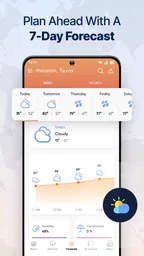
- Forecast details can help with everyday outdoor planning.
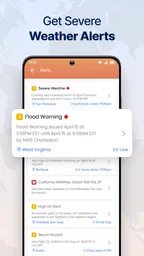
- Weather alerts may help users prepare for changing conditions.
- The combined interface keeps weather tools within easy reach.
What could be better
- Radar updates may be delayed in some locations.
- Forecast accuracy can vary by region and weather conditions.
- Location access is needed for relevant local forecasts.
- Frequent alerts may feel distracting to some users.
- Weather features may use mobile data and battery power.





