Live Weather: Forecast & Radar review
 Analysis by Appsdrops
I judge a weather app less by how much information it promises than by whether it helps me make a simple decision: take a coat, change my route, or leave a little earlier. Live Weather: Forecast & Radar is a free weather app from Chavazoem Potenutme, aimed at people who want forecasts close at hand as they plan the day. Its audience is broad, but the useful question is whether its experience fits your routine—and what to check when the forecast seems unhelpful.
Getting past the first-use friction
Weather apps depend on a few basics working together: a useful location, a working connection, and a forecast that is easy to interpret. If the information looks wrong at first, I would check those basics before treating it as a forecasting failure. A place selected manually can be more useful than relying on a location that is outdated or imprecise, especially when you are planning for somewhere other than home.
The practical distinction is between “weather where I am” and “weather where I am going.” If you are checking before a commute, trip, or outdoor appointment, make sure the forecast is for the destination rather than the place you happened to open the app. That small habit prevents a common mistake: seeing a plausible local forecast and assuming it applies to the rest of the day’s route.
The app is listed for devices running Android 9 or later, and its current version is 1.6.0.0. If it will not install or behaves oddly after an update, I would first check that the device meets the minimum operating-system requirement, then reopen the app and check the connection. These are ordinary first checks, not guarantees; if the problem persists, restarting the device or reinstalling may help, though reinstalling can mean setting up preferences again.
Make the forecast answer a real question
I get the most from a weather app when I open it with a decision in mind. “Will I need a layer for the walk?” is more actionable than browsing conditions without a plan. For a day with several commitments, I would check the relevant place before leaving, then check again if the schedule changes or the weather looks noticeably different outside.
A useful routine is to compare the forecast with the time you will actually be outdoors. A morning glance may not answer whether an afternoon errand needs different clothing. Likewise, a general forecast should not be treated as a precise promise for every street or moment. Weather can change, and the value of a forecast is in helping you prepare—not in removing uncertainty.
On a weekday, for example, I might check the destination before walking to a bus stop, then revisit the forecast before an outdoor lunch. If the app appears to show the same conditions for a different place, I would verify the selected location rather than assume the forecast has followed me. That simple check is especially useful when switching between home, work, and a nearby town.
Building a dependable checking habit
For routine planning, I would keep the app focused on a small set of questions: what conditions are expected where I will be, when I need to be there, and whether I should adjust my plans. This is more reliable than repeatedly refreshing a screen in search of certainty. If a decision is important, checking again closer to the time is sensible, but constant checking can create noise without making the forecast more dependable.
When information does not appear to update, work through the problem in a calm order. Confirm the selected place, check that the phone has a connection, close and reopen the app, and then give it another look. If the issue is limited to one location, selecting that place again can help distinguish a location-selection problem from a broader app problem. If nothing changes, checking again later is often more useful than making a major plan based on a screen that may be stale.
This is not a claim that the app has a particular refresh control or a specific alert system. It is a practical recovery workflow for weather apps generally, and it avoids relying on controls or options that may not match your device. The key is to identify what is actually failing—location, connectivity, or the forecast itself—before deciding that the entire app is unusable.
When the phone or conditions are the issue
A forecast can seem inaccurate even when the app is working normally. Conditions may vary across a short distance, and a forecast is not a live description of every corner of a neighborhood. If the sky outside differs from what you expected, treat what you can see as relevant evidence and use the forecast as context for the next few hours, not as an instruction to ignore current conditions.
Connectivity can also affect what appears on screen. If the forecast does not change while you are away from a reliable connection, I would avoid drawing conclusions until the phone is online again. Similarly, location settings or a manually chosen place can make a forecast feel “wrong” when it is simply for somewhere else. Checking the place name and comparing it with your actual destination is a quick way to catch that mismatch.
For safety-sensitive plans, such as a long drive or an outdoor activity where changing weather matters, I would not rely on one casual glance at any general-purpose weather app. Check the forecast again before setting out, use official local guidance where appropriate, and be ready to change plans if conditions shift. The app can support everyday decisions, but it cannot replace judgement on the ground.
How it fits among weather alternatives
Live Weather sits in a crowded category where many people already have a built-in weather app or a familiar service they consult out of habit. The built-in option may be enough if all you need is a quick glance without installing anything else. A dedicated app is more appealing if you prefer to keep weather separate from the phone’s default tools or want another place to check before making plans.
Its store summary points to planning daily life with forecasts, and that is the sensible way to evaluate it: does it help you make ordinary choices without adding friction? I would not choose an app solely because its name suggests live information. What matters in practice is whether the place and timing you need are clear, and whether the information is available when you check. If you need a specialized tool for severe-weather monitoring, detailed meteorological analysis, or highly specific activity planning, compare those needs directly rather than assuming this app covers them.
There is also a cost detail worth considering before installing. The app is free to download, but it includes in-app purchases listed from $2.99 to $49.99 per item. I would start with the free experience and only consider spending if a paid option clearly addresses a need you have. Those prices do not, by themselves, tell you what each purchase includes, so it is sensible to review the purchase details in the app before confirming anything.
Who should try it, and who should look elsewhere
The broad age rating is Everyone, which makes the app suitable for a general audience. It has a 3.7 average from 763 ratings, with 35 written reviews, and has passed 500K installs. I take those figures as context rather than proof that it will work perfectly for every phone or every kind of forecast need: ratings can reflect different expectations, locations, and devices.
I would suggest trying it if you want a straightforward way to check weather while organizing errands, a commute, or casual outdoor plans. It may also suit someone who wants to compare a destination forecast with what is happening at home before leaving. The strongest practical benefit is the habit it can support: checking the right place at the right time, then making a realistic adjustment instead of hoping the weather will cooperate.
I would skip it if you already have a weather app that reliably answers those questions and you do not want another app to maintain. I would also look for a more specialized alternative if your plans depend on detailed weather interpretation or dependable decision-making in hazardous conditions. A general daily forecast is not a substitute for expert tools or official warnings.
My practical verdict
My recommendation is to try Live Weather as a daily planning aid, not as a source of certainty. Its appeal is the ordinary job it sets out to do: help you think ahead about the weather. The best way to get value from it is to confirm the location, check close to the time your plans matter, and treat unexpected conditions as a reason to reassess rather than blindly trust a screen.
The developer is Chavazoem Potenutme, and the app’s 1.6.0.0 version is the one to look for when checking compatibility or troubleshooting. If the app feels unreliable, start with the selected place and your connection before blaming the forecast. If those checks do not resolve the problem, or if your needs go beyond everyday planning, another weather service may be a better fit. For casual decisions, though, it is a reasonable free option to test—provided you keep expectations grounded and review any in-app purchase before paying.
What we like
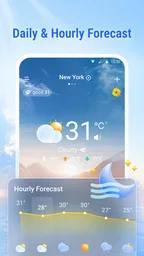
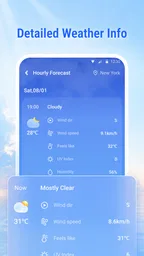
- Provides hourly forecasts for planning the day.
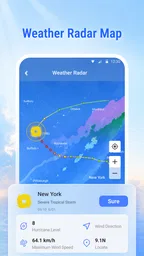
- Radar maps help track approaching rain.
- Weather alerts can warn about severe conditions.
- A clean layout makes key details easy to scan.
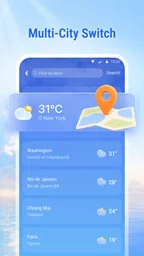
- Multiple locations help users check weather elsewhere.
What could be better
- Forecast accuracy can vary by location and conditions.
- Some features may require an internet connection.
- Frequent alerts can become distracting.
- Radar coverage may be limited in some regions.
- Some features may require a paid subscription.





