

Lingtutor: AI English review
 Analysis by Appsdrops
I judge an English-learning app not just by what it teaches, but by whether it fits into the scattered moments when I might actually use it. Lingtutor: AI English has a useful combination at its heart: speaking with an AI, reading short stories, and working on vocabulary. That mix gives me a reason to open it for more than one kind of practice, though the experience is naturally shaped by having a reliable connection available.
Where a connection changes the lesson
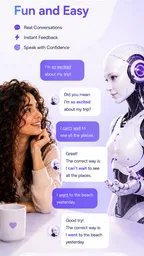
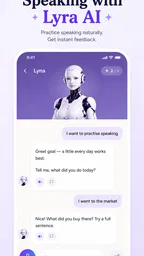
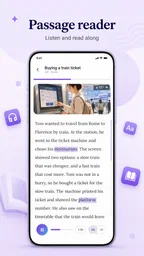
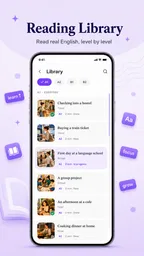
The app’s central appeal is the chance to use English actively rather than only review it. A conversation with an AI can give a learner a low-pressure place to try forming sentences, while short stories offer a quieter way to encounter vocabulary in context. I like that these activities point toward different skills: speaking asks me to produce language, and reading lets me notice words and phrases as part of a passage.
That variety matters most when I have a specific learning goal. If I am preparing to order food while travelling, for example, I could use a conversation session to practise making a request, then read a story to meet vocabulary in a different context. The useful habit is to carry a phrase from one activity into the next, rather than treating each session as a separate task. I would keep a short note of expressions I want to reuse and bring them into a later speaking attempt.
Because AI conversation is a core part of the idea, connectivity is not a minor convenience: it can affect whether the most interactive practice is available when I want it. I would plan to use that part when I have a stable internet connection, especially if I am relying on the session for focused speaking time. A train ride through patchy coverage may be a poor setting for a conversation that needs a back-and-forth rhythm.
Reading short stories may feel less demanding than speaking, but I would not assume that every part of the app works without a network. If I expect to study somewhere with no reliable signal, I would check what is accessible before leaving rather than count on being able to open a lesson offline. That small check can prevent a planned study break from turning into time spent troubleshooting.
Choosing the right activity for the moment
I would treat the three-part concept as a flexible routine, not a promise that every session will be equally effective. Speaking is best when I can concentrate and respond aloud; reading can fit a quieter pause; vocabulary work makes sense when I have enough attention to recall and reuse new words. The advantage is choice. The trade-off is that learners who want a single, fully structured course may need more direction than this activity-based approach provides.
For a beginner who freezes when asked to speak, an AI partner may feel less intimidating than a live conversation. Still, a simulated exchange is not a substitute for hearing different human voices, dealing with interruptions, or learning the social cues of real conversation. I would use it to build confidence and practise wording, then seek out human conversation when the goal is natural interaction.
Making it work in ordinary mobile moments
The app is most convincing to me as a way to use short pockets of time with a clear purpose. A learner could read a brief story during a lunch break, choose a few unfamiliar words, and return to speaking practice later at home. That split is more realistic than expecting a full study session every day. It also avoids trying to speak in a place where talking aloud would be awkward, such as a quiet waiting room.
At home, I would use the speaking activity when I can answer without rushing or worrying about disturbing anyone. If I only have a few minutes before bed, reading is likely the better fit; if I have a longer, quieter stretch, I can focus on constructing spoken replies. This is a practical distinction, because language practice loses value when I am distracted or hurrying through responses just to finish.
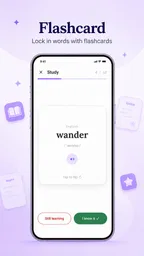
There is also a useful way to handle vocabulary without turning the app into a passive word collector. After reading, I would pick a small number of terms that seem reusable, make a sentence with each in my own words, and try one or two in a later conversation. The point is not to memorize every unfamiliar word in a story. It is to notice which words are likely to help me express something I actually want to say.
For a learner studying on mobile data, I would be deliberate about when to start interactive sessions and avoid opening them casually in a weak-signal area. The app’s main draw depends on activities that can involve network access, so it is sensible to begin when the connection is steady and the phone has enough battery for a focused session. I would also avoid assuming that a story or lesson is already stored on the device unless I have checked it myself.
When a session stalls, and how I would recover
Network interruptions can break concentration at exactly the wrong moment: while I am trying to answer, or just as I settle into reading. If a session stops responding, I would first check whether the connection has returned, then reopen or retry the activity rather than repeatedly tapping through the screen. That is a simple recovery habit, but it helps separate a temporary signal problem from confusion about how the app works.
I would also give myself a fallback plan that does not depend on the app continuing uninterrupted. Keep a note of the topic I was practising, or write down the sentence I was trying to say, then resume when the connection is steady. This preserves the learning goal even if the interaction itself is interrupted. It is especially useful for speaking practice, where losing the thread can make a learner feel they have wasted the whole attempt.
Not every interruption will be caused by connectivity, and I would not treat a single stalled session as proof that the app is unreliable. But a learner who regularly studies in basements, on underground commutes, or in places with unstable service should be realistic: a network-dependent activity can be frustrating there. For that routine, a book, downloaded audio from another source, or an offline-capable study tool may be a better companion.
Data, cost, and choosing the right fit
The app is free to install, while in-app purchases are listed from $12.99 to $36.99 per item. I would explore the free experience first and only consider paying once I knew which activities I would return to. That is a better test than deciding based on the promise of AI conversation alone, especially for someone who is not yet sure whether they prefer speaking practice or reading-led study.
Lingtutor is an education app from MTD TECHNOLOGY COMPANY LIMITED. It has a 4.2 average from 132 ratings and has passed 100K+ installs, which suggests that it has found an audience without making popularity a substitute for checking whether its learning style suits me. It is rated for Everyone, and its current version is 0.3.5, with Android 7.0 as the minimum operating system. Those details make it easier to judge basic compatibility, but the practical question remains whether I have the connection and quiet time its interactive approach asks for.
For data-conscious learners, the safest approach is to use a Wi-Fi connection for activities that may involve ongoing interaction, and to check mobile-data use through the phone’s own settings if conserving a monthly allowance matters. I would not assume that reading is always lighter on data or that an activity is cached for later. The useful principle is simple: start the session when you know the connection is suitable, and keep a non-app alternative ready for commutes or signal dead zones.
Who will enjoy this approach, and who may not
I can see this fitting learners who want a gentle way to practise speaking without immediately joining a class, and people who enjoy combining reading with active language use. It may also suit someone who tends to abandon study apps when they feel too much like drills: a story offers a change of pace, and a conversation gives a reason to use new language rather than merely recognize it.
I would look elsewhere if I needed a tightly sequenced course with a clearly defined progression, frequent live correction from a teacher, or dependable study in places without internet access. It may also be a poor match for learners who want to practise pronunciation with human feedback or need detailed grammar explanations as their main focus. Those are different needs from the mix of AI conversation, stories, and vocabulary that gives this app its identity.
My practical recommendation is to try a short routine before committing to a purchase: read a story when you have a quiet moment, identify a few useful words, and later use them in a speaking session over a stable connection. If that sequence feels natural, the app has a meaningful role in your study week. If you find yourself wanting a more formal syllabus or a human conversation partner, it can still be a supplement, but it should not be your only learning tool.
Overall, Lingtutor: AI English makes the most sense as a flexible practice companion rather than a complete replacement for a teacher, course, or real-world conversation. Its blend of reading and AI-led speaking gives me a useful way to turn spare time into focused English practice, while its dependence on a good connection is an important part of the decision. I would recommend it to learners who can study online and want low-pressure ways to use the language; for anyone who regularly loses signal or needs a strongly guided curriculum, another option will likely be more dependable.
What we like
- AI conversations offer practical English speaking practice.
- Instant feedback can help learners spot mistakes quickly.
- Lessons can be used for short study sessions.
- Practice adapts to different proficiency levels.
- The chat format can feel less intimidating than speaking with a person.
What could be better
- AI feedback may miss context or nuance.
- Some features may require a paid subscription.
- A stable internet connection may be needed for conversations.
- Practice lacks the spontaneity of real human interaction.
- Speech recognition can struggle with accents or background noise.





