
Lilly Health™ review
 Analysis by Appsdrops
I see Lilly Health™ as a health companion worth considering if you want practical support and tracking in one place, rather than another general-purpose wellness dashboard. Its appeal depends on how well its tools fit your own care routine: a focused medical app can make everyday follow-through easier, but it is not a replacement for clinical advice or a complete record of everything happening with your health.
Where a connected health routine helps
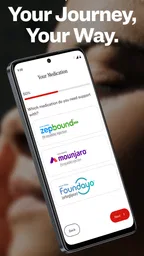
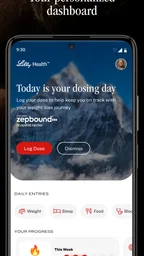
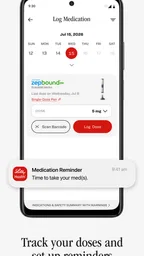
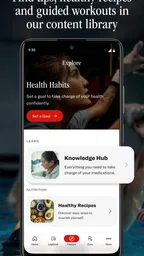
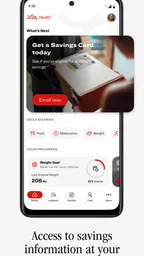
The app is published by Eli Lilly and Company and sits in the medical category. Its purpose is to give people access to tools, tracking, and support, so the most useful way to approach it is as a companion for organizing health-related tasks, not as a diagnostic service. I would use it to make routine information easier to revisit and to support conversations with a healthcare professional.
Connectivity matters most when you are trying to open a tool or update a record at the moment you need it. If you are at home and have a stable connection, that may feel unremarkable. The difference becomes more noticeable when you are away from your usual setup, moving between appointments, or relying on a phone connection that is inconsistent. I would make a habit of checking the app before an appointment rather than waiting until I am sitting in the waiting room to find the information I want.
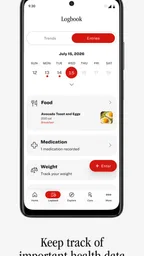
That small change is useful for a less obvious reason: it separates preparation from recall. Instead of trying to remember a detail while talking to a clinician, you can take a moment beforehand to review whatever you have tracked and decide what is relevant. A record only helps if it is clear enough to use, so I would keep entries focused on details that could affect a care discussion rather than treating the app as a diary for every passing thought.
There is also a practical trade-off in choosing a medical app from a pharmaceutical company. Lilly’s involvement may make the app especially relevant to people seeking support connected with Lilly’s health resources, but it does not automatically make it the best single organizer for every person’s care. If you manage several conditions or see clinicians across different health systems, you may still need another method for keeping broader records together.
Using it in the middle of an ordinary day
A realistic use case is a busy day when an appointment, work, and household responsibilities are competing for attention. I might check the app in the morning, make a note of a health question while it is fresh, and return to that note before speaking with a clinician. The value is not that the phone makes care decisions for me; it is that I have a more deliberate prompt for the conversation instead of relying entirely on memory.
On the move, I would avoid assuming that every screen or tool will be equally convenient in every setting. A crowded bus, a low battery, or poor reception can turn a quick check into a hassle. If I know I will need something for an appointment, I would prepare in advance and keep any essential information available through a dependable alternative as well. That is sensible for any health app, especially one whose usefulness may involve connected access.
For people who prefer to keep health management on a phone, this approach can reduce the friction of remembering what to raise next. For someone who rarely uses apps or prefers paper notes, the extra step of opening and maintaining a digital record may feel like work rather than support. I would not switch systems just because a dedicated app exists; I would use it only if its tools genuinely fit the routine I already have.
What to do when access is interrupted
With any connected health tool, a failed load or delayed update can happen at exactly the wrong time. I would treat the app as a helpful layer, not the sole place where urgent or essential information lives. Before relying on it for an important appointment, open it while you have time, confirm that the relevant material is accessible, and make a backup note for anything you cannot afford to forget.
If something does not appear as expected, I would first check the basics: whether the phone has a working connection, whether the app is current, and whether reopening it resolves the issue. The current version is 3.2.1, and keeping an app updated is a reasonable first step when troubleshooting, though an update cannot guarantee that a particular access problem will disappear. If an issue persists, use the support route available through the app or its official channels rather than repeatedly entering the same information.
A useful recovery habit is to distinguish between information that is convenient and information that is time-sensitive. A reminder or routine tracking entry can often wait until the app is working again; a question needed for a medical discussion should be written somewhere reliable in the meantime. This is not a criticism unique to Lilly Health. It is a good boundary for any phone-based care companion, because connectivity and battery life are outside the user’s control.
I would also avoid making assumptions about what a clinician can see. An entry in a personal app should not be treated as automatically shared with a doctor or added to a medical record. If you want a healthcare professional to consider something, bring it up directly and show or describe the information in the way they ask. That prevents a common misunderstanding: tracking for your own use is valuable, but it is not the same as communicating with a care team.
Keeping health information purposeful
Health information deserves a little more care than an ordinary shopping list. Before entering details, I would think about whether the information will help me notice a pattern, prepare a question, or follow a routine. If it serves none of those purposes, there may be little reason to add it. A smaller, consistent record is often easier to review than a sprawling log that becomes difficult to interpret.
I would also check the app’s privacy information and settings for myself before making it a regular part of care. That is especially sensible if I use a shared phone, leave my device unlocked around other people, or prefer to keep medical details separate from general apps. I would not assume that a familiar company name answers every question about how information is handled; reading the app’s own explanations is the more responsible approach.
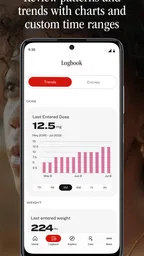
One non-obvious advantage of being selective is that it can make a clinician conversation more useful. Instead of scrolling through a long series of entries, you can identify the few observations that matter and explain why they stood out. The app can support that preparation, but the interpretation still belongs in a conversation with a qualified professional. I would never use a trend or a missed entry as a reason to change treatment without appropriate medical guidance.
Who is likely to get the most from it
I would recommend giving it a look if you want a medical-focused app from Eli Lilly and Company and are comfortable using a phone as part of your care routine. It is free, rated for Everyone, and has reached over 100,000 installs. Its average rating is 4.7 from around 1,200 ratings, with 279 written reviews, which suggests a meaningful user base but should not be mistaken for proof that it suits every health situation.
The app was released on April 30, 2025, and it requires Android 10 or later. That makes the operating-system requirement an important practical check before installing; a compatible phone is a prerequisite, not a minor detail. If your device is older than that, or if you do not want to manage health information on a smartphone, a paper notebook or another option that works with your existing setup may be a better fit.
Compared with a general notes app, a medical app is more purpose-built around health support and tracking. Compared with a broad health-record organizer, this one may be less suitable as the only place to assemble information from many clinicians or unrelated conditions. I would choose based on the job I need done: use a focused companion for a relevant routine, and prefer a broader record system or clinician-provided tool when coordination across multiple sources is the priority.
My connectivity verdict
My view is that Lilly Health™ makes the most sense when you treat it as a convenient, connected aid for staying organized, not as an always-available medical authority. The strongest workflow is simple: check it before you need it, keep entries selective, and have a fallback for information that matters in the moment. Those habits make the app more useful without asking it to do more than a phone-based health companion should.
I would skip it if you want a complete medical record for every provider, expect an app to communicate with your clinician automatically, or need dependable access in places where your phone may not connect. For someone who wants a focused health tool and is willing to plan around mobile connectivity, it is a reasonable option to try. The key question is not whether an app can replace your existing care routine, but whether its particular tools make that routine easier to manage.
What we like
- Offers personalized health guidance based on user-provided information.
- Lets users track health goals and progress over time.
- Provides educational content in an easy-to-follow format.
- Can help users prepare questions for healthcare appointments.
- Designed to make everyday health information more accessible.
What could be better
- Some features may require a paid subscription.
- Personalized suggestions depend on the accuracy of entered information.
- Health guidance is not a substitute for professional medical advice.
- Available features may vary by location or account eligibility.
- Sharing sensitive health data may raise privacy concerns.





