

Libre by Abbott review
 Analysis by Appsdrops
When an app is tied to diabetes care, trust matters as much as convenience. I would judge Libre by whether it fits the way someone already manages their health, what choices they can actually make in the app, and whether they are comfortable relying on a phone for this part of their routine. It is a free medical app from Abbott Diabetes Care Inc., and its purpose is closely linked to the Libre name. That makes it worth considering for people already using Abbott’s diabetes-care products, but not a general replacement for a clinician’s advice or a complete diabetes plan.
Where Libre fits in diabetes care
I see Libre as a companion to a particular care setup rather than a standalone diabetes-management solution for everyone. That distinction matters: an app can be useful when it belongs in your existing routine, but less useful if you are looking for a broad tool to organize every part of your health or to work with equipment from different manufacturers.
The app’s medical focus is clear, and the developer is Abbott Diabetes Care Inc. Its audience is not limited by an age restriction in the store, but that does not mean every person should manage the app alone. A parent, caregiver, or clinician may still need to be part of the practical decision-making, depending on the user’s age and care needs. I would treat the app as one part of a diabetes-care arrangement, not as a substitute for professional guidance.
There is a sizeable audience around it: Libre has more than half a million installs, an average rating of 4.3 from roughly 49,000 ratings, and about 8,900 written reviews. Those figures suggest that many people have tried it, but they do not tell me whether it will suit a particular phone, care routine, or Libre setup. I’d give more weight to whether it works with the products and instructions relevant to you than to the crowd’s overall score.
The app is free, which removes a purchase decision from the first step. Still, “free” is only one part of the commitment. Health apps can become part of a daily habit, so I’d also consider how comfortable I am using a phone for care-related tasks and what information I am willing to manage through an app. For a person who already relies on Libre, that may be a natural extension of an existing routine. For someone who is simply browsing for a diabetes app, compatibility and the intended role of this one should come first.
Trust is a practical question, not a slogan
With a medical app, I do not take a familiar product name as proof that every privacy or reliability concern is settled. I look for concrete choices I can inspect: what the app asks me to allow, what account options it presents, and whether I can understand how to manage the information I enter or access. Those are the details that affect day-to-day confidence, not a polished description.
I would check the app’s current permission prompts and privacy information in the app store and on the device before relying on it. Permissions can vary with phone settings and operating-system versions, so I would not assume that another user’s experience tells me exactly what I will see. If a prompt appears, I’d pause and ask whether it makes sense for the task I am trying to perform. That is a sensible habit for any health app, especially one connected to personal care.
It is also useful to distinguish app access from the broader care relationship. A phone may be shared, replaced, or set up with family controls; an account may be used in a household where more than one person helps with care. Before making the app part of a shared routine, I would decide who should have access to the device and account, and make sure everyone involved understands the arrangement. That small conversation can prevent confusion later, without assuming the app offers a particular sharing feature.
Small checks that prevent bigger confusion
My first practical step would be to confirm that the phone meets the app’s requirements and that the app is the right one for the Libre product in use. The current release is version 1.4.2, and it requires iOS or Android 11 or later. Those requirements are especially worth checking on an older phone or a device that has not been updated recently. A health routine should not depend on an installation that the device cannot support properly.
Next, I’d read the instructions that came with the relevant Libre product rather than assuming that the app alone explains the whole system. This is an important distinction: an app can be one interface in a broader product setup, while device-specific instructions explain how that setup is intended to be used. If something about the readings, alerts, or a care decision is unclear, I would follow the manufacturer’s guidance and ask a healthcare professional rather than improvising based on an app screen.
A further useful habit is to plan for ordinary phone disruptions. Batteries run down, phones get replaced, and settings can change after an operating-system update. Before depending on any mobile health tool in a time-sensitive routine, I would know what I am supposed to do if the phone is unavailable. That backup plan should come from the product instructions and the person’s care team, not from guesswork about what the app might do offline.
Data-sensitive moments in an everyday routine
The most sensitive moment is often not installation; it is the point when a person begins using an app as part of decisions about health. I would avoid treating a convenient display as an automatic instruction. A reading or notification, if available in the relevant setup, needs to be interpreted within the product guidance and the person’s care plan. The app should support that process, not take the place of judgment or medical advice.
Imagine checking in during a busy morning before leaving home. If the app is part of your Libre routine, it may be tempting to glance at the phone and move on. I would instead build in a brief pause: confirm I am looking at the right person’s information, make sure the phone is behaving as expected, and follow the guidance I have already received for responding to the information. That is a modest routine, but it helps avoid treating a quick screen check as a complete assessment.
Shared devices deserve extra care. If a family member sometimes handles the phone, I would make sure the person using it knows which account or profile is active and does not assume that information on screen belongs to them. Likewise, I would be cautious about leaving health information visible when handing the phone to someone else. These are simple privacy practices, but they are more actionable than making broad assumptions about how an app handles data behind the scenes.
When reviewing account or privacy choices, I would look for controls presented inside the app and for the device-level settings that govern notifications and access. I would only enable the options I understand and need. If I cannot tell what a setting changes, I would seek an explanation before relying on it. This approach keeps the decision with the user and avoids treating an unexplained toggle as harmless by default.
Who is likely to benefit, and who should look elsewhere?
I would recommend considering Libre first if you already use a compatible Libre product and want the app associated with that care routine. It is also a reasonable candidate for someone who values having a phone-based companion and is comfortable checking device and account settings. In that situation, the benefit is not that one app replaces every other part of care; it is that the app may fit into a system the person already uses.
I would be more cautious if you need one tool that works across several brands, if you do not use a Libre product, or if you expect an app to make treatment decisions for you. A general diabetes log or a tool recommended by your clinician may be a better match in those cases. Someone who prefers paper records or does not want health-related tasks tied to a smartphone may also find a phone-first approach inconvenient. That is not a failure of the user; it is a mismatch between the tool and the routine.
Compared with a basic manual log, an app can reduce the effort of keeping information together, but it also introduces phone, software, and account considerations. Compared with a broader health platform, a product-linked app may be more relevant to its own ecosystem but less useful as a universal organizer. I would choose based on the actual task: if the goal is to support a Libre-based routine, this app is the more obvious place to start; if the goal is to combine unrelated devices and records, I would compare alternatives before committing.
What I would check before making it a habit
Libre was released on April 7, 2025, and its store age classification is Everyone. The app’s current version and operating-system requirement are useful starting points, but I would still check the app store on the specific phone before installing, since compatibility depends on that device’s software. I would also confirm that the app is intended for the person’s particular Libre setup rather than assuming the name alone guarantees a match.
After installation, I would take time to understand the account and permission choices before entering into a regular routine. I would keep the phone’s access protections appropriate for the sensitivity of the information, avoid sharing login details casually, and review settings if the device changes hands. If another person helps manage care, I would agree on who handles which steps instead of relying on assumptions about what the app allows.
For someone new to diabetes technology, I would ask a clinician or the product support channel about setup and interpretation before treating the app as a source of instructions. That is especially important if a person is unsure how to respond to information shown on a phone. Familiarity with an interface is not the same as knowing how to make a medical decision, and I would keep that boundary clear.
A cautious recommendation
My view is that Libre is worth considering when it matches a person’s existing Abbott Libre care setup and they want a mobile companion for that routine. Its free price and broad adoption make it easy to explore, while its medical purpose calls for more care than I would give a casual lifestyle app. I would not install it on the assumption that it suits every diabetes-care arrangement, or treat its presence on a phone as a substitute for a clinician’s advice.
The most sensible approach is to confirm compatibility, read the relevant product instructions, and make deliberate choices about device access and account use. If those checks feel straightforward and the app fits the tools you already use, it may be a practical addition. If you need cross-brand organization, prefer not to manage health information on a phone, or are looking for automated medical decisions, I would choose a different approach or get guidance first. That balance is why I’d recommend it selectively rather than universally.
What we like
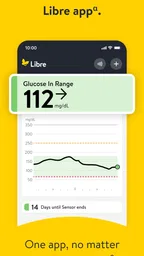
- Provides a convenient way to view glucose readings on a compatible phone.
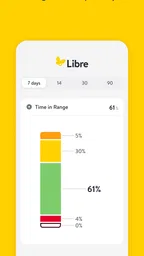
- Can show glucose trends to help users spot patterns over time.
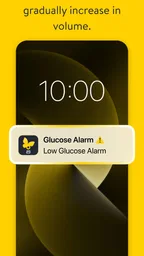
- Supports optional alarms for glucose readings that need attention.
- Lets users add notes about meals exercise or insulin use.
- Offers reports that can be shared with healthcare professionals.
What could be better
- Requires a compatible FreeStyle Libre sensor to provide readings.
- Phone compatibility varies by model and operating system.
- NFC scanning may not work reliably through some phone cases.
- Sensor readings can differ from blood glucose results.
- The app does not replace medical advice or confirm symptoms.





