


Learn Stock Trading - Finrise review
 Analysis by Appsdrops
I find a stock-trading simulator most useful when it gives me room to think through a decision before money is involved. Learn Stock Trading - Finrise is an education app built around that kind of practice: it lets users explore investing and strategic trading in a simulated market. That makes it appealing if you are curious about how market choices feel but are not ready to risk savings. It is not a substitute for financial advice or a real brokerage account, and I would approach it as a learning aid rather than a shortcut to expertise.
Learning through a simulated market
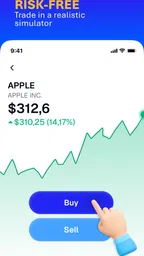
Finrise is published by Deep Flow Apps and sits in the financial-learning corner of education apps. Its central idea is straightforward: practise making market decisions in a realistic simulation, then use the experience to build familiarity with investing concepts. I like that framing because it puts decision-making ahead of simply reading definitions. A concept can feel very different when you have to choose what to do with a position and live with the result, even when the money is simulated.
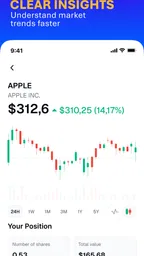
That practice is most useful when you attach a question to each session. Instead of tapping through trades just to see what happens, decide what you want to learn: how a change in price affects a position, whether a plan is too reactive, or how waiting compares with acting quickly. A short note after each session—what you expected, what happened, and what you would change—can turn a game-like exercise into a more deliberate learning routine.
There is an important limit to simulation, though. A paper market can help you rehearse choices without exposing real money, but it cannot reproduce every pressure that comes with investing real savings. I would not treat a successful run in Finrise as proof that a trading strategy will work outside the app. The better goal is to notice your habits: whether you chase movement, change your mind too often, or make decisions without a clear reason.
When a connection becomes part of the lesson
Because the experience is built around a market simulation, connectivity can matter at the moments when the app needs to present market activity or respond to a decision. I would use a reliable connection for a focused session, particularly if I wanted to follow a sequence of actions without wondering whether a delayed screen reflects the simulation or the network. The app is best treated as connected learning, not as a guaranteed always-available reference.
This distinction also helps set expectations. If a screen is slow to update, I would pause before repeating a trade or tapping several times. In any interactive market exercise, duplicate actions can make it harder to understand what caused the result. Waiting for the current screen to settle, then checking the displayed state before continuing, is a simple way to keep a practice session interpretable.
Short sessions work better than distracted trading
Finrise makes the most sense in a quiet pocket of time: during a break at home, after reading about a market idea, or when you want to revisit a decision without opening a real trading account. A phone is convenient for this kind of practice, but it also makes interruptions likely. If you are moving between apps, losing signal, or checking the simulator in a hurry, it is easy to forget why you made a particular choice.
My practical suggestion is to keep each session narrow. Choose one idea, make a small number of considered decisions, and stop to review what you learned before switching tasks. That workflow is more useful than treating the app as something to check constantly throughout the day. It also makes it easier to separate genuine learning from the impulse to keep reacting to every change on screen.
For a beginner, the approachable format may make investing feel less intimidating than starting with a full brokerage interface. For someone already trading, the value is more limited: a simulator can provide a safe place to test a thought, but it should not replace detailed research, careful record-keeping, or an understanding of real order execution. If you need structured lessons with a defined curriculum, or current, authoritative market education, a dedicated course or trusted financial resource may be a better companion.
Recovering from interruptions without confusing the practice
Connectivity interruptions are especially awkward when they happen mid-decision. If Finrise stops responding or a page does not appear to refresh, I would avoid immediately repeating the last action. First give the app a moment, then reopen or revisit the relevant screen and check what state it shows. That cautious sequence reduces the chance of turning a temporary delay into a confusing practice record.
It is also worth treating an interrupted session as a reason to review, not as a reason to rush. If you cannot tell whether an action registered, pause and resume only once the screen makes the situation clear. The point of a simulator is to learn from the relationship between a decision and its outcome; guessing at what happened weakens that feedback. I would rather end a session early than build conclusions on an uncertain sequence.
Use it thoughtfully on mobile data
If you are mindful of mobile data, the safest approach is to use Finrise when you have a stable connection and keep an eye on your device’s normal data controls. I would not assume a market simulation works offline or that a particular screen uses very little data. Those details can depend on how the app communicates and what is being displayed, so it is better to avoid long sessions on a limited plan until you have checked your own usage.
Battery and attention matter as much as data. A brief, planned session is easier to manage than leaving a trading simulation open while doing other things. Before starting, decide what you want to test; afterward, close out of the session when you have learned enough. This is not just a practical phone habit—it also keeps the exercise focused, so the app does not encourage aimless checking in place of considered learning.
Finrise is free to install, though it offers in-app purchases priced from $6.99 to $59.99 per item. I would begin with the free experience and decide whether it fits my learning style before spending anything. The presence of purchases is worth knowing if you are choosing an app for a younger learner or setting a budget; the content rating is Everyone, but that does not make every optional purchase necessary for understanding the basics.
Who will get the most from Finrise
The app has a 4.8 average from around 3,300 ratings, with roughly 98 written reviews, and has passed 100,000 installs. Those figures suggest that many people have tried it, but they do not tell me whether its teaching approach will suit a particular learner. I would use them as context, not as a promise that the simulator will make investing easy or profitable.
Its current version is 1.2.1, and it runs on devices using version 7.0 or later of its supported mobile operating system. The app is appropriate for a wide age range, but younger users should still have guidance when learning about investments: simulated gains and losses can make trading look simpler than the real financial decisions it represents. The best fit is someone who wants a low-stakes way to explore choices and is willing to think critically about what a simulation can and cannot teach.
Compared with a paper notebook, Finrise can make practice feel more interactive; compared with a brokerage app, it offers a safer setting for experimenting because the purpose is learning through simulation rather than managing an actual portfolio. Those alternatives serve different needs. A notebook is better if you want a completely self-directed record of ideas, while a brokerage is necessary for real transactions. Neither should be mistaken for a replacement for the other.
My connectivity verdict
Finrise is most convincing as a connected, low-pressure place to practise thinking about trades. I would recommend it to a curious beginner who can set aside a few focused minutes, has a dependable connection, and understands that simulated outcomes are not a forecast. It is less suitable for someone seeking offline lessons, a complete investing course, or a tool for making real-money decisions.
What I appreciate most is the chance to test a decision without putting savings at risk; what I would watch closely is the temptation to confuse simulation success with investing skill. Start with one question, avoid repeating actions when a screen is slow, and review what your choices taught you. If that measured approach sounds useful, Learn Stock Trading - Finrise is worth trying as one part of a broader learning routine—not as the whole routine.
What we like
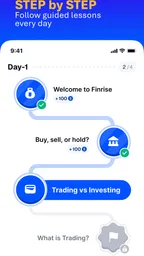
- Bite-sized lessons make stock market concepts easier to study.
- A beginner-friendly format can help explain unfamiliar trading terms.
- Self-paced learning lets users revisit topics when needed.
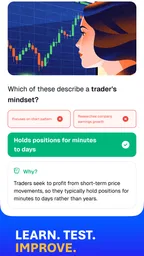
- Practice activities can help reinforce lessons without real trades.
- A focused curriculum keeps stock trading topics in one place.
What could be better
- Lessons do not guarantee profitable trading decisions.
- The app may not reflect current market conditions in every lesson.
- Users may need another source for advanced investing strategies.
- Learning through an app offers less personalized guidance than a tutor.
- Some content or features may require payment to access.





