




Learn English, Spanish: Learna review
 Analysis by Appsdrops
I judge a language-learning app less by how many lessons it promises than by whether I can make useful progress in the small gaps of an ordinary day. Learn English, Spanish: Learna is built around learning and speaking, with AI as part of the pitch, and that focus makes its connection to the internet an important part of the experience. I would treat it as a practice companion for moments when I can give a lesson my attention, rather than assume every activity will be ready regardless of signal.
Where a steady connection matters
Learna is an education app from Deep Flow Apps, and its central appeal is active language practice rather than simply collecting vocabulary. That distinction matters: reading a phrase is easy to fit into a brief pause, but speaking and working with AI are activities I would plan for a moment when my phone can reliably connect and I can hear and respond without rushing.
In practical use, I would open a speaking session at home, during a quiet break, or somewhere with dependable Wi-Fi or mobile data. A weak connection can turn a language exercise into a frustrating stop-start task, especially when the point is to respond naturally. I would not begin a longer practice session in a place where service is known to drop, unless I was comfortable changing plans if the interaction did not continue smoothly.
This is not a reason to avoid the app; it is a useful way to choose when to use it. A short vocabulary review may suit a quick pause, while speaking practice deserves a calmer setting with a stable connection. Learna’s AI emphasis is most relevant when I can actually participate, not when I am trying to squeeze a spoken exchange into a noisy, unreliable commute.
Make speaking sessions easier to finish
A simple workflow helps: decide whether I want to practise English or Spanish before opening the app, find a spot where I can speak comfortably, and give the exercise a few uninterrupted minutes. That small bit of preparation reduces the chance that I will start, get distracted by travel or poor reception, and leave the session half done. It also makes it easier to notice whether I am improving at forming answers rather than merely tapping through content.
For a learner who freezes when speaking a new language, AI-based practice can feel less socially demanding than approaching a conversation partner. I see that as a useful low-pressure step, not a full substitute for hearing different accents and navigating real conversations. If my goal is to prepare for a trip, for example, I would use the app to rehearse likely phrases and then seek real-world listening and conversation practice too.
Using Learna in the middle of a real day
Mobile language learning works best when the session matches the setting. On a quiet lunch break, I can give a speaking exercise enough attention to think through a response. In a crowded bus or shared office, speaking aloud may be awkward even if the connection is strong. In that situation, I would save the more interactive work for later rather than treat every spare minute as a suitable lesson slot.
A realistic routine might be to practise at home before leaving, then return to the app during a quiet evening break to pick up where my attention is better. If I only have a few minutes while waiting for an appointment, I would keep the goal modest: review or practise one small point rather than expect a deep session. The advantage is consistency; the trade-off is that bite-sized use can feel fragmented unless I deliberately return to the same learning goal.
The app is free to download, and its Everyone age rating makes it broadly accessible. That does not mean every learner will find its approach equally suitable. A beginner who wants a gentle prompt to start speaking may appreciate the AI angle, while someone who needs a structured classroom syllabus, detailed grammar explanations, or teacher feedback should compare it with courses designed around those needs.
Pick one language and make the goal concrete
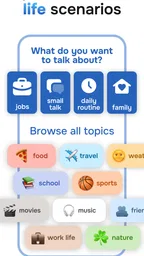
Because Learna is positioned for English and Spanish, I would avoid switching between them just because both are available. Choosing one immediate purpose—ordering food, introducing myself, or explaining a simple problem—gives practice a practical direction. After a session, I would jot down one phrase I struggled to produce and make that the focus next time. This is a low-effort way to turn app practice into something I can use outside the screen.
That workflow is especially helpful for learners who already know some words but hesitate when they need to assemble them. It is less compelling for someone who wants a passive listening app to run in the background, or who prefers a textbook-style progression with explicit explanations at every step. Learna’s emphasis is more appealing when I am ready to participate, speak, and tolerate the occasional pause while I work out what to say.
What to do when a session stalls
Connectivity problems are not always dramatic. A lesson may simply take longer to respond, or I may find that the setting is too noisy to concentrate. My first response would be to stop rather than repeatedly retry the same interaction while distracted. I would check that the phone has a usable connection, move to a quieter place if possible, and reopen the activity when I can give it proper attention.
If a session is interrupted, I would avoid assuming the app has saved a particular point unless I can see that it has. A practical habit is to remember the topic or phrase I was practising before leaving the screen. That makes it easier to resume deliberately instead of spending time trying to reconstruct a lesson from memory. It is also a good reason to keep sessions focused: a short, clear goal is easier to pick back up than a vague plan to “study Spanish.”
Speaking apps also involve a personal comfort question. I would use headphones in public if that makes listening easier, but I would not speak aloud where doing so feels intrusive or uncomfortable. If I cannot talk freely, a different kind of study—such as reading or writing—may be the better choice for that moment. The most useful app is not necessarily the one I can open everywhere; it is the one I can use well in the situations available to me.
Keep expectations realistic about recovery
When mobile service is unreliable, I would plan for the possibility that an interactive exercise needs to wait. Learna’s store summary highlights AI-supported language practice, but I would not build a travel routine around an assumption that every activity works offline. Before a flight, a subway ride, or a rural trip, I would do any speaking work while connected and use another prepared resource if I need guaranteed study during the journey.
This is a sensible distinction between a connection-dependent practice session and a language-learning habit overall. A disrupted lesson does not have to end the day’s study: I can review notes, mentally rehearse a phrase, or return when reception improves. The app is a better fit when I can accept that flexibility than when I need a complete, dependable offline course for every commute.
Data use, cost, and choosing the right fit
For anyone watching mobile data, the safest approach is to use Wi-Fi for AI-oriented speaking practice until they understand how their own sessions affect their plan. I would be particularly cautious about long practice periods on a limited connection. That is a general data-conscious habit, not a claim about a particular amount of usage. Keeping sessions purposeful also helps avoid spending data and attention on a practice loop that has no clear goal.
Learna is free, but it includes in-app purchases ranging from $0.99 to $199.99 per item. I would explore the free experience first and decide what I actually need before buying anything. The wide range makes it worth checking the purchase details shown in the app carefully, rather than assuming that every optional item has the same price or value. A learner who only wants occasional practice should be especially clear about what is necessary for their routine.
Its scale suggests that many people have tried it: Learna has over 50 million installs, an average rating of 4.6 from around 861,000 ratings, and about 6,100 written reviews. Those figures are reassuring as a sign of reach, but they cannot tell me whether its learning style matches my needs. I would weigh my own comfort with AI-guided speaking and my access to a reliable connection more heavily than popularity alone.
The app’s current version is 4.0.2, and it supports devices running Android 7.0 or later. That makes checking device compatibility straightforward for many Android users, while the central decision remains whether the app’s interactive approach suits the way they want to learn. For someone who prefers a fixed course book, live instruction, or an entirely offline routine, a different tool may be a better primary option. Learna can still complement those methods, but I would not expect it to replace every part of a language course.
My connectivity verdict
Learna makes the most sense for someone who wants to practise speaking English or Spanish in focused sessions and can usually find a stable connection and a place to talk. Its AI-oriented approach gives a learner a practical way to rehearse without immediately needing a human conversation partner, and a clear everyday goal can make those sessions more useful than aimless repetition.
I would recommend it to a friend who wants to build confidence with spoken responses, is comfortable learning through a mobile app, and is willing to plan around connectivity. I would suggest another or additional resource to someone who needs offline lessons, formal feedback, a highly structured grammar course, or hands-free practice in places where speaking is not appropriate. Used on its own terms—with short goals, a quiet setting, and realistic expectations when reception is poor—Learna can be a handy part of a language-learning routine.
What we like
- Short lessons fit into spare moments.
- Speech practice helps build confidence.
- Personalized topics keep learning relevant.
- Progress tracking makes improvement easy to follow.
- The interface is simple to navigate.
What could be better
- Some lessons may require a paid subscription.
- A stable internet connection may be needed for some features.
- Speech recognition can mishear certain accents.
- Repeated exercises may feel predictable over time.
- The app may not provide enough depth for advanced learners.





