
Langla: AI Language Tutor review
 Analysis by Appsdrops
I judge a language-learning app not only by what it teaches, but by whether I can use it comfortably in the moments I actually have: during a quiet study session, between errands, or when I need to check a phrase quickly. Langla: AI Language Tutor is an education app from Aquaworld Infotech built around AI-assisted language practice. Its mix of conversation, translation, grammar, and vocabulary could suit learners who want several kinds of help in one place, though that breadth also means it is worth thinking about how you prefer to study.
Getting around without losing your place
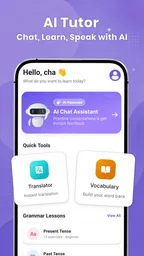
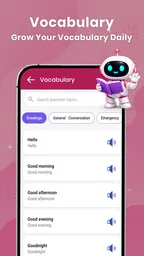
The central appeal of Langla is the chance to move between language tasks rather than treating learning as a single routine. A learner might ask for a translation, use that phrase as a starting point for a chat, then look at a grammar question or vocabulary item. In principle, that creates a useful path from “What does this mean?” to “Can I use it myself?” I find that progression more valuable than collecting translations without practicing them.
That flexibility can also make the app feel less straightforward than a course organized into a fixed sequence of lessons. If you like being told exactly what to study next, a structured textbook-style app may be easier to follow. With an AI tutor, the learner has more say in the direction of a session, so arriving with a small goal helps: practice ordering food, understand a sentence from a message, or review a handful of words you keep forgetting.
For readability, the most useful habit is to keep prompts short and focused. A request such as “Explain this sentence in simple English” is likely to be easier to assess than a long message combining translation, grammar correction, and cultural nuance. I would treat the reply as a learning aid, then ask one follow-up at a time. This makes it easier to notice what the app is explaining and to catch an answer that does not quite fit the context.
The app’s average rating is 4.5 from around 22,000 ratings, and it has more than 10 million installs. Those figures suggest that many people have tried it, but they do not tell me whether its conversational style will suit an individual learner. I would use the app for a short, low-pressure trial before building a daily routine around it, especially if I need a very particular teaching style.
A practical way to turn answers into learning
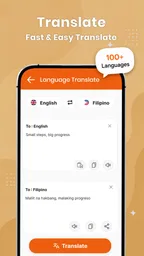
Translation is most useful when it becomes a prompt for active recall. If I look up a phrase, I can close the explanation mentally, try to produce the phrase again, and then use it in a new sentence. For example, after checking how to ask where a station is, I might practice changing the destination or making the question more polite. That small variation tests whether I understand the pattern rather than merely recognizing a finished answer.
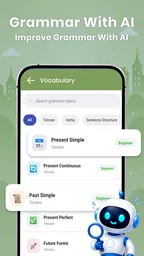
The same approach helps with grammar. Instead of asking for a broad overview of a tense, I would bring one sentence I have actually encountered and ask what each part is doing. Then I would try a similar sentence of my own. This is a concrete use for an AI tutor: it can respond to the learner’s immediate example, whereas a conventional grammar reference is often better for a stable, carefully organized explanation.
There is a trade-off here. A tutor that responds to open-ended requests can feel personal, but it may not provide the clear progression or consistent terminology that a formal course offers. If you are preparing for an exam, following a school syllabus, or need a teacher to evaluate your work against specific criteria, use Langla as a supplement rather than your only source.
Comfort across different abilities and settings
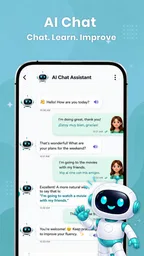
For someone who finds speaking to another person intimidating, private chat practice can lower the emotional barrier to trying a sentence. You can experiment, make mistakes, and rephrase without holding up a class or worrying about a conversation partner’s reaction. That can be especially useful for a beginner who understands more than they feel confident saying. It does not replace the unpredictability of speaking with a person, but it may help make that first step less daunting.
Motor comfort depends partly on how a learner chooses to interact. Typing a short question can be more manageable than composing a long explanation, while a person who finds frequent text entry tiring may prefer learning materials that require less written input. I would keep a few reusable prompts in mind—such as asking for a simpler explanation or an example sentence—so each session takes fewer actions and less effort to set up.
Sensory needs vary, and I would not assume that an AI tutor is automatically comfortable for everyone. A learner who needs large text, strong contrast, screen-reader-friendly controls, or a low-stimulation interface should check how the app behaves on their own device and with their usual accessibility settings. The important practical question is whether the text and navigation remain comfortable for a real session, not whether an app makes a broad claim about inclusion.
Langla is rated Everyone, which makes its intended age suitability broad, but that does not mean every learning style or support need is equally served. A child who benefits from close adult guidance may still need help choosing appropriate prompts and checking explanations. Likewise, a learner with reading difficulties may find concise, conversational answers easier to approach than dense reference material, but should judge the actual presentation and response length personally.
When a quick session is realistic
One everyday scenario I can see working well is a learner preparing for a short trip. Before leaving home, they can ask how to phrase a simple request, check what a confusing line means, and practice a couple of variations. This is more focused than trying to “learn a language” in one sitting. It also makes clear what the app is not: a guaranteed substitute for reliable travel information, a human interpreter, or a source to trust blindly when a misunderstanding would matter.
Another useful moment is after reading a message or watching a clip in a language you are studying. Rather than translating everything, pick one sentence that blocks understanding. Ask about its meaning, then request an example with a similar structure. This limits the session to something you can remember and avoids turning the app into a machine for producing answers you never review.
Situational access can be less convenient when attention is divided. A noisy commute, a brief queue, or a low-energy evening may not be ideal for a detailed grammar discussion. In those moments, a quick translation or a single vocabulary check is a better fit than an extended chat. If you are trying to learn in a place where you cannot comfortably type or concentrate, a saved lesson plan or paper notes may be more dependable.
Because the product combines multiple learning tasks, it can reduce the need to switch among separate tools. That convenience is not the same as depth in every area. A dedicated dictionary can be a better choice when you need carefully organized definitions, while a course with fixed lessons can be better when you want a steady curriculum. A human tutor remains stronger for nuanced correction, personal accountability, and the social cues of conversation.
Costs, limits, and sensible expectations
The app is free to download, with in-app purchases ranging from about $12 to $200 per item. I would check what a paid option actually includes before committing, and consider whether I use the app often enough to justify it. A free starting point makes experimentation easier, but the presence of paid items means I would not assume every part of the experience is included at no cost.
The current version is 1.0.109 and it requires Android 8.0 or later. Those details matter if you are using an older device: check compatibility before planning to rely on it for study. The release date is April 23, 2026, so the product is relatively new in its current form; I would be open to the possibility that the experience changes over time rather than treating today’s workflow as permanent.
The biggest learning limitation is the need to evaluate answers rather than accept them automatically. Translation can lose tone, and grammar explanations can miss a context that a human teacher would ask about. When a phrase affects a work message, a formal application, or a sensitive conversation, I would cross-check it with a trusted reference or someone fluent. For ordinary practice, the risk is lower, but the habit of checking meaning is still part of learning.
Another possible friction is open-endedness. If you are tired, unsure what to ask, or easily distracted by switching topics, an AI chat can lead to a scattered session. I would decide on one outcome before opening it and stop once I have practiced that outcome. For learners who need reminders, a visible syllabus, or external accountability, a class or structured course is likely to provide more support.
Who I would recommend it to
I would recommend Langla to curious learners who want an approachable place to test phrases, ask grammar questions, and build vocabulary through examples. It seems particularly suitable for people who already have a rough idea of what they want to practice and are comfortable steering a conversation. It can also help someone who hesitates to make mistakes in front of others, provided they later seek real-world conversation when speaking confidence is the goal.
I would skip it as a primary tool if I needed a tightly sequenced course, authoritative specialist translation, or a teacher who can notice confusion without being prompted. I would also look elsewhere if a short personal test showed that the interface, text presentation, or amount of interaction created friction. Accessibility is practical and individual: a feature is only useful if it works with the way you read, move through an app, and concentrate.
My overall view is that this is a flexible study companion, not a complete language-learning plan. Its strongest use is turning immediate questions into small practice opportunities, especially when you follow an answer by trying the phrase yourself. Aquaworld Infotech has made an app with a broad audience in mind, and its Everyone rating reflects that general reach; still, the right choice depends on whether chat-based learning feels comfortable and whether you can check important answers. I would give it a try for focused, everyday practice, then pair it with a structured course or human conversation if your goals call for more guidance.
What we like
- AI conversations provide low-pressure speaking practice.
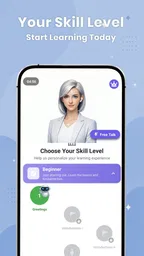
- Lessons can adapt to your language level and learning pace.
- Instant feedback helps highlight mistakes while practicing.
- Short activities make it easier to fit study into a busy day.
- A broad range of practice topics can keep sessions engaging.
What could be better
- AI feedback may miss context or misunderstand unusual phrasing.
- Speaking practice depends on a stable internet connection.
- Some learning tools may require a paid subscription.
- AI conversations cannot fully match the nuance of a human tutor.
- Frequent notifications may become distracting if enabled.





