


Kiwix review
 Analysis by Appsdrops
I like having reference material available when a connection drops, but offline access only helps if I can prepare it before I need it. Kiwix is an education app built around that practical idea: it lets people consult Wikipedia and other material without relying on an internet connection at the moment of reading. In my view, its appeal is less about replacing everyday web browsing and more about giving a curious person a dependable reading option for commutes, travel, classrooms, and other places where connectivity is unreliable.
Where offline reading can trip you up
The first thing to understand is that “offline” does not mean every reference collection appears on your device automatically. You need to get the material you want while you have a connection, then use it locally later. That distinction sounds obvious, but it is the main setup hurdle: if you wait until you are already on a train, in a remote area, or facing a network outage, you may be too late to prepare the content.
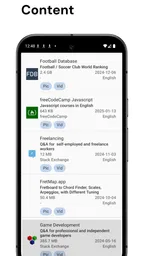
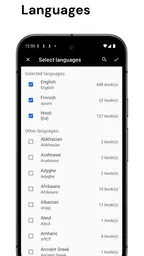
That preparation also calls for a little planning. A full reference collection can be a substantial download, so I would choose what I actually expect to read rather than treating offline storage as unlimited. Before a trip, for example, I would decide whether I need broad reference coverage or a narrower collection suited to the journey. The right choice depends on the device’s available space and the kind of questions I tend to look up.
There is a trade-off compared with a browser search. Online search is quicker when the connection is good and can lead straight to fresh pages, current discussions, and sources beyond an encyclopedia. Kiwix is more useful when access itself is the problem. I think of it as a prepared library, not a universal replacement for the live web.
Make the download decision before you leave
My practical advice is to prepare at home or somewhere with reliable Wi-Fi, then check that the chosen material is actually available for reading before relying on it. Do not assume that installing the app alone has made a whole library accessible. If a download is still pending, a weak connection or a closed app can leave you with less offline coverage than expected.
It also helps to keep the intended use in mind. For a student revising familiar subjects, a focused collection may be easier to manage than a very broad one. For a family trip, wider reference material may be more useful because questions can range from animals to geography. This is not a matter of finding one perfect setup; it is about matching the offline library to the questions likely to come up.
When a page seems missing
If a search does not find what you expect, I would first check which content has been downloaded rather than assuming the app or search is broken. Offline access is bounded by the collection on the device. A page outside that collection cannot be fetched from the internet while you are disconnected, so the sensible recovery is to reconnect later and prepare the relevant material if it is available.
Search habits matter, too. A broad topic can be easier to locate with a distinctive phrase or a more specific subject term. If I am looking for information about a particular place, person, or scientific concept, I would try the precise name rather than a vague question. That small adjustment can help separate a genuine coverage gap from a query that simply needs narrowing.
Set up a useful offline reference shelf
Kiwix is a free education app from the Kiwix Team. Its audience is broad: the age rating is Everyone, and its role suits readers who want reference material for learning or general curiosity rather than a lesson plan or a course with structured assignments. It has been available since April 5, 2013, and its reach is reflected in more than a million installs. Its average rating is 4.7 from around 40,000 ratings, with 983 written reviews.
Those figures suggest that offline reference access is useful to many people, but they do not mean every person will enjoy the preparation involved. I would recommend it most to readers who already know they will spend time without dependable data, or who prefer to keep a substantial reference source close at hand. If you mostly browse with stable internet and rarely revisit reference material, an ordinary browser may be simpler.
A realistic travel workflow
Imagine taking a long bus ride through areas with patchy coverage. Before leaving, I would use a reliable connection to select the reference material that seems relevant, let it finish downloading, and open it once to make sure it is ready. On the ride, I could look up a landmark mentioned along the route or follow a question that comes up in conversation without waiting for a signal.
The useful part of this workflow is not just avoiding a loading spinner. It changes how I use spare time: I can follow an unexpected question without needing to plan every search in advance, provided the subject is covered by the material already on the device. The limitation is equally clear. If the question calls for a live update or a page that was not included, I would need to reconnect and use an online source.
Keep expectations clear when something fails
If a download appears incomplete or reading access does not behave as expected, I would troubleshoot in a simple order. First, confirm that the device has a working connection during preparation. Next, check whether the selected material has finished downloading. Then reopen the relevant content and try a specific search. This avoids spending time changing settings when the underlying issue may simply be that the library is not ready.
For a large download, I would also avoid starting at the last moment. A busy or unstable network can interrupt preparation, and rushing makes it harder to tell whether the content is complete. If it does not work on the first try, reconnect and retry when the connection is steadier, then verify access before going offline. That is a more useful recovery plan than expecting an offline app to retrieve missing material after the signal is gone.
Tell an app problem from a connection problem
There are two different situations that can look similar: the app may not have the material you need, or the device may simply be unable to reach the internet for preparation. If browsing online works elsewhere but a chosen collection is not ready, I would focus on the download and the content selection. If the entire device is offline, no app can fetch new material at that moment; Kiwix can only help with what was prepared earlier.
This distinction is worth remembering because it prevents a common frustration. Offline access is a plan made in advance, not a way to make an absent connection behave like a live one. Once I treat it that way, the app’s strengths and limits are easier to judge fairly.
How it compares with browsing and other study tools
A regular search engine is the better choice when I need current information, several viewpoints, or quick access to a source I have not anticipated. A conventional encyclopedia site is also convenient when the connection is steady, because there is nothing to prepare on the device. Kiwix has the advantage when connectivity is costly, unreliable, or unavailable, and when reference reading is more important than live updates.
It is not the same as a dedicated study app. Someone who wants guided lessons, progress tracking, practice questions, or a course sequence should look for a tool designed around those activities. Kiwix is better suited to self-directed reading: it gives a person material to explore, but the learner decides what to investigate and how deeply to follow it.
A less obvious benefit is that offline reading can make curiosity more spontaneous. A question that would otherwise be abandoned when the network stalls can become a short reading session. The corresponding compromise is that a saved collection can feel less current than live browsing. For topics where the latest developments matter, I would treat it as a starting point or a backup, then check an up-to-date source when I can get online.
Who should choose it—and who should pass
I would point Kiwix toward students who want reference material during study sessions away from Wi-Fi, travelers who like reading on the move, teachers preparing for settings with limited connectivity, and curious readers who want an offline fallback. It can also suit households that want a shared source for spontaneous questions, as long as someone takes responsibility for preparing the content in advance.
I would skip it if I expect every answer to be current, if I have no interest in planning downloads, or if my main goal is a structured learning course. It may also be a poor fit for someone whose device has little room for additional material and who does not want to choose carefully what to keep. In those cases, online browsing or a more focused learning resource may be the more comfortable option.
My practical verdict
For me, Kiwix is a useful form of insurance against disappearing connectivity, with the bonus that it can turn spare time into reading time. The strongest way to use it is straightforward: decide what you may need, prepare it while connected, and check it before leaving. Once that habit is in place, the app can make reference reading available in situations where a browser cannot help.
I would not install it expecting effortless access to every live answer. Its value depends on the material you have chosen and the time you spend getting ready. But if that trade-off fits your routine, I think it is a sensible, no-cost addition to an offline reference library. The key question is simple: would you rather plan a little now, or risk having nothing to read when the connection disappears?
What we like
- Works offline after content is downloaded
- Offers Wikipedia and other reference collections
- Supports full-text search within downloaded content
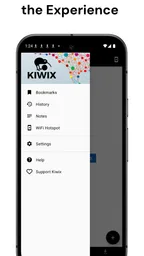
- Includes bookmarks for saving useful pages
- Available for Android and iOS
What could be better
- Large content packages can use substantial storage
- Initial downloads require an internet connection
- Some collections may be outdated
- Search results depend on the downloaded collection
- Downloading large packages can take considerable time





