
Khan Academy review
 Analysis by Appsdrops
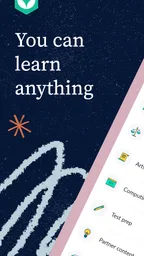
When I have a few spare minutes and want to make them count, I like having a learning app that lets me start with a question rather than a complicated setup. Khan Academy is built around that simple idea: its guiding promise is that you can learn anything. It’s a free education app for people who want to explore a subject, strengthen what they already know, or make steady progress at their own pace.
From a learning goal to a first lesson
My starting point with Khan Academy is usually a small, specific goal: understand a concept, refresh a skill, or spend a little time learning something new. That matters because an educational app can feel overwhelming if it asks you to plan an entire course before you begin. Here, the appeal is the opportunity to turn curiosity into a practical learning session, without paying to get started.
The app is aimed at a broad audience, and its Teen content rating makes it relevant to younger learners as well as adults. I see it as useful for more than one kind of situation: a student looking for extra support, someone revisiting a topic after time away, or a curious learner who simply wants to build knowledge. The best fit is anyone willing to take an active role in learning rather than expecting an app to do the thinking for them.
It also helps to approach a study session with a clear but modest intention. “I want to get a better handle on this subject” is a good starting point; “I’ll master everything today” is not. Learning takes attention and repetition, and the app works best as a place to return to, not a shortcut around the effort that understanding requires.
Finding a useful rhythm
Once I have a goal in mind, I treat the app as a study companion. I focus on one topic at a time, give myself enough attention to follow the material, and pause when I need to think. That makes the experience feel less like scrolling through a feed and more like setting aside time for a real task. Even a short session can be worthwhile when I know what I’m trying to learn.
For a student, that might mean using the app to support classroom learning. For an independent learner, it could be a way to explore an unfamiliar area without committing to a paid course first. Either way, I find it helpful to connect what I’m learning to a question or need outside the app. That simple handoff—from studying to using the idea in context—is what makes a lesson more memorable.
Moving through a study session
A sensible workflow begins with choosing a learning goal, then giving the lesson enough time to make sense. I try not to rush simply to say I have completed a session. If an idea is unfamiliar, I stop and work through it; if it connects to something I already know, I use that connection to build understanding. The point is not to race through content, but to leave with a clearer grasp of the subject.
From there, I decide what to do next. Sometimes the right move is to continue studying the same topic; sometimes it is to step away and return later. This is a small but important part of using any learning app: progress depends on a routine that fits real life. A tool can make material available, but I still have to choose when to engage with it and how much concentration I can give.
The app’s strongest promise is its breadth of purpose. The idea that anyone can learn is welcoming, especially for people who might feel that education belongs only in a classroom or formal course. I appreciate that framing because it encourages curiosity without making learning feel exclusive. At the same time, a broad invitation is most useful when I turn it into a manageable plan: one topic, one session, and a clear reason for showing up.
Where learning connects to everyday life
The most valuable handoff happens after I close the app. A concept becomes more useful when I can explain it in my own words, recognize it in another situation, or bring a question about it into class or conversation. That is the outcome I look for: not merely time spent in an app, but knowledge I can carry into the next task.
This also makes Khan Academy easier to fit alongside other learning methods. It can complement schoolwork, personal reading, or discussion with someone who knows the subject. I would not treat any single app as a replacement for every kind of instruction or support. Instead, I see it as one accessible part of a larger learning routine—particularly handy when I want to take initiative and study on my own schedule.
That independent approach has a trade-off. A learner who already knows what they want to study may find it easy to get started, while someone who needs a lot of structure may need to set their own goals and reminders. I find that a quick note about what I want to understand helps: it gives the session direction and makes it easier to tell whether I actually made progress.
What works, and where the flow can break
Khan Academy has earned a substantial audience: it has over 10 million installs and an average rating of 4.1 from around 174,000 ratings. Those figures suggest that many people turn to it for learning, though they do not tell me whether it will suit every individual. For my part, the strongest reason to try it is straightforward: it is free, focused on education, and built around an encouraging idea rather than a paywall at the starting line.
There are practical details worth keeping in mind before installing. The app is at version 8.5.2, requires iOS 9 or later, and is rated Teen. It was released on September 22, 2015, so it has been part of the mobile learning landscape for years. I would still judge it by how well it supports my own study habits, because a long-running app is only useful when its approach fits the way I like to learn.
When motivation or focus runs short
The workflow can break before a lesson even begins if I open the app without knowing what I want from it. With no goal, it is easy to drift, feel unsure where to direct my attention, or close the app without a clear result. I avoid that by choosing a question first. It does not have to be ambitious; a simple “What do I want to understand better?” is enough to give a session purpose.
Another friction point is expecting immediate mastery. Education is rarely a straight line, and revisiting a difficult idea is normal. If I do not understand something on the first pass, I take that as a signal to slow down, reconsider the concept, or return to it later—not as proof that learning is out of reach. This mindset matters as much as the tool itself, particularly for younger learners who may benefit from encouragement and sensible expectations.
There is also a handoff the app cannot make on my behalf: turning access into consistent practice. A free resource can remove one barrier, but it cannot guarantee attention, make a study plan for every person, or ensure that new knowledge sticks. I get the most from the experience when I pair it with a routine that is realistic. A few focused sessions that I actually complete are more useful than an elaborate plan I abandon.
My verdict for learners
I recommend Khan Academy to anyone looking for a free education app that makes independent study feel approachable. Its clearest strength is the open-ended invitation to learn, which works well for students seeking support and curious people who want to keep building their knowledge. The app is particularly appealing if you are comfortable taking responsibility for your own pace and choosing a goal for each session.
It may be less satisfying for someone who wants every step of a learning journey planned for them or who expects an app to create motivation automatically. That is not a reason to dismiss it; it is a reminder to match the tool to your habits. If you can bring a question, spend focused time with it, and connect what you learn to life beyond the screen, the experience has a clear purpose.
Overall, I see Khan Academy as a practical place to begin, continue, or revisit learning without an upfront cost. Start with one subject that matters to you, keep the first goal small, and pay attention to what you understand by the end of a session. For learners who want an accessible way to turn curiosity into steady study, its central message feels more than catchy: learning really can start wherever you are.
What we like
- Lessons are available at no cost.
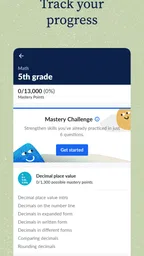
- Progress tracking helps learners monitor their practice.
- Downloadable videos support offline study.
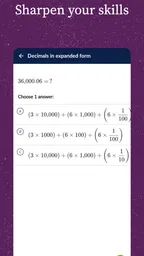
- Hints guide learners through challenging exercises.
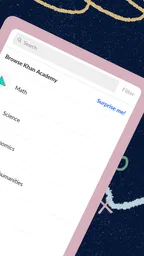
- Content spans many school subjects and grade levels.
What could be better
- Some lessons require a reliable internet connection.
- The large course library can feel difficult to navigate.
- Practice exercises may not suit every learning style.
- The app offers limited tools for live teacher interaction.
- Some advanced topics have less content than core subjects.





