

Khan Academy Kids review
 Analysis by Appsdrops
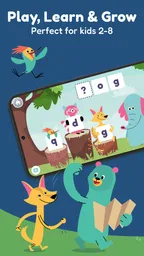
When I look at a learning app for a young child, I care about more than whether it can hold their attention. I want to know whether they can understand what to do, make choices without constant adult help, and return to a task after getting distracted. Khan Academy Kids makes a thoughtful attempt at that balance, with early learning activities designed for children from two to eight. My overall impression is that it can be a welcoming starting point for short reading and maths sessions, though it is not a substitute for one-to-one teaching or a tool that automatically adapts to every child’s needs.
Clear paths through early learning
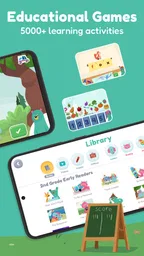
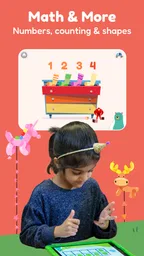
The app comes from Khan Academy, a developer known for educational learning tools, and sits in the education category. Its child-focused scope matters: rather than asking a preschooler to navigate a broad library of unrelated subjects, it concentrates on foundational skills, including reading, maths and phonics. That narrower purpose makes it easier for a parent to decide whether it fits a particular moment, such as practising letter sounds or doing a brief number activity together.
For a young learner, clarity is partly about what the screen asks them to do next. In my view, an activity works best when an adult can explain the task in a sentence, then let the child try without turning the session into a string of instructions. This app is more useful in that role than as a digital worksheet: it gives children a way to engage with early learning, while a caregiver can remain nearby to help when a prompt is confusing or a child loses the thread.
That distinction is especially important for children who are only beginning to use a tablet. A child may understand a letter or number but still need help interpreting an on-screen direction. I would introduce the app together first, rather than hand over the device and assume the child will immediately know how to move through every activity. Once a child recognises the general rhythm, short independent turns may become more practical.
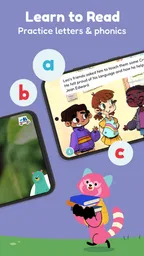
The reading and phonics focus can be useful for families who want learning to feel connected to everyday life. After a short session, a caregiver might point out a familiar letter on a book cover or ask the child to listen for a sound in a word they already know. That small conversation gives the screen activity a real-world landing place. Without that follow-up, children can still enjoy the app, but a parent may miss an easy chance to connect practice with language they hear outside the device.
There is also a useful difference between using it as a routine and using it as a rescue. If a child is already tired, upset or struggling to focus, an educational activity may not be the right answer just because the app is available. I would choose a calm moment and keep the session short enough that the child can finish feeling successful, rather than pushing through a task to meet an arbitrary target.
How I would use it with a child
For a first session, I would sit beside the child, let them choose or begin an activity, and watch where they hesitate. That reveals whether the friction comes from the learning task itself or from navigating a device. If they understand the question but need help with the controls, I would give them time to practise the interaction rather than answering for them. If the learning prompt is the hard part, I would simplify it aloud and see whether they can continue.
A realistic everyday use is a few minutes before dinner while a caregiver is nearby—not as a way to keep a child occupied indefinitely, but as a small, focused learning break. Another is a shared session when an adult wants to see whether a child enjoys sound-based reading practice or prefers number work. In both cases, the app is most helpful when it starts a conversation about what the child is learning, rather than replacing that conversation.
Readable screens, but not a universal fit
Young children vary widely in how they process pictures, words and spoken instructions. Some are ready to follow a prompt on their own; others benefit from an adult reading it aloud or pointing to the relevant part of the screen. I would treat the app as a flexible activity to try, not assume that one presentation style will suit every child. If a child repeatedly misses an instruction, it may be a sign to pause, explain it in a different way, or choose another activity rather than conclude that they are not ready to learn the skill.
For children who are beginning readers, the combination of a visual task and adult support can make a difference. A caregiver can repeat a sound, connect it to a familiar word, or let the child answer at their own pace. The useful point is not to turn the adult into a constant narrator; it is to offer help when the child’s attention is on the wrong part of the task. That lets the child keep ownership of the answer.
Navigation is another part of readability. A preschooler may tap quickly, revisit a screen, or leave an activity before finishing. I would not interpret those behaviours as proof that the learning content is poor. They may simply show that a young user is still developing the patience and device habits needed to follow a sequence. At first, a parent can help the child return to the intended task; over time, the child may need less prompting.
One practical tip is to avoid introducing the app for the first time during a rushed transition. If a family is about to leave the house, an unfamiliar screen or a difficult activity can create more stress than learning. Trying it when there is time to explore gives the child a chance to understand the pattern and gives the adult a clearer sense of which parts are easy to follow.
Different hands, attention and sensory needs
Motor comfort can affect whether an activity feels manageable. A child who is still refining pointing and tapping may need a device held steady, a clear space around it and an adult close enough to help if they make an unintended selection. This is a general consideration for tablet learning, not a claim that every child will have trouble. If a child becomes frustrated by inaccurate taps, I would first adjust the physical setup and slow the interaction down before deciding the content itself is unsuitable.
Some children also find busy or unfamiliar sensory experiences tiring. A caregiver can watch for signs such as turning away, rushing through prompts or becoming upset, then pause rather than insist on finishing. A short session is often a better choice than treating the app as a lesson that must be completed in one sitting. This is particularly relevant for younger children, whose attention and tolerance can change from one day to the next.
For a child who benefits from repetition, the adult can keep the learning goal small: focus on one sound or one kind of number task, then stop while the child is still engaged. For a child who prefers variety, switching between reading and maths may make a session feel fresher, though it is worth noticing whether a change of activity helps or makes it harder to concentrate. The app can be part of that experiment, but the caregiver’s observation is what makes the choice responsive.
I would also be cautious about assuming that a screen-based lesson is automatically comfortable for every learner. A child may prefer a printed book, physical counting objects or conversation. Those are not inferior alternatives. In fact, pairing a digital activity with something tangible—counting toys after a number task, for example—can make the concept easier to discuss and gives the child a break from tapping.
When access depends on the moment
Because this is a mobile learning app, it can fit into a family’s existing device routine, but that does not mean it belongs in every gap of the day. I see its best use as intentional and supervised at first: a parent chooses a suitable moment, stays available, and helps the child stop when the session is over. That approach is more realistic than expecting a young child to manage screen time independently.
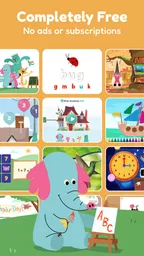
The free price and absence of ads or subscriptions are meaningful for families who want to try a learning tool without weighing recurring charges or commercial interruptions. It is rated for Everyone, which aligns with its young audience, but age suitability does not guarantee that every activity will match a particular child’s reading level, attention span or motor confidence. I would still preview the experience with the child and decide whether the content and interaction feel comfortable for them.
If a caregiver shares a device with other family members, it helps to make the app easy to find and to agree on when it can be used. That small bit of planning avoids turning the learning activity into a negotiation every time. It also gives parents a chance to make sure the child is using the intended app rather than simply handing over a device with no context.
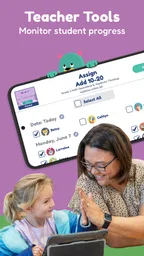
It may be less suitable in situations where a child needs a highly structured lesson delivered by a teacher, or where an adult is looking for detailed progress reports to guide instruction. Families seeking a specialised learning plan should use advice from the child’s educator or relevant professional and treat this app as an optional practice resource. It can support a routine, but I would not rely on it alone to identify a learning difficulty or measure a child’s development.
Where the experience can still fall short
No single early-learning app can account for every child’s language background, learning pace, sensory preferences or need for assistance. A child may be ready for one reading activity but not another, or may enjoy practising on a tablet one day and reject it the next. Adults should be prepared to change course. If the child needs repeated explanations for basic navigation, a shared book or hands-on activity may be the more comfortable choice for that session.
There is also a risk of mistaking engagement for understanding. A child can enjoy tapping through an activity without retaining the lesson, just as a child can learn from a quiet conversation without appearing especially excited. I would ask the child to show or explain something in their own way after the activity, without turning that into a test. If they cannot, that is a cue to revisit the idea together, not a reason to keep pressing buttons until they get it right.
For families comparing it with the usual alternatives, the choice comes down to what they need. A printed workbook offers a slower, tactile experience and can be easier to share at a table, but it does not provide the same on-screen interaction. A general video can be convenient for watching together, yet it may leave the child more passive. A teacher or caregiver can adapt explanations in the moment, though that requires a person’s time. This app sits between those options: structured digital practice that is more interactive than simply watching, but less responsive than a person who knows the child well.
Its current version is 9.0.3, and it requires Android 6.0 or later. Families should check that their device meets that requirement before planning to use it. The app has a 4.6 average from around 58,000 ratings, and it has been installed over 10 million times. Those figures suggest that many families have tried it, but they cannot tell me whether it will suit an individual child’s way of learning. I would use them as context, not as a substitute for trying a short session together.
Who I would recommend it to
I would recommend Khan Academy Kids to caregivers of young children who want a free way to introduce early reading, phonics and maths practice, especially when an adult can be nearby for the first few sessions. It is a sensible option for parents who prefer a focused educational app over an unstructured collection of videos, and for families who want to see which kinds of early learning activities capture a child’s interest.
I would hesitate to recommend it as the main learning method for a child who needs close individual teaching, a tightly controlled sensory environment or a different interaction style from tablet tapping. It may also be a poor fit for a family whose goal is to avoid screen use altogether; physical books, conversation and hands-on play can meet that preference better. Choosing another option in those cases is not a failure of the app or the child—it is simply a better match for the situation.
Khan Academy Kids was released on July 10, 2018, and its enduring appeal is easy to understand: it offers a low-cost way to bring early-learning activities onto a device many families already use. My inclusive verdict is positive but measured. Its strongest role is as a flexible, adult-supported practice tool, not a universal classroom or an automatic solution for every ability. If I were introducing it to a child, I would start together, observe what feels clear or frustrating, and keep it only if it makes learning more comfortable and enjoyable for that particular child.
What we like
- Lessons adapt to each child's progress.
- Activities cover early reading and math skills.
- Offline access supports learning on the go.
- No ads interrupt lessons or activities.
- Multiple child profiles suit shared devices.
What could be better
- The app is designed mainly for children ages two to eight.
- Some activities require an internet connection.
- Parents may need to guide younger children through navigation.
- Progress tracking may feel limited for detailed homeschooling records.
- The large activity library can make it hard to choose a starting point.





