

Kardia review
 Analysis by Appsdrops
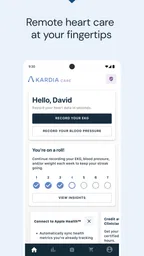
I see Kardia as a focused heart-health companion rather than a general wellness tracker. Its usefulness depends on a simple but important distinction: it can help you capture and review heart information, but it is not a substitute for a clinician or emergency care. That makes the app most appealing to people who already use a compatible Kardia device and want a more organized way to keep track of readings and discuss them with a medical professional.
Connectivity shapes the experience because a reading is most valuable when it can be saved, reviewed, and shared at the right time. I would treat the app as part of a care routine, not as a promise that every step will work the same way in every network condition. If you are considering it, the key question is not just whether you want heart readings on your phone; it is whether you will use the app consistently and have a suitable device and care plan to make those readings meaningful.
Where a connection matters most
Developed by AliveCor Inc., Kardia is a medical app built around personal heart monitoring. The app is free, rated for Everyone, and has a 4.7 average from around 68,000 ratings. It has been installed over a million times, which suggests it has found a substantial audience among people looking for a phone-based way to support heart care.
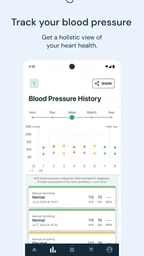
The app’s role is clearest when you think of it as a bridge between a measurement and a conversation. A reading taken at home can be more useful than a vague memory of how you felt, especially if you want to bring a specific observation to a clinician. In practice, that means I would use Kardia with a clear purpose: follow the instructions for a compatible device, record information when appropriate, and review it in the context of professional advice rather than trying to diagnose myself from a screen.
Connectivity is part of that bridge. Depending on what you are doing in the app, a stable connection may be relevant to account-related tasks or moving information beyond the phone. I would avoid leaving an important record or care discussion until the last minute in a place where reception is unreliable. If I wanted to show a clinician a particular reading, I would prepare beforehand and check that the information I need is accessible, rather than assuming a weak signal will be harmless.
That practical habit is especially useful for appointments. Before leaving home, I would review the records I plan to discuss and make sure I know how to find them in the app. It is a small step, but it avoids turning a short consultation into a search through menus or a struggle with connectivity. The app is most effective when the phone is a prepared record-keeping tool, not when you are trying to set everything up while sitting in a waiting room.
Making readings useful in everyday life
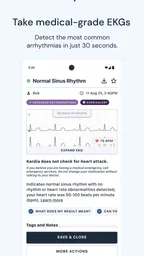
A realistic use case is someone who notices an unusual sensation at home and wants to keep a record to discuss with their care team. Instead of relying on memory several days later, they can use their Kardia setup according to its instructions and keep the resulting information organized through the app. The important benefit is not that a single result explains what happened, but that a timely record can make a later conversation more concrete.
I would also be deliberate about when I take a reading. If I were rushing, walking around, or distracted by notifications, I would pause and follow the device’s instructions rather than treating the measurement like a quick phone check. A calm routine helps make the process more repeatable. Keeping the phone close, opening the app before starting, and allowing yourself a moment to concentrate can reduce avoidable friction without pretending that technique alone guarantees a particular result.
For people who travel between home, work, and appointments, the phone makes the record easier to carry than a paper note. But that convenience has a limit: the app cannot make every setting equally suitable. A noisy, hurried moment in public may not be the best time to take or review a reading. I would choose a quiet place when possible, and if the situation feels urgent, I would prioritize appropriate medical help rather than spending time trying to use an app.
What to expect on a phone
Kardia is a medical tool, so I would approach its mobile experience differently from a step counter or a general fitness dashboard. The goal is not to check it repeatedly for entertainment. It is to use it when there is a reason, then keep the information in context. That narrower purpose can be a strength for someone who wants a practical heart-care routine without a stream of unrelated wellness features.
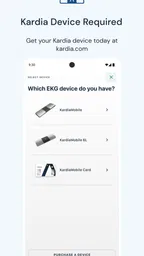
The app is not a standalone replacement for the hardware needed to capture a reading. If you do not have a compatible Kardia device, installing the app alone is unlikely to provide the experience many people are looking for. That is the first thing I would clarify before downloading: identify the specific device you intend to use and make sure the app fits your care routine. If your main goal is broad activity tracking, a smartwatch or general health app may be a better match.
Phone use also brings familiar everyday distractions. A call, low battery, or an interrupted session can break concentration, so I would avoid starting a reading when I know I may be pulled away. Keeping the phone charged and setting aside a quiet moment are simple steps, but they matter more here than they would when casually checking a notification. The app works best as part of a deliberate process, not as something squeezed into a hectic minute.
At the time of writing, the current version is 5.61.0-8a9f62a8b9, and the app requires Android 8.0 or later. The version number is useful when checking compatibility or troubleshooting with support, but I would not assume that every device behaves identically just because it meets the minimum operating-system requirement. Phone models, system settings, and connection quality can all affect how smooth a particular session feels.
When something interrupts the process
Any app-based care routine needs a sensible response to failure. If a reading does not complete as expected, I would first stop and check the basics: whether the device is positioned and used as instructed, whether the phone is functioning normally, and whether the connection is stable if the step I am attempting needs one. Repeating the same action in a hurry is rarely a useful troubleshooting strategy, especially when the result could influence a health decision.
If a saved record is not immediately visible, I would not assume it has vanished or keep creating duplicates without checking. I would give the app a moment, reopen the relevant area, and verify what is actually present before trying again. For anything that matters to a clinician, a cautious approach is better than relying on a memory of what the screen briefly showed. If the issue persists, the appropriate next step is to consult the app’s help resources or the device’s support guidance.
There is also a more important kind of failure: expecting a phone tool to handle a medical emergency. Kardia is not a reason to delay urgent care when symptoms are severe or alarming. I would use it for planned monitoring and documentation, not as a gatekeeper that decides whether I deserve medical attention. That boundary is essential, even for users who find the readings reassuring or have been advised to monitor their heart.
When connectivity is poor, I would separate the immediate measurement task from anything that depends on sending or retrieving information. I would not claim the app works offline in every situation; instead, I would plan around uncertainty. If I need a record for an upcoming appointment, I would check it in advance while I have a reliable connection. This approach reduces the chance that a network problem becomes a last-minute obstacle.
Using health information thoughtfully
Heart information is personal, so I would be selective about where and how I use the app. A phone may be shared with family, viewed by someone nearby, or used in a public place. A private setting is a better choice for reviewing sensitive details, and a device passcode is a sensible general safeguard. I would also avoid sending screenshots or records casually; if I need to share information, I would use a method recommended by my clinician or the app’s own available options.
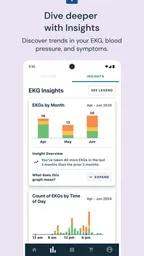
There is a useful distinction between collecting more data and collecting better data. Repeatedly taking readings without a reason can create anxiety and make it harder to identify what is genuinely worth discussing. I would follow the schedule or instructions given by a health professional, note relevant context when appropriate, and resist treating every variation as a diagnosis. Kardia’s value is strongest when it supports a specific care plan rather than encouraging constant self-checking.
For someone who wants a written timeline, a small habit can help: after a reading, make a brief note of what was happening and why it was taken, if that is relevant to the clinician’s advice. The app may hold the measurement information, while a concise personal note can preserve context that a number alone may not convey. This is not a reason to over-document every sensation; it is a way to make occasional records easier to interpret in conversation.
People who do not want to manage a device, phone, and health records may find the setup too involved. A clinician-led monitoring plan or a simpler approach recommended by their care team could be more suitable. Likewise, someone who expects the app to explain symptoms automatically should look elsewhere for guidance from a qualified professional. The app is a tool for supporting care, not an independent medical decision-maker.
Who will get the most from it
I would recommend Kardia to someone who has a compatible device, has a reason to monitor heart information, and is prepared to use the results in conversation with a medical professional. It is particularly practical for people who want their records available on a phone rather than scattered across paper notes or remembered imperfectly. The app’s medical focus is also a better fit for this purpose than a general fitness tracker that emphasizes activity and lifestyle metrics.
It is less compelling for someone who only wants a free app that can assess heart health without any additional equipment. It may also be the wrong choice for a person who is uncomfortable handling digital health records, has no guidance about what to do with readings, or wants an app to replace medical evaluation. In those cases, starting with a clinician’s advice is more useful than downloading a monitoring tool and guessing how to interpret it.
Compared with ordinary alternatives, Kardia occupies a narrower lane. A smartwatch can be more convenient for passive, everyday tracking when the wearer already owns one, while a paper log can be enough for a simple clinician-directed routine. Kardia makes more sense when its compatible hardware and app are already part of the plan and the user values a dedicated record. The trade-off is that it asks for a more intentional workflow and does not remove the need for medical interpretation.
My connectivity verdict
After weighing its role and limitations, I see Kardia as a useful, focused companion for people already engaged in heart monitoring—not a universal health app. Connectivity matters most when setting up, reviewing, or sharing information, so I would prepare records before appointments and avoid depending on a weak signal at a critical moment. At the same time, I would not let network access become a reason to delay care or repeatedly chase a reading.
AliveCor Inc. has built an app aimed at a specific need, and that focus is its main advantage. The free download lowers the barrier to trying the software, but the practical value still depends on suitable hardware and a clear reason to monitor. My advice is to confirm the device fit, follow the instructions and clinical guidance, and treat the app as a record-keeping aid rather than a diagnosis. Used that way, it can make heart-care information easier to bring into an everyday conversation with a clinician.
What we like
- Provides quick ECG readings using a compatible Kardia device.
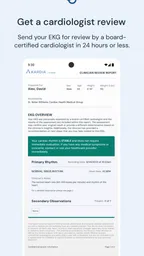
- Can help detect possible atrial fibrillation for clinician review.
- Stores ECG recordings for later reference.
- Offers an easy way to share recordings with a healthcare professional.
- Supports monitoring between scheduled medical visits.
What could be better
- Requires a separate compatible Kardia device for ECG recordings.
- Readings do not replace a professional diagnosis.
- Some features may require a paid subscription.
- Results can be inconclusive and may need repeating.
- Availability of features can vary by device and region.





