

IXL review
 Analysis by Appsdrops
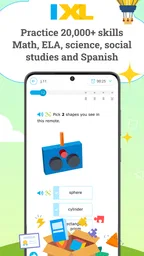
I find IXL most useful when learning needs to fit around an ordinary family day rather than take over the whole evening. It is an education app from IXL Learning, aimed at K–12 subjects, and its main appeal is the chance to practise different school skills in one place. On a shared tablet, that can be handy: one child might work on a maths topic while another uses the device later for a different subject. The important thing is to treat it as a practice tool, not as a substitute for a teacher, a full lesson, or a conversation about what a child is learning.
How it fits into a shared-device routine
Picture a weekday after school: a child has a short stretch of time before dinner and wants to review something from class. IXL can provide a focused activity without requiring the family to gather books and worksheets first. I like this kind of use because it gives practice a clear beginning and end. A parent can agree on one subject or skill for the session, then check in afterward about what felt easy or confusing.
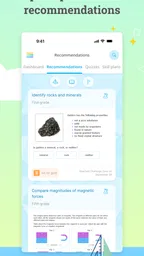
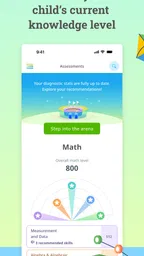
The app’s personalized approach is a useful idea for families with learners at different stages. Instead of expecting everyone to follow the same sequence, each person can work on material suited to their own school needs. That matters in a household where siblings share a screen but are not studying the same things. It also gives a parent a practical way to offer support without trying to turn the whole device into a classroom.
There is a trade-off, though: shared hardware does not automatically mean shared progress is easy to manage. Before children take turns, decide whose account or learning session they are using and make sure they know when to stop and hand over the device. I would not rely on a child remembering to switch contexts every time. A small household routine—finish the current activity, leave the app in a neutral state, then let the next learner begin—can prevent one person’s work from being confused with another’s.
Set expectations before the first session
IXL is free to download, and its content rating is Everyone, which makes it approachable for a broad range of households. Still, an all-ages label is not a promise that every activity will suit every child’s current level or attention span. I would sit with a younger learner at first, help them find a comfortable starting point, and see whether the way questions are presented makes sense to them.
For older children, the boundary can be less about sitting beside them and more about agreeing on purpose. Are they reviewing a topic from school, practising a weak area, or exploring a subject they enjoy? That simple question makes it easier to judge whether the session was useful. It also keeps the app from becoming an open-ended screen-time filler when the child would benefit more from a specific explanation or a break.
One practical tip is to keep a short note of the topic a learner worked on and what they want to revisit. This does not require a complicated tracking system; a paper planner or a quick family check-in is enough. The benefit is that the next session can start with a clear intention rather than a round of browsing. If the child repeatedly gets stuck, I would pause practice and look for a teacher’s explanation or another resource that teaches the concept step by step.
Coordinate without turning practice into pressure
Personalized practice can help a learner spend time on relevant material, but it can also make adults focus too heavily on visible progress. I would use IXL to prompt a conversation, not to rank siblings or turn every session into a test. Ask what the child understood, which question made them think, and what they would like to try next. Those questions tell me more about learning than simply asking whether they completed an activity.
For a shared device, coordination is especially important when different children use it at different times. Agree on a reasonable handoff routine and avoid assuming the next person will know where the previous learner left off. If a household already has a school routine, place IXL alongside it: for example, use it for a brief review after homework, rather than replacing assigned work or stretching study time late into the evening.
Another useful workflow is to connect practice to something the child has just encountered at school. If a topic is familiar, the app can offer a way to reinforce it; if it is brand new and the child has not had an explanation, independent questions may be frustrating. In that case, I would ask the teacher or use a teaching resource first, then return to IXL for practice. This distinction helps prevent a learner from mistaking unfamiliarity with a subject for personal failure.
Who is likely to feel at home in IXL?
I see the strongest fit for families looking for flexible K–12 practice across subjects, especially when a child can work independently for a short period and ask for help when needed. It may also suit parents who want one learning app to support more than one school subject, rather than installing a separate practice tool for every topic. The breadth is convenient, but it does not remove the need to choose carefully: a focused session on one relevant skill is usually more manageable than browsing without a goal.
IXL may be less suitable for a learner who needs a teacher to explain every new idea before attempting questions, or for a child who finds screen-based practice discouraging. It is also not my first pick when the main need is a long, connected lesson with extensive spoken explanation, hands-on projects, or direct feedback from a human tutor. A textbook, classroom materials, a teacher’s guidance, or a subject-specific lesson app may serve that need better. I would choose the tool based on the learning problem, not on the assumption that one app should cover everything.
Compared with a stack of worksheets, IXL’s digital format is easier to use in short bursts and can make it simpler to move among subjects. Compared with a video lesson, it is more oriented toward active practice than watching someone explain a topic. Those are different jobs, so I would not treat the app as a winner in every comparison. If a child already understands a skill and needs repetition, practice can be a sensible choice; if they do not understand the idea yet, explanation should come first.
Age, trust, and a parent’s role
Because the audience spans school-age learners, I would match the app to the child rather than assume that the same setup works for everyone. Younger children may need help navigating and interpreting questions, while older learners may prefer to manage their own study plan. In both cases, a parent can make the experience more useful by checking that the chosen activity connects to a real learning goal and by staying open to the child’s feedback.
The broad age rating is reassuring as a starting point, but it should not replace a family’s own judgment about screen habits, independence, or subject readiness. I would introduce the app in a shared space at first and watch how the child responds. If practice feels productive, they can gradually take more responsibility. If it leads to tension or confusion, a shorter session or another learning format may be a better fit.
IXL has an average rating of 3.9 from around 46,000 ratings, with about 8,900 written reviews, and it has been installed over 5 million times. I take those figures as signs that it is a widely used option, not proof that every family will like its approach. The app has been available since July 26, 2014, and version 12.0.3 requires Android 7.0 or later. That makes checking device compatibility a sensible first step if the household relies on an older Android phone or tablet.
My household verdict
For a family sharing a device, IXL is worth considering when the goal is straightforward school-skill practice that can fit into a short, planned session. I especially like the idea of using it as a bridge between classroom learning and a quick review at home, rather than expecting children to spend a long time in the app. It can make different learners’ practice easier to organize around one device, provided the family agrees on account boundaries and takes turns deliberately.
My advice is to start with one learner, one subject, and a clear reason for opening the app. Watch whether the child can work comfortably and whether the practice helps them explain what they are learning. If it does, make it part of a modest routine. If the child needs fuller teaching, dislikes the format, or becomes more focused on completion than understanding, switch to a resource that better matches that need. IXL is most valuable when it supports thoughtful practice—not when it is asked to replace a teacher, a parent’s attention, or the rest of a balanced learning routine.
As an education app from IXL Learning, it is free and has an Everyone content rating. For families who want a flexible practice option, that combination makes it easy to try; the real test is whether its question-based work suits the learner and the household’s way of studying. I would recommend giving it a purposeful trial, then keeping it only if it helps your child feel more capable with the material.
What we like
- Adaptive practice adjusts question difficulty to the learner.
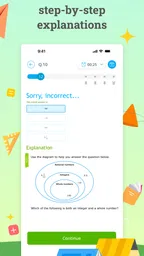
- Detailed explanations help clarify mistakes.
- Progress reports make skill gaps easier to spot.
- A wide range of subjects is available in one app.
- Parents can monitor learning progress through reports.
What could be better
- Full access requires a paid membership.
- Some learners may find repeated practice monotonous.
- The interface can feel busy for younger children.
- Questions may rely heavily on multiple-choice formats.
- Limited offline access can hinder practice without internet.





