

Intermountain Health review
 Analysis by Appsdrops
When healthcare is already taking up your attention, keeping track of appointments, messages, and records can feel like a separate job. Intermountain Health is a free medical app from Intermountain Healthcare that aims to make those routine tasks easier to manage from a phone. I see its value less as a replacement for a conversation with a clinician and more as a practical place to handle the administrative side of care.
The app is best suited to people who already receive care through Intermountain and want a convenient digital connection to it. It has an average rating of 4.3 from around 1,400 ratings, and it has been installed over 100,000 times. Those figures suggest a sizeable audience, but the more important question is whether its setup fits your own care. If your clinicians and records are elsewhere, a general health app or that provider’s own patient portal may be more useful.
Build a reliable everyday routine
A patient portal works best when I treat it as a regular part of managing care, rather than something I open only when a problem appears. With Intermountain Health, a sensible baseline is to check it around planned appointments, use it to keep up with care-related communication, and return to it when I need to review information connected to that care. The app’s store summary, “Care Simplified by MyChart,” points to that patient-portal role; it is not a substitute for emergency care or a general medical advice service.
For a routine visit, I would open the app before the appointment to see what relevant information is available, then check it again afterward rather than relying on memory alone. That small habit can help me keep the digital side of care organized. It is especially useful when several ordinary tasks—finding an appointment detail, following a message, or revisiting a record—would otherwise be spread across notes, email, and memory.
A realistic example is a person juggling work and a follow-up visit. They can make checking the portal part of their appointment routine: look for relevant details before leaving, then return after the visit to review anything the care team has made available. The benefit is not that the app makes healthcare effortless; it gives those tasks a consistent home. I would still keep any important instructions I need immediately somewhere accessible, rather than assume a phone app is the only dependable place to find them.
The biggest practical condition is having a relationship with Intermountain care that makes the portal relevant. An app can be polished and still add little if the information you need is maintained by another health system. Before making it part of a daily routine, I would check whether the clinicians and services I actually use connect to this account. That is a more useful test than downloading it simply because it is free.
Check the setup before relying on it
Intermountain Health is a medical app for everyone, and it is free. It was released on January 17, 2019, and its current version is 11.7.2. The minimum operating-system requirement is version 11, so I would check that an older phone meets the requirement before planning to use the app as my main portal. A device that cannot run the current app can undermine an otherwise convenient workflow.
After installing it, I would take a moment to confirm that I am using the right account and can reach the care information I expect. That is a useful early check, not busywork: a portal is only helpful if its contents correspond to the patient and care relationship I intend to manage. If I am setting it up for a family member, I would be careful to distinguish their care from my own rather than assume that one login automatically covers both.
I also recommend reviewing the phone’s notification settings. A patient portal can be easier to keep up with when alerts are allowed, but health-related notifications may appear on a lock screen or at an inconvenient time. I would choose a level of visibility that suits my privacy needs, and avoid treating a notification as a complete record of a message. Opening the app to read the actual information is a safer habit than relying on a short alert.
It is worth deciding where this app fits alongside other tools. If I already use a calendar for appointments, I would keep that calendar for scheduling and use the health app for care-related information, rather than trying to make one tool do both jobs. Likewise, a personal notes app may still be useful for questions I want to raise at a visit. This division keeps the portal focused and makes it less likely that I will confuse my own reminders with information from a clinician.
Small habits that make repeat visits easier
Experienced users can save effort without relying on undocumented shortcuts: they repeat a simple sequence. Before a visit, they check the portal for relevant updates and write down questions in their usual notes app. Afterward, they return to the portal to review any information that has been made available. Repeating the same sequence is more dependable than trying to remember which screen held something several months later.
Another useful pattern is to check the app at a deliberate time instead of reacting to every alert. Someone with a busy day might choose a quiet moment to review portal activity, then handle non-urgent follow-up in one sitting. This is a personal routine, not a special feature, but it can prevent health administration from interrupting work or family time. If a matter feels urgent, I would not wait for a scheduled app check; I would use the appropriate direct care channel.
For recurring care, I would also keep a short list of topics to revisit at each appointment. The app can serve as the place to review available care information, while the list helps me remember what I want to ask. This pairing is particularly handy for people who see clinicians periodically and find that questions occur to them between visits. It avoids the assumption that a portal will automatically organize every personal reminder or replace a conversation.
When helping a relative, I would agree on a clear routine before trying to manage care on their behalf: who checks the app, when information is reviewed, and how questions are passed to the care team. That approach reduces confusion without assuming that the app provides a particular sharing arrangement. It also respects that a patient’s account and a caregiver’s role are not necessarily the same thing.
Where a patient portal helps—and where it stops
Compared with a paper folder or scattered email, a provider-linked portal can make it more natural to return to care information in one place. Compared with a general health tracker, its purpose is different: a tracker is often centered on information a person records about themselves, while Intermountain Health is aimed at managing a connection to Intermountain care. If your priority is tracking habits or symptoms across providers, a dedicated tracking tool may suit you better. If your priority is handling the digital side of care within this health system, a patient portal is the more relevant category.
That distinction matters because a portal does not guarantee that every health task belongs inside it. I would not use it as a replacement for emergency services, nor assume that a message or record review will produce an immediate response. For time-sensitive symptoms, a direct phone call or urgent care route is more appropriate. For broader health questions that are not tied to Intermountain, a clinician who knows your situation is more useful than treating the app as a medical reference.
There is also a trade-off in keeping care digital. A phone makes it easier to check information while away from home, but it depends on access to a compatible device, a working account, and the user’s comfort with managing health details on that device. Anyone who prefers face-to-face help with appointments or struggles with account setup may find calling the provider or asking for in-person assistance more straightforward. The app is a convenience, not a requirement for receiving care.
I would be cautious about using the app as the sole place for something I must remember at a precise moment. A portal can support follow-up, but I would keep essential personal reminders in a calendar or another dependable system and confirm any important care instructions through the appropriate clinical channel. That is not a criticism unique to this app; it is a sensible boundary for any patient portal.
A good fit for connected care, not every patient
Intermountain Health makes the most sense for people whose care is already connected to Intermountain Healthcare and who are comfortable handling routine administrative tasks on a phone. Its appeal is practical: one provider-specific app can become a familiar point of reference for visits and care-related information. The app’s medical focus is clear, and its free price removes a purchase decision, though it does not remove the need to check device compatibility and account fit.
I would skip it if I do not receive care through Intermountain, if I want a single tool that brings together records from unrelated providers, or if I prefer to manage healthcare entirely by phone or in person. In those cases, a portal from the health system I actually use, a broader record-management option, or direct contact with the provider is likely to be more useful. The right choice depends on where care happens, not on which app has the broadest-sounding purpose.
My overall view is that Intermountain Health can earn a place in a routine when it is matched to the right provider relationship and used consistently. I would set it up, verify that the expected care information is available, choose notification settings that protect my privacy, and settle on a repeatable before-and-after appointment habit. That is a modest but worthwhile way to reduce the friction of managing care. It is not a universal health organizer, and it should not be treated as urgent medical support, but for an Intermountain patient who wants a straightforward digital companion to routine care, it is a sensible option.
What we like
- Find care options and health resources in one place
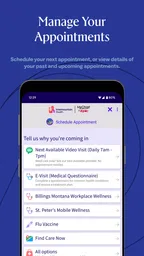
- Manage appointments without calling the clinic
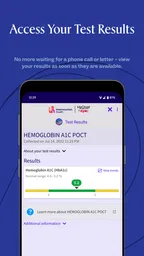
- Access health records and test results on the go
- Use virtual care to connect with a provider remotely
- Helpful for patients already receiving Intermountain care
What could be better
- Some features may require an Intermountain Health account
- Available services can vary by location
- Not every appointment type may be bookable in the app
- Virtual visits depend on a reliable internet connection
- The app may be less useful for people outside the network





