

HealtheLife review
 Analysis by Appsdrops
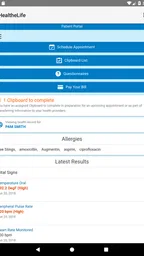
I’d approach HealtheLife as a convenient doorway to health information, not as a complete health-management system on its own. The app is made by Cerner Corporation, and its appeal is straightforward: it gives people a way to manage health online from a phone. Whether that proves useful depends on the care services available to you and how comfortably you handle personal health information on a mobile device.
Trust starts with knowing what the app is for
Health apps ask for more confidence than a typical utility because the subject is personal. I would first treat HealtheLife as a companion to the care arrangements already in place, rather than assume it can replace a clinician, a provider’s own instructions, or an urgent-care service. Its role is to make online health management more accessible; medical decisions still need to be made with appropriate professional guidance.
The app sits in the medical category, is free to download, and is rated for Everyone. That age label describes its content rating, not whether a child should manage an adult’s health account. If a family member is helping someone else, I’d make sure the account arrangement is appropriate and that the person receiving care understands what is being shared and who is using the device.
HealtheLife has an average rating of 3.3 from around 2,700 ratings, alongside about 1,300 written reviews and more than one million installs. I read those figures as a reason to set practical expectations, not as proof that the app will work the same way for everyone. A health portal can be useful for one person and frustrating for another, especially when its usefulness depends on how their care provider has set up online access.
Check the care connection before relying on it
Before making this part of a routine, I’d confirm that the healthcare organization or service you use supports access through HealtheLife. The name alone does not guarantee that your particular provider’s information will appear. If you cannot connect the care you need, the app may have little value for you, and using the provider’s established patient portal or contacting its office directly may be the better route.
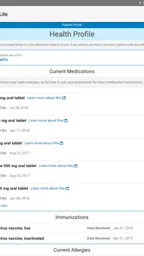
This is also why I would not treat the app as a universal medical record. Its usefulness comes from the health services and account access available to an individual user. If you see only a portion of the information you expected, avoid assuming that it represents your full medical history. For an important appointment or treatment decision, confirm details with the relevant care team.
Account controls are worth checking for yourself
My trust test for any health app is practical: I want to know which account I am signed into, what information is visible, and what choices the app offers me. I would review the available account and privacy controls during setup, then revisit them if I change phones or begin helping a relative. I would not assume that an app’s presence on a device automatically means every useful account or privacy choice is obvious.
Because the exact controls can depend on the user’s setup, I would avoid relying on a feature being present until I can see it in my own account. Look for the options the app actually presents, and use the provider’s support channel if you are uncertain about access or account handling. That is more dependable than guessing from another person’s experience or from a general description.
A simple device habit matters too. If you share a phone or tablet, sign out when appropriate and use the device’s own screen lock. I would also be careful about leaving health information open where someone else can see it. These are not a substitute for app-level safeguards; they are sensible steps for reducing casual exposure on a device you do not use alone.
Health information deserves deliberate handling
The most sensitive moments are often ordinary ones: checking information while sitting with family, opening the app in a waiting room, or handing a phone to someone for help. I would pause before displaying anything private in a public place and avoid sharing account credentials just to make access easier. If another person needs to assist, it is better to understand the account’s permitted access options than to treat password sharing as the default solution.
I would also keep a clear boundary between information shown in the app and urgent medical needs. A mobile portal is not a reason to wait for an app response when someone needs immediate attention. For an emergency, use the appropriate local emergency service; for a non-urgent question, contact the care provider through the channel they recommend. That distinction makes a health app a useful convenience instead of a risky substitute for care.
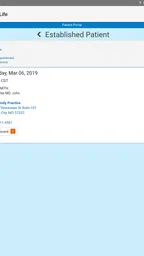
When preparing for an appointment, a sensible workflow is to open the account beforehand, check that you are in the correct profile, and note any information you want to discuss. If something appears incomplete or unclear, bring the question to the clinician rather than trying to interpret it alone. This keeps the app in its strongest role: helping you arrive better prepared, without asking it to make a diagnosis.
Where it fits beside other options
Compared with keeping notes in a general-purpose phone app, a health-focused portal may be a more natural place to access information connected to care. But a notes app can be quicker for jotting down a question or a symptom reminder, while a provider’s own portal may be preferable if that is where your care organization directs you. I would not move sensitive details into several places just for convenience; duplication can make it harder to know which information is current.
For someone who mainly wants a personal wellness tracker, HealtheLife may not be the right choice. A dedicated tracking tool may suit that goal better, provided its data practices and controls meet the user’s needs. Likewise, people who prefer speaking to staff or receiving paper instructions may gain little from adding another digital account. I see the app as most appropriate for someone who already wants online access connected to their health care.
On the other hand, it may be helpful for a person who regularly handles appointments or health-related tasks on a phone and wants a single starting point for the services available through their account. A family caregiver could also find a mobile portal convenient, but only when access is set up appropriately and the person receiving care is comfortable with the arrangement. Convenience should not quietly erase the patient’s control over personal information.
Small habits that make use more dependable
I would begin by installing the app only on a device I can protect, then take a moment to confirm the account identity before using it. If I were helping someone else, I would keep their information separate from my own and avoid assuming that switching profiles is foolproof. Those checks are especially worthwhile on a shared household device, where a hurried tap can expose the wrong person’s information.
For routine use, I’d decide what I actually need from the app before opening it: preparing for a visit, reviewing available health information, or handling an online task. That keeps the session focused and reduces the temptation to treat a partial view as a complete picture. If the app does not provide the information or action I need, I would use the care provider’s established route rather than repeatedly searching through menus.
Updates can matter for stability and compatibility. The current version is 102.0.34, and the minimum operating-system requirement is version 9. If the app behaves poorly, I would first check that the device meets that requirement and that the app is current, then try the provider’s support route if the problem involves access. A login or account issue is not something I would try to solve by sharing credentials or creating duplicate accounts without guidance.
My cautious recommendation
HealtheLife is best judged as a provider-connected health companion, not a universal medical hub. I would recommend trying it if your care arrangements support it and you want online access from a phone. Its free price removes a purchase decision, but it does not remove the need to check whether it suits your provider, your device habits, and your comfort with managing health information digitally.
The main trade-off is that convenience depends on a working account relationship and a user who is comfortable handling sensitive information on a mobile device. Someone expecting a comprehensive record, a diagnosis tool, or a replacement for direct clinical contact should choose a different approach. Someone who wants an online route to the health services available through their account may find it worthwhile, as long as they confirm details with their care team when something matters.
Developed by Cerner Corporation and released on October 26, 2015, HealtheLife has been available long enough to have a substantial user base, but individual experiences still vary. I would start with a low-stakes task, inspect the account choices that are actually visible, and decide from there whether it earns a regular place on my phone. That is the most sensible way to balance its convenience with the care and discretion health information deserves.
What we like
- Provides a convenient way to check health information on the go.
- Secure messaging can make contacting a care team more convenient.
- Appointment tools help users keep track of upcoming visits.
- Some organizations allow users to request prescription refills.
- Caregivers may be able to access health information with authorization.
What could be better
- Available features depend on whether your health organization supports the app.
- Some users may need a separate account for each care organization.
- Messages and test results may not receive immediate replies.
- The app is not intended for emergency medical situations.
- Login or verification issues can make access inconvenient.





