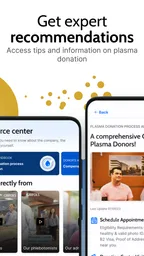
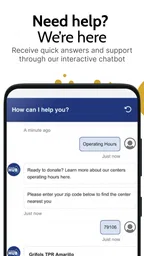
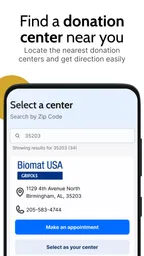
Grifols Plasma Donor Hub review
 Analysis by Appsdrops
I judge a donor app less by how polished its screens look than by whether it helps when I’m actually trying to plan a visit. Grifols Plasma Donor Hub is a medical app from GRIFOLS SA, built around the plasma-donation experience rather than general health tracking. That focus can make it useful for people who already donate through Grifols, but it also means its value depends on whether the information and tasks you need are available for your situation and whether your phone can connect when you need them.
Where a connection matters most
The clearest reason to use Donor Hub is to keep donation-related activity together on a phone instead of relying only on memory, paper, or a string of separate reminders. In practice, that makes it most relevant before and around a visit: when you want to check the app, organize your plans, or have donation information handy while preparing to go. I see it as a companion to the donor process, not a replacement for the center or for medical guidance.
That distinction matters because an app can only be dependable if the information it needs to show is reachable at the moment you open it. If you are at home with a stable connection, checking the app as part of your routine should feel more straightforward than waiting until you are already on the move. I’d make a habit of opening it before leaving, rather than assuming every screen or action will be available in a weak-signal location.
A realistic use case is a donor getting ready for an appointment after a busy day. Instead of trying to remember details while rushing out, you can make checking Donor Hub part of the same routine as gathering your essentials. The practical tip is to do that check while connected, then allow a little time to resolve any uncertainty before travel. That small change can prevent a last-minute scramble, even though it cannot guarantee that every issue will be solved in the app.
For first-time donors, the app may be less of a standalone guide than an ongoing point of contact with a donation process they are still learning. I would use it alongside the instructions from the donation center, especially if a question concerns eligibility, a health change, or whether to proceed. A phone interface is convenient for organizing routine tasks; it should not be treated as a medical decision-maker.
Planning around mobile signal
Donor Hub is designed for mobile use, and that makes the setting important. A donor might open it at home, during a commute, in a parking area, or while moving between places. Those situations do not offer the same quality of connection. If the app is part of your visit routine, the most reliable approach is to do important checks before entering a location where reception may be poor, rather than waiting until you are at the door.
This is especially useful for people who travel through areas with patchy service or who depend on public Wi-Fi. I would not make a donation-day plan that assumes a public network will be available, stable, or convenient to join. Nor would I count on a screen remaining current simply because it was open earlier. When a detail matters, refresh or review it while you have a dependable connection and make sure you understand what you are looking at.
There is also a simple battery-and-attention trade-off. Opening an app repeatedly in transit to see whether a page has loaded can waste time and make a straightforward errand feel more complicated. I’d check the relevant information once before setting out, then use the app again only when there is a clear reason. This is not a special trick so much as a sensible way to make a connection-dependent tool fit into a real day.
For someone who donates regularly, this small planning habit can be more valuable than expecting the app to do everything. Put the app check beside an existing cue, such as getting ready to leave, rather than relying on a vague intention to remember later. That workflow is particularly helpful when donation visits compete with work, errands, and family plans.
When loading or access gets in the way
Connectivity problems are frustrating precisely because they often happen at inconvenient times. If a screen does not load, I would first check whether the phone has a usable connection, then try again somewhere with stronger service. If the problem continues, closing and reopening the app is a reasonable basic step. Those actions are general troubleshooting, not a promise that a particular error has a specific fix.
The more important point is not to let a failed load become a medical or scheduling assumption. A blank or delayed screen does not tell you whether you are eligible to donate, whether a visit is confirmed, or whether a health concern is unimportant. If the matter affects whether you should go ahead, contact the donation center through its usual channel instead of repeatedly refreshing the app and treating silence as an answer.
I also recommend leaving time for recovery. If you open Donor Hub only moments before you need to act, even a short connection interruption can create avoidable stress. Checking earlier gives you room to retry, move to a better signal, or use another appropriate way to get help. That is a useful habit for any donor, but it matters most for people whose travel or work schedule leaves little flexibility.
When an app behaves inconsistently, it can be tempting to reinstall it immediately. I would try less disruptive steps first: confirm the connection, restart the app, and check whether the phone’s software is compatible. Reinstallation can mean setting things up again, so I would reserve it for persistent problems and make sure I know how to regain access before removing anything. The goal is to recover calmly, not turn a minor loading delay into a larger access problem.
Using it thoughtfully with personal information
A medical-category app naturally deserves a little more care than a casual entertainment app. I would use it on a phone protected by a screen lock, avoid signing in on a device other people share, and be deliberate about what appears on the display in public. These are practical privacy habits, not claims about the app’s specific data practices.
Connection choices matter here too. If you are uncomfortable using an unfamiliar public network for an account-related task, wait until you have a connection you trust. That does not mean every public network is unsafe; it simply gives you more control over when you access personal information. I also would not send sensitive details through an unrelated messaging service just because the app is not loading. Use the appropriate contact route for the donation center instead.
Donor Hub should also be treated as one part of a broader personal routine, not the sole place where important health information lives. If you have a medical concern, keep track of it in a way that works for you and raise it with qualified staff. The app’s convenience is most useful for ordinary donor-related organization; it cannot replace a conversation when your circumstances have changed.
Who will get the most from it
I’d recommend Grifols Plasma Donor Hub first to people who already use Grifols’ plasma donation services and want a mobile point of reference for the process. It is less compelling for someone who is only researching plasma donation in general, donates through a different organization, or rarely uses a smartphone for appointments. In those cases, the center’s direct guidance or a simple personal calendar may be enough.
Compared with the usual alternatives, the app’s advantage is its connection to a specific donor experience. A calendar can remind you to leave home, but it does not serve the same role as an app intended for Grifols donors. On the other hand, a calendar is usually simpler for a one-off reminder and does not require you to open a dedicated service app. I would use both only if each has a clear job: the app for donor-related tasks and the calendar for a plain reminder, rather than duplicating everything.
The app is free and rated for Everyone, so there is no purchase decision to weigh before trying it. Its average rating is 4.7 from around 48 thousand ratings, with about 4.7 thousand written reviews, and it has over 1 million installs. Those figures suggest that many people have tried it, but they do not tell me whether it fits a particular center, phone, or donor’s routine. I would treat them as context, not as a substitute for checking whether it makes your own visits easier.
It first appeared on November 9, 2021, and the current version is 13.6.7. The stated minimum operating system is 7.0, so compatibility is worth checking if you use an older phone. Keeping the app and phone reasonably up to date is a sensible first step if you run into trouble, though no update can fix a weak mobile signal by itself.
My connectivity verdict
My view is that Donor Hub is most useful when it is part of a prepared routine, not something you depend on at the last second. Check it while connected, leave time to respond to a problem, and use the donation center for questions that require a human answer. Those habits make the app more practical without expecting a mobile tool to remove every uncertainty from donating plasma.
For an existing Grifols donor with a compatible phone, I think it is worth trying: its focused purpose is more relevant than a generic health tracker, and it may make donor-related planning easier to keep close at hand. I would skip it if you are not part of the Grifols donation process or prefer not to manage appointments and related tasks on a phone. The key trade-off is straightforward: convenience when your connection is available, alongside the need for a backup plan when it is not.
What we like
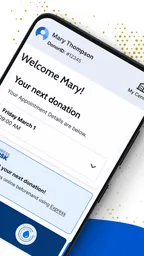
- Donors can review appointment details in one place.
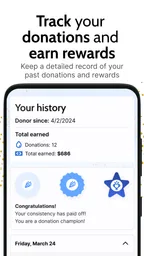
- The app provides access to donation history.
- Eligibility guidance can help donors prepare for visits.
- Users can manage their donor account from a mobile device.
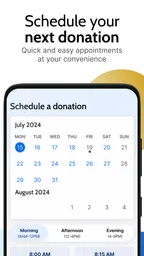
- Appointment reminders can help reduce missed visits.
What could be better
- Available features may vary by donation center.
- Some account actions may require contacting the center.
- A stable internet connection is needed to use online features.
- The app is useful mainly to people donating at Grifols centers.
- Login or account setup may take extra time.





