Great Weather Alarm - Radar review
 Analysis by Appsdrops
I know the small morning scramble: check the sky, wonder whether a shower is moving in, then open another app to see if the forecast has changed. Great Weather Alarm - Radar is aimed at making that routine less fiddly. It is a free weather app from GoFish Apps, built around quick access to forecasts, radar and alerts. The idea is useful if weather checks are part of deciding when to leave, what to wear or whether to bring a coat—not if you want a full meteorology workstation on your phone.
Less morning guesswork, if quick checks are your priority
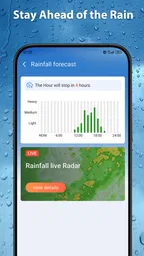
What I like about the app’s premise is its focus on reducing a repeated task rather than asking me to explore a pile of charts. A forecast is most valuable when it helps answer a practical question quickly: should I walk now, wait for a rain shower to pass, or take an umbrella? Pairing that kind of information with radar and alerts can make a weather check more actionable than glancing at a temperature alone.
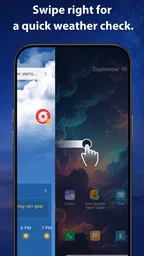
The home-screen emphasis is especially relevant for people who check conditions in brief moments. If you are heading out the door or planning a school run, getting to weather information with less navigation can save a little time each day. That convenience is the app’s strongest appeal; it is less about offering an elaborate hobbyist toolkit and more about making a routine check easier to reach.
I would still treat any forecast as guidance, not a promise. Weather changes, and a radar view is most useful when you understand it as a snapshot that helps you judge what may be approaching. For a commute or outdoor plan, I would look at the broader forecast as well as the immediate picture rather than making a decision from one glance.
Start with the information you actually use
On first use, I would keep the setup practical: make sure the app can show the place you care about, then decide whether alerts will genuinely help you. Your current area may be enough for everyday errands, while a saved destination—if available in the app’s location workflow—would be useful before a trip or a commute. Avoid enabling every notification simply because the option exists; an alert is only helpful when it changes what you do.
The app is on version 1.3.0 and supports Android 8.0 or later. It is rated for Everyone, so its intended audience is broad. The current average is 3.6 from 401 ratings, with 40 written reviews. I would read that rating as a reason to try it for your own routine rather than assume it will suit every phone, location or expectation equally well.
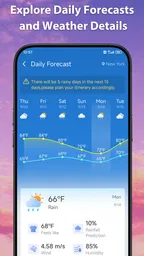
One useful habit is to separate “what is happening now?” from “what should I plan for later?” Radar is better suited to checking the movement or presence of precipitation around a near-term outing; a forecast is the more relevant starting point for deciding what to wear for the full day. Keeping those questions distinct helps prevent a dramatic-looking radar image from outweighing the rest of the forecast.
Where it can fit into an ordinary day
Imagine leaving for work on a morning when the sky looks uncertain. A quick forecast check can help you choose between carrying an umbrella and taking a lighter bag, while radar gives you another clue about whether rain is nearby. If conditions change later, an alert may be more useful than repeatedly opening the app—provided you have chosen notifications that matter to you.
For a parent planning a school pickup, the value is similar but the timing is different. You might check once before leaving home and again before the return trip, instead of relying on what the weather looked like hours earlier. Someone who walks a dog could use the same routine to choose a drier window. These are modest decisions, but they are exactly where quick access can remove a bit of friction.
It can also help when deciding whether to postpone a short outdoor task. If the forecast suggests unsettled conditions and the radar view makes the immediate picture look more promising, you can make a more informed call than by judging the clouds from one window. I would not use that as a guarantee for a long hike or a safety-critical plan; for those, a more detailed forecast source and a cautious backup plan are better choices.
A practical tip is to check at decision points rather than on a fixed loop. For example, look before getting dressed, then revisit the information only if your plans depend on changing conditions. That approach makes an at-a-glance weather app more valuable: it saves attention as well as time, instead of becoming another screen to refresh without a clear reason.
Convenience matters more than depth here
Compared with a typical weather app, Great Weather Alarm - Radar puts the emphasis on reaching core information quickly. Many alternatives are better suited to people who want extensive maps, long-range planning or a large set of specialist displays. This app’s appeal is narrower: forecast, radar and alerts presented as everyday tools, with the home screen positioned as a convenient starting point.
That focus is a trade-off, not automatically a weakness. If you mainly want to know whether rain could affect your next errand, a simple routine may be preferable to navigating several layers of detail. On the other hand, if you plan outdoor events days ahead, compare conditions across multiple locations, or need in-depth weather analysis, I would choose a more comprehensive service and use this app only as a quick secondary check.
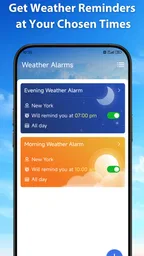
Another trade-off is alerts. They can remove the need to keep checking, but too many notifications can create the opposite problem by interrupting you without changing your plans. I would start with only the alerts that affect a real decision, then adjust after seeing whether they are timely and relevant in your area. That small bit of restraint is often the difference between a helpful warning and background noise.
What to expect before relying on it
The experience of a weather app depends heavily on the places and conditions a person checks. A quick glance may be enough for a familiar neighbourhood, while a trip to an unfamiliar area calls for more deliberate planning. I would test the app against your own daily route for a few days before making it your only source, especially if you depend on alerts to change when you leave.
There is also a difference between convenience and certainty. A home-screen shortcut can make information easier to reach, but it does not remove the need to interpret it. If rain is close, give yourself room for conditions to change; if the forecast is important to a longer journey, check again near departure. These habits matter more than expecting any single screen to settle every weather question.
Great Weather Alarm - Radar has passed 100K+ installs, and its free price makes a personal trial an easy way to see whether its quick-check approach fits your habits. I would recommend it to someone who wants a straightforward way to consult forecasts, radar and alerts without turning a weather check into a project. I would skip it as a primary tool if you need deep planning or highly specialized weather information.
My verdict is that its best feature is the time and attention it may save across small, repeated decisions. The value is not that it can make the weather predictable; it is that it gives everyday users a convenient place to check before acting. If that is the problem you want to solve, Great Weather Alarm - Radar is worth trying. If you need breadth and detailed analysis, a more advanced alternative is the better fit.
A sensible fit for everyday decisions
GoFish Apps has made a weather app for people who want useful information close at hand, and that straightforward aim is easy to understand. I would judge it by whether it helps you leave with the right layer, time a short walk or avoid an unnecessary trip into a passing shower. For those practical jobs, Great Weather Alarm - Radar has a clear role; just keep a more detailed source available when the stakes or planning horizon call for one.
What we like
- Weather alerts can help you prepare before conditions change.
- Radar maps make it easier to follow approaching weather.
- A weather-based alarm can support planning for outdoor activities.
- The app combines forecasts and alarm features in one place.
- Useful for checking weather before choosing an alarm time.
What could be better
- Weather radar coverage may vary by location.
- Forecasts can be less reliable further into the future.
- Frequent alerts may become distracting.
- Weather-based alarm features may need location access.
- Some features may depend on an internet connection.





