
Gradient Weather review
 Analysis by Appsdrops
I like weather apps that help me make a decision, not just fill a screen with numbers. Gradient Weather is built around a practical question: is rain close enough that I should change what I’m doing? Its focus on minute-by-minute rain alerts gives it a clear purpose, while its color-led design makes checking the forecast feel less like reading a spreadsheet. I’d consider it when showers are the main thing I need to plan around, rather than as an all-purpose source for every detail of the weather.
Rain timing is the app’s clearest strength
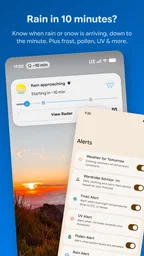
As a weather app from subtle signals, Gradient Weather pairs rain alerts with a visual style that changes to match the weather. The idea is appealing because short-term rain is exactly the sort of forecast that can alter a walk, commute, or errand at short notice. A broad daily forecast may say rain is possible, but that alone doesn’t tell me whether to leave now, bring a jacket, or wait a little.
The app’s central promise is therefore more useful than a generic forecast headline: it aims to make the timing of rain easier to notice. I’d check it before leaving home, then again if the sky begins to look uncertain. That second glance matters. A weather forecast is a planning aid, not a guarantee, and a minute-by-minute view is most valuable when I treat it as a changing estimate rather than a promise about exactly what will happen.
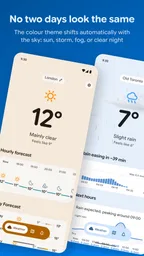
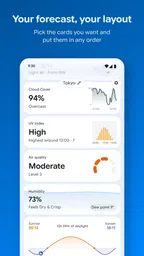
Its other defining choice is visual. Rather than presenting weather as only a set of readings, Gradient Weather uses gradients and themes that reflect conditions. That can make a quick check more intuitive, especially when I’m in a hurry and want an immediate sense of the day. The trade-off is that visual polish can’t substitute for information I need to inspect closely. I’d still want to read the forecast itself before making a decision that depends on precise timing.
A useful routine for ordinary plans
One realistic way I’d use it is before a short walk to a shop. If rain appears likely soon, I can take a coat or shift the errand; if the immediate outlook looks clearer, I can head out without overthinking the possibility of rain later. The alert focus is especially relevant for plans that last minutes rather than the whole day, such as walking a dog, collecting a takeaway, or moving between a station and an office.
For a longer trip, I’d use the app differently. I would check the near-term rain view for the first part of the journey, then compare it with a broader forecast from a service that makes longer-range planning easier. A minute-by-minute outlook is naturally most helpful for the near future; it shouldn’t be treated as a complete answer to questions about conditions much later in the day. That distinction helps keep the app useful without asking it to do a job its main feature doesn’t promise.
Weather-led design, not decoration alone
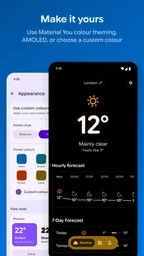
The changing palette gives the app a recognizable personality, and it may suit people who find conventional weather screens dull or crowded. I see the design as part of the experience, not evidence that the forecast is more accurate. The practical test is whether the visual treatment helps me understand conditions quickly. If I have to hunt through colors to find the information I need, the theme becomes friction; if the key forecast remains easy to read, it makes repeat checks more pleasant.
A helpful habit is to use the appearance as a cue to open the forecast, then rely on the forecast details to decide what to do. That avoids treating an attractive screen as a substitute for judgment. It also makes the app more useful for people who glance at weather several times a day: a distinct visual state can prompt a check, while the actual rain timing informs the plan.
Where it sits among familiar weather choices
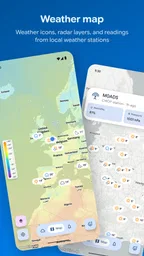
Compared with a standard weather app, Gradient Weather has a narrower identity. Many alternatives try to be the one place for current conditions, daily outlooks, maps, alerts, and other weather information. Gradient Weather instead puts short-term rain timing and a weather-responsive look in the foreground. That focus could be refreshing if I mainly want to know whether a shower is close, but it may feel limited if I expect one app to answer every weather question.
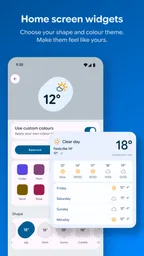
Compared with relying on a built-in phone forecast, its visual approach may make the experience more distinctive, and rain alerts give it a specific reason to earn a place on my home screen. Still, someone already satisfied with a basic forecast may not gain enough from installing another app. I’d make the decision based on a simple test: do I regularly need a better sense of when rain is approaching, or do I only check the temperature once in the morning?
How much confidence to place in the forecast
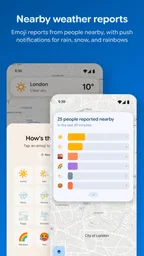
Minute-level wording can sound more exact than weather prediction really is. I’d use the alerts as a prompt to reconsider a plan, not as a guarantee that rain will begin at a particular moment. Local conditions can change, and an alert is only helpful if it reflects the place and time I care about. If I’m about to start a long drive or an outdoor event, I’d check a broader source as well instead of basing the whole decision on a short-term rain signal.
That is not a flaw unique to this app; it is a sensible boundary for this kind of feature. The more the decision depends on consequences—keeping equipment dry, protecting a long outdoor commitment, or choosing a route—the less I’d rely on one quick glance. For everyday flexibility, though, a timely heads-up can be enough to decide whether to carry an umbrella or wait before heading out.
What the product’s history tells me
Gradient Weather was released on April 28, 2026, so its public history begins recently. I wouldn’t infer a long record of refinement from that alone, or assume that a particular feature has changed since launch. The clearest evidence of its current direction is the combination of rain alerts and a weather-matching visual design. For now, I’d judge it on how well those two ideas serve a daily routine rather than on imagined future additions.
For people already using it, the most meaningful evolution to watch would be whether the core experience remains clear as the app develops: are rain alerts easy to interpret, does the design continue to help rather than distract, and does checking the forecast feel dependable enough to become a habit? Those are useful questions for any update, but I wouldn’t treat them as claims that specific changes have already happened.
The app has an average rating of 4.4 from around one thousand ratings, with 47 written reviews. That gives a prospective user a modest sense of how others respond, not a guarantee that it will suit every location or routine. Its audience is also broad in age terms, with an Everyone content rating, so the appeal is not limited to a particular age group. The real dividing line is how much you value immediate rain timing and a more expressive interface.
Who should try it—and who may prefer something else
I’d recommend giving Gradient Weather a try if sudden showers often disrupt your short trips, if you like checking forecasts throughout the day, or if you prefer a screen with more visual character than a plain list of conditions. It could be especially handy for someone whose schedule is flexible enough to leave a few minutes earlier or later when rain threatens. In that situation, a focused alert can turn a vague forecast into a small, useful choice.
I’d skip it if I want extensive planning tools in one place, rarely check the weather, or am already happy with the rain information in my usual app. I’d also choose a more comprehensive forecast service for decisions that require a wider view than immediate rain timing. The point isn’t that Gradient Weather is inadequate; it is that its strongest reason to exist is specific, and not everyone needs that focus.
It is free to install, with in-app purchases ranging from $3.49 to $54.99 per item. I’d begin with the free experience and decide whether its alerts and presentation fit my routine before considering any purchase. Those prices cover a wide range, so I would check the individual purchase details in the app store rather than assume every option offers the same thing or is necessary for ordinary use.
What I’d watch as it develops
As a newer app, its next chapter is worth judging by practical improvements rather than promises. I’d watch for clearer ways to understand an alert, a smooth experience when checking rapidly before going out, and a balance between expressive themes and readable forecast information. Those are areas where the app’s own concept can either become more useful or start to feel like style taking priority over substance.
I’d also keep expectations grounded: the release date tells me when the app arrived, not what future updates will contain. For a current decision, the essentials are already easy to understand. Gradient Weather is a free weather app by subtle signals, with a rain-first purpose and an interface designed to reflect conditions. Its audience has reached over fifty thousand installs, but that scale doesn’t remove the need to decide whether its particular focus matches your habits.
My overall view is positive but specific. I’d keep it in mind for quick decisions about rain, especially when a short walk or errand can be moved around. I wouldn’t make it my only weather source for every kind of planning, and I’d treat its alerts as guidance rather than certainty. If that balance sounds right, Gradient Weather is a sensible app to try; if you want a broad forecasting toolbox, a more comprehensive alternative is likely a better fit.
What we like
- Clean layout makes current conditions easy to scan.
- Hourly forecasts help with short-term planning.
- Multiple saved locations simplify checking weather elsewhere.
- Weather alerts can provide useful advance notice.
- The app offers a convenient at-a-glance forecast.
What could be better
- Forecast accuracy can vary by location and weather conditions.
- Some features may require an internet connection.
- Frequent alerts may become distracting.
- Detailed forecast information can take extra taps to find.
- Availability of features may differ by region.





