





Fluzy: Learn Language with AI review
 Analysis by Appsdrops
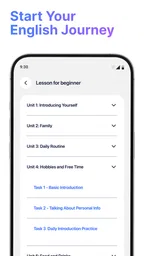
I judge a language-learning app by what it helps me do when a lesson is no longer open in front of me: catch a phrase in conversation, ask a simple question, or keep going after I make a mistake. Fluzy: Learn Language with AI is built around bringing practice together in one place, with AI chat and speaking exercises alongside lessons. That mix makes it worth considering if you want more than a stack of vocabulary cards, though it also means a dependable connection matters to the experience.
Where Fluzy fits in a language-learning routine
Fluzy is an education app from Mall Collections. Its central idea is to let learners move between structured study and interactive practice rather than treating language learning as only reading or memorizing. I find that combination appealing for people who know a little already but struggle to produce a sentence when they need one.
The app is free to download, and its Everyone age rating makes it broadly accessible. It has a 4.7 average from around 30,000 ratings and more than 10 million installs, so it has attracted a sizeable audience. Those figures can help establish that it is widely used, but they do not tell me whether its teaching style will suit you; the best test is whether its lessons and practice fit the way you actually study.
The current version is 1.7.7, and the app requires Android 8.0 or later. In-app purchases range from $7.99 to $199.99 per item, so free access should not be confused with every part of the learning experience being free. I would check what an offered purchase covers before committing, especially if you are comparing Fluzy with a course that charges a fixed subscription or a free resource with a narrower scope.
How the AI practice changes a study session
The most useful promise here is not simply that an AI is present, but that chat and speaking practice can give you a reason to form your own sentences. A conventional flashcard session is good for recognizing a word; it is less good at preparing you to reply when someone asks a question. Moving from a lesson into an exchange can bridge that gap, provided you treat the interaction as practice rather than as an authority that never needs checking.
I would use the chat to rehearse a small, practical situation: introducing myself, asking for directions, or explaining what I need at a shop. Keeping the scenario narrow makes it easier to notice which words I can retrieve without help. A useful habit is to repeat the exchange once, then try to say the same idea with different wording. That turns a conversational exercise into a test of flexible recall instead of a script to memorize.
Speaking practice has a different job. It asks you to make language audible, which can expose hesitation that silent reading hides. I would not judge progress by whether every attempt feels smooth. Instead, I would note one phrase that took too long to produce and bring it into the next study session. This is a practical way to make short sessions cumulative, even when I have only a few spare minutes.
When a connection helps—and when it gets in the way
Because Fluzy’s distinctive activities include AI chat and speaking practice, I would plan to use it when I have a reliable internet connection rather than assume every part will be available without one. A lesson or practice flow that depends on an online interaction can be awkward if a train tunnel, weak reception, or crowded network interrupts it. If you need study material that is guaranteed to work in airplane mode, choose a tool that clearly supports offline lessons and verify that before relying on it.
That does not make Fluzy unsuitable for commuting. It changes how I would use it. I would open the app before a journey, complete an interactive activity while the connection is steady, and use any travel time with poor reception for a different task, such as reviewing notes I have already made elsewhere. This is more realistic than expecting an AI conversation to remain smooth through every coverage gap.
At home, a stable connection makes the chat-and-speaking loop easier to use without interruption. In a café or shared space, the practical question is not only network quality but whether you feel comfortable speaking aloud. I would save voice practice for a private room or a quiet corner, and use chat or lesson work when speaking would feel distracting or socially awkward. The app’s format is most valuable when the environment lets you participate, not merely open it.
Recovering from interruptions without losing the thread
A dropped connection can break concentration more than it wastes time. If an interactive exercise stalls, I would avoid repeatedly tapping through it in frustration. First, check whether the network has returned; then reopen or resume the activity if the app offers a clear way to do so. Since the exact recovery behavior can vary, I would not make an important study plan depend on an unfinished live interaction.
A small workflow helps reduce that risk: decide what you want to practise before opening chat, keep the session focused on one situation, and make a brief note afterward of a phrase you want to revisit. That note is useful even if the next session starts fresh. It also gives you a personal record of recurring trouble spots instead of relying on an interrupted conversation to serve as your only memory aid.
If the app feels slow, it is worth separating a connection problem from a learning problem. Try a simpler activity when reception is poor, and return to speaking practice when the network is steadier. If interruptions are frequent where you study, a downloaded course or a book-based routine may be more dependable. Fluzy is at its best when online interaction is a deliberate part of the session, not a feature you need to work perfectly everywhere.
Using mobile data thoughtfully
For anyone watching a data allowance, I would treat AI chat and speaking activities as the parts to use selectively until I understand how they behave on my connection. I cannot assume that every interaction consumes the same amount of data, so the sensible approach is to check device-level data usage after a typical session. If your plan is tight, use Wi-Fi for longer practice and reserve mobile data for a short exercise you genuinely want to complete.
There is also a difference between limiting data and limiting distractions. A ten-minute session with a clear goal can be more useful than opening the app repeatedly whenever you have a moment. I would choose one target—such as asking a follow-up question—and stop when I have practised it a few times. That keeps the app from becoming an endless stream of prompts and makes it easier to see whether the lesson has helped.
Purchases deserve the same deliberate approach. The listed in-app items span from $7.99 to $199.99, a broad enough range that I would read each purchase screen carefully rather than infer what a price includes. If you are learning casually, start with the free experience and decide whether the routine itself is sticking before paying. If you are studying for a specific goal, compare the paid option with other courses on what you will actually use, not just on the size of the feature list.
Who is likely to benefit most
I can see Fluzy working well for a learner who has studied vocabulary or grammar but needs a low-pressure way to practise producing language. It may also suit someone who likes alternating between a lesson and an active exercise, rather than spending every session on passive reading. A realistic use case is a person preparing for a trip: they could practise a greeting and a simple request in chat, then say the wording aloud before the day they need it.
It is less compelling for someone who wants a carefully sequenced classroom-style course with a teacher correcting every nuance, or for a learner who needs extensive grammar explanations as the main event. AI interaction can create useful rehearsal, but I would still cross-check important language with a trusted dictionary, teacher, or course. For pronunciation coaching with detailed human feedback, a tutor or a specialist speaking service may be a better match.
Compared with flashcard-focused alternatives, Fluzy’s appeal is the chance to move from recognizing words toward using them in a conversation. Compared with a textbook or structured course, the trade-off is that interactive practice may feel more immediate while offering a different kind of depth and guidance. I would not replace every study resource with it; I would use it as a practice partner alongside a reliable reference for grammar and vocabulary.
A measured verdict on staying connected
My overall view is that Fluzy is most useful when you can give its interactive activities a steady connection and a little attention. The combination of lessons, AI chat, and speaking practice gives it a practical role in a language routine, especially for turning recognition into attempted speech. Its mobile convenience is real, but connectivity and the comfort of speaking in your surroundings shape when the most distinctive exercises make sense.
I would recommend trying the free app if you want guided practice that asks you to form and say language, and if you are comfortable studying online. I would choose another option first if offline access is essential, if you rely on intensive human correction, or if you want a fully transparent fixed-cost course before exploring. For a learner who can plan around reception and keep sessions focused, Fluzy offers a useful bridge between studying a language and trying to use it.
What we like
- AI conversations offer practice beyond scripted lessons.
- Personalized feedback can help identify areas to improve.
- Short activities are easy to fit into a daily routine.
- Speech recognition lets learners practice speaking aloud.
- Multiple language options can suit different learning goals.
What could be better
- AI feedback may occasionally miss the meaning of an answer.
- Speech recognition can struggle with accents or background noise.
- Some features may require a paid subscription.
- Reliable internet access may be needed for AI activities.
- AI practice may not replace conversations with fluent speakers.





