




Fluza: AI Language Tutor review
 Analysis by Appsdrops
I look at Fluza as a way to turn small pockets of spare time into language practice, rather than as a complete language course. Its central appeal is an AI coach that can respond to a learner and offer feedback in the moment. That makes it more interactive than reviewing a word list alone, though it also means the quality of the experience depends on whether you enjoy learning through a back-and-forth conversation.
Fluza: AI Language Tutor is an education app from Vit Corp. It is free to install, rated for Everyone, and has a 4.9 average from around 10,000 ratings, with over a million installs. Those figures suggest that plenty of learners have given it a try, but they are not a substitute for working out whether its conversational approach suits your goals. I would treat Fluza as a practice companion, especially useful for building confidence and keeping a routine, not as a guaranteed shortcut to fluency.
What the current version is built to do
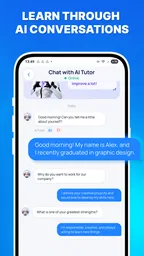
The app’s defining idea is straightforward: practise a language with an AI tutor and receive feedback without having to wait for a class, a conversation partner, or a teacher to be available. In practical terms, that is most valuable when you already know some words and grammar but need a low-pressure place to try using them. Being able to make a mistake during practice can feel easier than making one in front of another person.
The current release is version 1.8.0, and the app’s recorded release date is May 27, 2026. That identifies the version and release point users can evaluate now; it does not, by itself, establish what has changed from earlier editions. I would avoid assuming a particular new lesson format or major redesign based only on a version number. The useful question for a new learner is whether the present conversation-and-feedback approach fits the way they want to study.
Because Fluza is framed around practice with an AI coach, I would use it actively rather than treating it as a passive course to leave running in the background. Write or say a sentence, pay attention to the response, then try expressing the same idea another way. That second attempt is where feedback can become useful: it asks you to retrieve language again instead of simply reading a correction and moving on.
The strongest reason to try Fluza is the chance to practise producing language on your own schedule. Someone preparing for a trip, returning to a language after a break, or trying to get past the awkward first stage of conversation may find that particularly helpful. A conventional vocabulary app can make recall easier, but it may not give you the same feeling of shaping a thought for another speaker.
Where it fits beside familiar language tools
Compared with flashcards, Fluza’s conversational focus is better suited to practising complete thoughts than drilling isolated terms. Flashcards remain the better choice when you need a tightly controlled review of specific vocabulary or want a predictable repetition routine. Fluza makes more sense when you want to test whether you can use words in context and respond without seeing the answer first.
It also occupies a different role from a structured textbook course. A textbook can lay out grammar in a deliberate sequence and explain why a form works; a conversational coach is more naturally used to try out what you have learned. I would not replace a clear grammar reference with Fluza if your main problem is understanding a rule. Instead, learn the rule elsewhere, then use a short Fluza session to see whether you can apply it in your own sentences.
Against a human tutor or language exchange, the trade-off is availability and human nuance. An AI practice partner can be easier to approach for frequent, informal attempts, while a person can bring lived cultural context, personal reactions, and a more natural sense of what sounds appropriate in a particular situation. If your goal is to prepare for a sensitive conversation, understand local humour, or get detailed guidance on cultural etiquette, I would choose a knowledgeable person rather than relying on an app alone.
A routine that makes feedback stick
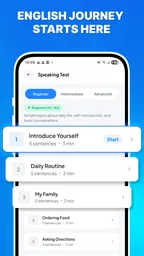
One practical way to use the app is to choose a small real-life task before opening it: introduce yourself, ask for directions, explain a preference, or describe what you did that day. Keep the task narrow enough to finish in one sitting. After receiving feedback, write down only the correction you are most likely to use again, then make a fresh sentence with it. This avoids turning a short practice session into a long, unfocused exchange.
For a more demanding exercise, repeat the same scenario with a different detail. If you practised asking for a drink, change the order or add a preference; if you described your commute, explain what changed today. That variation tests whether you have learned a usable pattern rather than memorized one response. It is a simple workflow, but it is more informative than having a single polished exchange and assuming the language will come back later.
A realistic everyday moment might be a few quiet minutes before leaving for work. I would use that time to rehearse one likely interaction in the language I am studying, notice where I hesitate, and try the exchange again with a simpler sentence. The value is not that an app can promise a real-world conversation will go perfectly; it is that I can identify a sticking point before I meet it outside the app.
What established users should expect
For someone who already studies regularly, Fluza can serve as a change of pace: a move from reading and recognition toward forming replies. That is useful when lessons have started to feel too comfortable. I would bring a specific question or situation to each session, though, because open-ended practice can become less productive if you chat without noticing what you are trying to improve.
For a beginner, the same freedom may be less comfortable. If you have almost no vocabulary, a conversation-based tool can leave you unsure what to say next, even when the coach responds. In that case, I would first build a small base of common words and phrases with a structured beginner resource, then use Fluza for short, forgiving attempts. The app is more likely to feel rewarding once you can produce at least a basic sentence.
Parents considering it for a younger learner can note that its content rating is Everyone, but that does not automatically mean its teaching style will suit every child. I would try it together at first and see whether the child understands the feedback and enjoys the practice. For a learner who needs a carefully sequenced curriculum, a parent or teacher may still need to provide structure around the app.
Limits worth weighing before you rely on it
AI feedback is not the same as a teacher who knows your learning history. A correction may help with a sentence in front of you without explaining the broader pattern clearly enough to transfer it. When a response surprises you, do not simply accept it as a universal rule: compare it with a trusted grammar reference or ask a qualified teacher if the distinction matters. That habit is especially useful for language points where context changes what sounds natural.
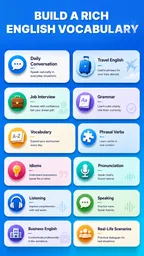
There is also a motivation trade-off. A responsive practice partner can make it easier to start, but a conversation alone does not guarantee balanced progress in listening, reading, pronunciation, grammar, or vocabulary. If you are studying for an exam, follow a curriculum that maps to the exam and use Fluza as supplementary practice. If you need pronunciation evaluation or a carefully graded listening programme, check that your chosen study tools address those goals rather than assuming conversational feedback covers everything.
Price deserves a little attention too. Fluza is free to install, while it offers in-app purchases ranging from $3.49 to $69.99 per item. I would begin with the free experience and decide what is missing before buying anything. Consider whether you are practising often enough to justify an upgrade and whether the particular paid option addresses a real need; a larger purchase is poor value if your main obstacle is simply finding time to practise.
The minimum operating system requirement is Android 8.0. If you are choosing a device for a learner, check compatibility before planning a routine around the app. That is a small practical detail, but it can prevent an avoidable frustration after you have decided that this style of practice is right for you.
Who will get the most from it
I would recommend giving Fluza a try if you understand some of your target language but hesitate when you need to form a reply. It may also suit independent learners who want short practice sessions between lessons, travellers rehearsing everyday exchanges, and people who find speaking with strangers intimidating at first. The app’s best role is likely to be a regular, low-pressure place to attempt language, notice weak spots, and try again.
I would skip it, or keep it as a minor supplement, if you want a complete course with a fixed lesson sequence, detailed explanations of every grammar point, or expert human correction. It is also not the obvious first choice if your priority is memorizing a large vocabulary set through scheduled flashcard review. Those needs call for tools built around those methods; using a conversational tutor for everything can leave important gaps in your study plan.
What I would watch as it develops
Version 1.8.0 gives readers a clear current reference point, but I would judge future development by how well the app helps learners turn feedback into lasting progress. Useful improvements would be ones that make it easier to understand why a correction matters, revisit recurring mistakes, and connect free-form practice with a learner’s broader goals. Those are things I would look for in future releases, not features I assume are already present.
Existing users can make the current experience more valuable without waiting for an update: keep a small record of recurring errors, return to them in later practice, and use a separate source when you need a fuller explanation. New users should start with a realistic target, such as practising one everyday scenario at a time, rather than expecting a few conversations to replace a course or tutor. That approach makes it easier to tell whether the app is helping you become more comfortable expressing yourself.
Overall, I see Fluza as a promising practice partner rather than an all-in-one language solution. Its AI-led format gives learners a convenient place to produce language and receive an immediate response, while its limits make a broader study routine important. If you want more chances to try speaking or writing without the pressure of a live conversation, it is worth exploring. If you need a structured syllabus, deep grammatical teaching, or human cultural insight, pair it with a more suitable resource instead of asking it to do every job.
What we like
- AI practice lets you rehearse conversations at your own pace.
- Personalized feedback can help highlight areas to improve.
- Flexible lessons make it easier to fit language practice into a busy day.
- Interactive exercises can make study feel more engaging than drills.
- Useful for learners seeking extra practice between formal lessons.
What could be better
- AI feedback may not always catch subtle grammar or usage errors.
- Speech recognition can struggle with accents or background noise.
- Some features may require a subscription or in-app purchase.
- An internet connection may be needed for key AI tools.
- It may not offer the depth of a structured language course.





