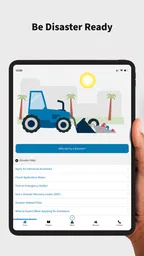
FEMA review
 Analysis by Appsdrops
When a storm is approaching or an emergency is already unfolding, a weather app needs to do more than make the forecast look attractive. I see FEMA as a practical companion for people who want disaster-related guidance alongside weather awareness, rather than another app focused mainly on rain icons and hourly temperatures. Its purpose is especially relevant for households that need to think ahead, though its usefulness depends on how easily each person can navigate it under ordinary and stressful conditions.
Finding your way when attention is limited
FEMA is a free weather app from the Federal Emergency Management Agency, the US government agency behind its emergency-preparedness focus. It is rated for Everyone, and its current version is 3.2.1. Those details make it approachable to a broad audience, but a general age rating should not be mistaken for a guarantee that every screen will suit every reading or navigation need.
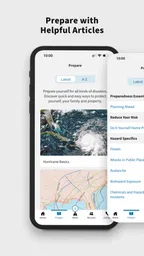
My main test for an emergency app is whether I can find something useful without having to explore every menu. In this case, I would treat the app as a place to prepare and check information before a situation becomes urgent, rather than assuming that it will automatically solve every problem during a crisis. A calm first visit is a good time to learn the layout, identify the sections you are likely to need, and decide what information belongs in your household’s plan.
That small bit of preparation has an accessibility benefit: it reduces the amount of reading and decision-making required when someone is tired, worried, or interrupted. If you are setting it up for a family member, walk through the app together and let them try to repeat the steps themselves. Watching someone else tap through a screen is not the same as knowing where to go when you are the one holding the phone.
The app’s public reception is encouraging without being conclusive: it holds an average rating of 4.4 from around 5,900 ratings, and there are about 2,000 written reviews. It has been installed more than one million times. I would read that as evidence of broad interest, not proof that its navigation works equally well for every person or in every emergency.
Reading and navigation in everyday use
Emergency information can be harder to absorb than a routine forecast because it often involves unfamiliar terms and choices with real consequences. I recommend reading important guidance before you need it, then noting the specific steps that apply to your home. If a passage is difficult to follow, do not wait for an alert to ask a relative or trusted local source to help interpret it.
One useful habit is to separate “what should I know?” from “what should I do now?” First, use a quiet moment to become familiar with the app’s information. Later, if conditions change, you can focus on the relevant guidance instead of trying to learn the whole interface at once. This is a simple workflow, but it matters for anyone who has limited attention, reads slowly, or finds long blocks of text tiring.
I would also avoid making the app the only place where your household keeps essential instructions. A written plan kept somewhere easy to reach can help a person who cannot comfortably read a phone screen, whose hands are occupied, or whose device is unavailable. FEMA can support preparedness; it should not become a single point of failure for information everyone may need.
Different abilities, different ways of using a phone
For people with low vision, the most useful first step is to check how the app’s text and controls appear on their own device, in the lighting where they expect to use it. I would not assume that an app is comfortable simply because it contains important information. If someone has difficulty distinguishing screen elements or reading dense content, try the app together and make sure they can reach the material they need without relying on another person to operate every screen.
Motor access deserves the same practical test. A person with limited dexterity may find repeated taps, small controls, or hurried navigation difficult; I cannot promise that every interaction will be easy for every hand or device. Have the intended user practise the core actions at their own pace. If a caregiver is helping, agree in advance on what they can do and what the person wants to handle independently.
For sensory needs, consider the environment as well as the interface. A person who is sensitive to sound may prefer to keep their phone’s alerts and audio settings at a level they can tolerate, while someone who depends on sound should confirm that important information is also available in a form they can read. I would not treat any one alert style as suitable for everyone. The safest approach is to combine the app with a household communication plan that accounts for hearing, vision, language, and stress.
These checks are not a judgment on anyone’s ability; they are a way to avoid discovering a mismatch at the worst time. If you are helping an older relative or someone who is new to smartphones, let them practise rather than simply installing the app on their behalf. If they cannot comfortably use it, keep an alternative route to emergency information ready.
Using it across places and changing conditions
A realistic use case is a family preparing for a severe-weather day. The evening before, one person can review relevant guidance with the household, while another checks that everyone knows where to find the plan. In the morning, they can consult the app as part of a wider check that includes local instructions and the family’s own arrangements. This makes FEMA most helpful as a preparation tool, not as a substitute for judgement or direct emergency communication.
It can also help someone who travels between home, work, and school think beyond the forecast at their current address. The useful question is not only whether the weather may affect one location, but whether the day’s movements create a different risk or make it harder to reach other people. I would use the app to prompt that kind of planning, then confirm decisions with local authorities and the information sources appropriate to the place I am in.
People who live in a household with varied needs can turn that planning into a short, specific checklist: who needs help receiving information, who may need transport, and where the group will reconnect if separated. Keep the checklist somewhere that does not depend on the app being open. This is a concrete way to make disaster preparation more inclusive without assuming that a phone can meet every person’s needs.
Connectivity and access to a charged device are practical limits for any phone-based emergency resource. I would not rely on being able to open every piece of information at the exact moment it is needed. Review important material ahead of time, keep essential details in another accessible form, and make sure the household knows how to act if a phone is lost, damaged, or out of reach.
Where it fits among weather apps—and where it does not
Compared with the usual weather app, FEMA’s strongest reason to be on a phone is its emergency-preparedness perspective. A conventional forecast app may be a better fit if your daily priority is a quick glance at temperature, rain, or conditions for a commute. FEMA makes more sense when you want to include disaster readiness in your routine rather than treating weather only as a question of what to wear.
I would not ask it to replace a local warning source, a personal weather tool, or a direct emergency service. Those serve different purposes. If you need immediate, location-specific instructions, follow relevant official local communications; if you mainly want a fast hourly forecast, choose the tool that presents that information most clearly for you. Keeping FEMA alongside another source can be sensible, but only if you know which one to consult for each task.
The app has been available since August 24, 2011, and its current release is 3.2.1. It requires Android 6.0 or later. That operating-system requirement is worth checking before installation, especially if the intended user relies on an older phone. The app is free, which makes trying it straightforward, but an older device or a person’s particular access needs may still make another route more practical.
Limits worth considering before an emergency
The biggest limitation is not that a preparedness app can do everything badly; it is that no single app can cover every local circumstance, personal need, or communication failure. FEMA is a useful part of preparation, but it cannot decide which advice applies to a particular household or guarantee that a user will be able to reach a phone during a crisis. A plan should include people, places, and backup ways to communicate.
There is also a difference between having information available and being able to act on it. Someone may understand the guidance but need help with transport, medication, mobility, or contacting family. Use the app as a prompt to discuss those needs before an emergency. If the person who will rely on it cannot read or navigate it independently, identify a specific helper and a backup rather than leaving the arrangement vague.
For readers who prefer a very simple forecast screen, FEMA may feel less immediately useful than a weather app built around everyday conditions. For someone who dislikes reading on a phone, a printed plan and assistance from a trusted person may be more accessible. And if a user has sensory or motor needs that make smartphone use uncomfortable, it is better to acknowledge that limitation and build a different route to the same information than to insist that the app must work for them.
A useful addition, with preparation built in
I recommend FEMA to people who want to make emergency readiness part of their weather routine, especially households willing to explore the app before severe conditions arrive. Its value is less about replacing every other source and more about encouraging users to think through what they will need when ordinary plans are disrupted. The federal agency behind it gives the app a clear preparedness role, while the free price and broad age rating make it easy to consider.
My advice is to install it only as the beginning of a practical plan: check that it works for the person who will use it, practise finding relevant information, and keep an accessible backup outside the phone. The app is not the right choice as someone’s sole source of urgent instructions or as a replacement for a quick, straightforward forecast. Used with those limits in mind, FEMA can be a worthwhile tool for turning weather awareness into better household preparation.
What we like
- Official alerts provide timely information during emergencies.
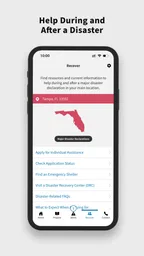
- Interactive maps help locate nearby shelters and disaster resources.
- Users can save emergency information for offline access.
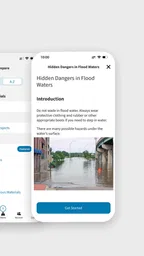
- Preparedness guidance covers a wide range of hazards.
- The app is free to download and use.
What could be better
- Some features require location access to work well.
- Alerts may not cover every local emergency situation.
- Map details can be limited in some areas.
- Information may take time to update during a fast-moving crisis.
- The app is most useful in the United States.





