

Express Scripts review
 Analysis by Appsdrops
When prescription care is split across a busy household, small tasks can become surprisingly easy to lose track of: checking whether a refill is needed, remembering which account to use, or finding the right information while away from home. I see Express Scripts as most useful when it gives one person a practical way to manage their own pharmacy errands from a phone, rather than as a shared family organizer. That distinction matters: convenience does not erase the need to keep each person’s health information and account access separate.
One phone, several people’s routines
A familiar household situation makes the app’s appeal clear. Imagine one adult is out running errands when someone at home asks whether a prescription needs attention. If that adult already manages the relevant account, a mobile pharmacy app can make it easier to check and act without waiting to get back to a computer. The value is not dramatic; it is reducing the number of little tasks that depend on being in one particular place.
But I would not treat a single phone as a shared household dashboard. Prescription details belong to the person whose care they concern, and an app account should be handled with that boundary in mind. If two adults need to manage separate prescriptions, they should think in terms of their own accounts and access, not assume that one login is intended to represent everyone in the home.
That makes Express Scripts a better fit for a person who regularly handles their own prescriptions, or for a household member who has an appropriate role in helping someone else. It is less suited to casual pass-the-phone use, where different people might open an account without clear permission or awareness. The app can support convenient pharmacy care, but it cannot settle who in a household should be responsible for another person’s health information.
Start with the account boundary
Before relying on any prescription app, I would first make sure the account belongs to the person whose care is being managed and that the person understands who can access the device. This is especially worth considering on a shared tablet or a phone that other household members use. A convenient sign-in is not a substitute for deciding whether the device itself is private enough for health-related tasks.
Express Scripts is made by Express Scripts, Inc., and its focus is pharmacy care rather than general household scheduling. That distinction helps set expectations: I would use it for prescription-related tasks, not as a family calendar, a medication reminder system for everyone, or a place to coordinate unrelated care. Keeping those jobs separate makes it less likely that someone mistakes a household note or a relative’s message for an update from the pharmacy.
For a caregiver helping another person, the sensible first step is to confirm what access is appropriate through the person’s own arrangements, rather than trying to work around account boundaries. If the person can manage their own account, they may prefer to keep control and ask for help only when needed. If they need more assistance, the household should agree on a clear, respectful process instead of sharing credentials informally.
Coordination without assuming a family tool
Prescription coordination often means more than one person remembering a date. Someone may need to notice that a refill is approaching, another person may handle a trip to the pharmacy, and the patient may still be the one who needs to make decisions about their care. My practical advice is to use the app for the account holder’s pharmacy tasks and use an agreed household method for communicating responsibilities, rather than expecting the app to coordinate every person involved.
For example, if one adult is picking up errands after work, the account holder can check their own prescription information and tell that person what help is needed. That avoids turning a shared phone into an informal record of multiple people’s medical details. It also makes responsibility clearer: the person who knows the prescription is theirs can confirm what action is appropriate, while the helper handles only the agreed errand.
This separation is a useful trade-off. A single, shared system can sound easier, but it can blur whose information is being viewed and who is expected to act. With Express Scripts, I would favor a simple division: use the app for the account holder’s pharmacy care, and use direct conversation or a household planning tool for handoffs. That approach may feel less automated, but it is easier to understand and less dependent on assumptions about features the app is not presented as providing.
What the app is—and where it sits among alternatives
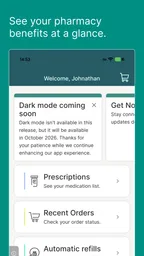
Express Scripts is a medical app for managing prescription and pharmacy care on a mobile device. Its audience is not every person looking for health advice or a broad medication database. I would consider it when the pharmacy-related tasks I need to manage are connected to Express Scripts, and I would not expect it to replace a clinician, pharmacist conversation, or a general health record.
Compared with going through a pharmacy counter or using a computer, the phone-based approach is useful when I want to handle a task away from home. Compared with a general medication tracker, its focus is different: a tracker is commonly used to organize a person’s own schedule, while this app is centered on pharmacy care. If the main need is coordinating reminders for several relatives, a dedicated shared planner may be a better fit. If the need is to ask a question about treatment, speaking with a qualified health professional remains the more appropriate route.
The app is free, which lowers the barrier to trying it, but that does not mean every household member should install it or use one person’s account. I would start with the person who actually needs to manage prescriptions and see whether the app fits their routine. If their pharmacy tasks are handled another way already, or they need a broader family coordination system, adding another app may create more work than it saves.
Age, trust, and practical expectations
The app is rated for Everyone, but that age label is not a recommendation that children should manage prescription accounts. In a household with younger people, I would keep account access under an appropriate adult’s control and explain that pharmacy information is private. An age category describes the app’s content suitability; it does not decide who should make health decisions or have access to another person’s account.
Trust also depends on the phone and the habits around it. If several people unlock the same device, I would be careful about leaving an account open or letting others browse it out of convenience. The best setup is the one that lets the account holder use the app without turning their prescription information into something everyone in the household can casually inspect.
For older relatives, the app may be useful if they are comfortable using a smartphone and want to manage their own pharmacy tasks. A family member can help with navigation, but I would avoid taking over by default. Let the account holder remain involved in decisions and use assistance in a way they understand. If using a phone is more frustrating than helpful, a familiar pharmacy contact or another established method may be a better choice.
Reputation and version context
Express Scripts has been available since April 15, 2011, and its current version is 14.1.3. It has an average rating of 4.6 from around 41,000 ratings, with about 17,000 written reviews and over a million installs. Those figures suggest that many people have encountered the app, but they cannot tell me whether it will suit a particular household’s account arrangements or pharmacy needs.
It is free to download and is listed for users on operating system version 12 or later. That makes compatibility worth checking before making it part of someone’s routine, especially if the household member who needs it uses an older device. I would also judge it by whether the person who owns the account can complete their regular pharmacy tasks comfortably, rather than by popularity alone.
A useful way to evaluate it is to try one ordinary task that the account holder already knows how to handle through another channel. If the app makes that task clearer and easier to fit into the day, it may earn a place on their phone. If the person finds the account process confusing, prefers speaking directly with a pharmacy, or needs one shared view of several relatives’ schedules, I would not force the app into the routine simply because it is available.
My household verdict
I would recommend Express Scripts to someone who wants mobile access to their own prescription and pharmacy care and is comfortable keeping their account separate from other household members. Its strongest household use is modest but real: one person can handle their own pharmacy tasks while away from home, then communicate any agreed errand to someone else without turning that helper into the account owner.
I would skip it as a supposed all-in-one family medication manager. It should not be treated as a substitute for consent, careful account boundaries, a caregiver arrangement, or a direct conversation with a health professional. A shared device can still be used thoughtfully, but the household needs to decide who signs in and who is allowed to see the account before convenience takes over.
Overall, Express Scripts makes the most sense when the person using it has a clear, individual pharmacy-care need. I like the idea of being able to handle those tasks from a phone, but I would keep household coordination outside the account unless the people involved have an appropriate arrangement. If that matches your situation, it is a reasonable app to consider; if you need shared family tracking or prefer face-to-face pharmacy help, another approach will likely feel more natural.
What we like
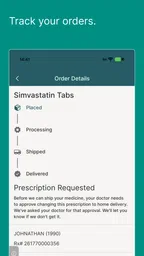
- Shows prescription status and estimated delivery dates.
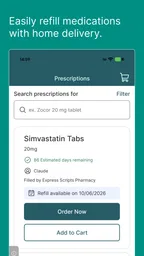
- Makes it easy to request eligible refills from a phone.
- Provides access to prescription information while away from home.
- Can help locate nearby pharmacies in the network.
- Offers medication reminders to support routine use.
What could be better
- Some features may require an eligible Express Scripts account.
- Coverage and pharmacy options depend on the user's plan.
- Refill requests may still need approval before processing.
- Delivery estimates can change during fulfillment.
- Prescription details may not update immediately.





