Drive Weather With Live Radar review
 Analysis by Appsdrops
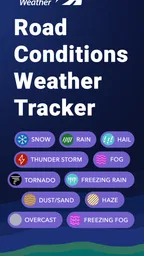
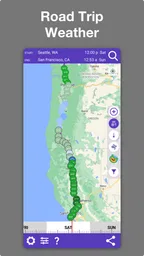
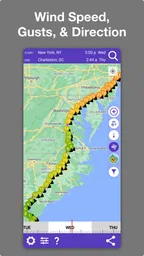
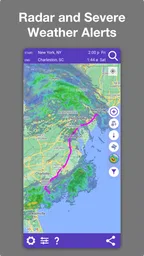
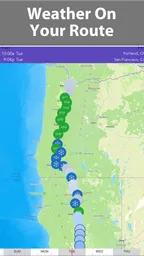
Planning a trip around changing weather can be stressful, especially when a clear start gives way to rain or snow along the way. Drive Weather is built for that specific problem: it shows live radar, rain, snow, and wind along your driving route before you set off. I like the practical focus. Instead of treating weather as a general forecast to check once, the app makes the journey itself the thing to consider.
A weather check designed around the drive
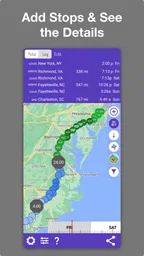
Many weather apps are centered on a location, but a drive can pass through several different conditions. A forecast for where you are now may tell only part of the story. Drive Weather brings the route into the picture, helping you see what could be ahead before leaving. That makes it a useful companion for road trips, commutes, and other journeys where rain, snow, or wind could affect your plans.
The app’s central idea is refreshingly straightforward. Check the route, look at the live radar and the conditions shown along it, then decide whether to leave as planned or reconsider your timing. It is not trying to turn weather into a complicated hobby. For me, that focus is its biggest strength: the information is framed around a decision drivers actually need to make.
Speed expectations: focused rather than flashy
When I think about speed in a route-weather app, I care less about visual effects and more about how quickly I can get to a useful answer. Drive Weather has a narrow job, which gives it a clear path to being convenient: open it when planning a drive, check the weather along the route, and use that view to prepare. The concept does not require a long explanation before it becomes useful.
Weather information can change while a journey is being planned, so a live-radar focus is especially relevant. The app is intended to help drivers check conditions before they leave, rather than rely only on a broad, familiar forecast. In practice, I would treat it as a planning aid: review the route’s weather when making the decision to travel, and check again if conditions or departure plans change.
There is no need to assume that every screen will load instantly or that radar will update at a particular pace. Those things can depend on a device and connection. What matters about the product is that its purpose is easy to understand and its main information is directly connected to driving. That makes the experience feel purposeful, even without judging it by unsupported performance claims.
When you are checking more than one part of a trip
The app’s route-based approach is most valuable when a journey is long enough for the weather at the destination to differ from the weather at the starting point. A quick look out the window, or a forecast for one city, may not give a complete picture. Live radar and weather details along the route offer another perspective, particularly when rain or snow could appear after you have already started driving.
These are also the moments when a weather app can feel busy: you may be comparing conditions, thinking about departure time, and weighing whether a change in the forecast affects your plans. Drive Weather keeps the subject matter tightly focused on that decision. I find that more helpful than a tool that makes the driver sort through unrelated material before getting to the route conditions.
Still, weather should be treated as changing information, not a guarantee. A route display can support preparation, but it cannot promise that conditions will remain exactly as shown throughout a drive. I would use the app to inform a sensible plan, then stay alert to changing circumstances and follow safe driving practices rather than checking a screen while behind the wheel.
Reliability means useful context, not certainty
For a weather app, reliability is not just about opening without trouble. The information also needs to be presented in a way that helps someone make a reasonable decision. Drive Weather’s emphasis on live radar and conditions along a driving route gives it a clear role: it helps put weather into the context of the trip instead of leaving the driver to connect separate location forecasts mentally.
That route-first perspective can be reassuring during planning, but I would not treat any forecast as a promise. Radar and weather conditions can evolve, and a view checked before departure is still a snapshot of a changing situation. The app is best understood as one source of useful context, not a replacement for judgment or attention on the road.
The product has an established audience, with an average rating of 4.5 from around 1.7 thousand ratings. That gives prospective users a broad signal that other people have tried it, although ratings cannot tell every driver exactly how it will feel on their own phone or suit every kind of trip. I’d take that as encouraging background while focusing on whether route-based weather is the feature I need.
Device constraints and day-to-day expectations
Drive Weather is available for Android, with a minimum operating-system requirement of version 7.0. That makes device compatibility a practical first check: an older phone may not meet the requirement, while a compatible device can be considered for installation through the app store. It is rated for Everyone, which is a general content classification rather than a statement about how much battery, storage, or mobile data it uses.
I would avoid assuming that a particular phone will run the app with a specific level of speed or resource use. Performance can vary between devices, and a live weather service naturally depends on having a usable connection when you want current information. If you are preparing for a drive, it is sensible to open the app and review the route before setting off, rather than making trip decisions while moving.
The app is free to download, with in-app purchases listed from $5.99 to $29.99 per item. That pricing model is worth knowing before you install it, especially if you prefer apps with no optional purchases. The existence of in-app purchases does not change the core purpose described here: checking live radar, rain, snow, and wind along a driving route.
Stability and getting back to your plan
A useful travel tool should fit naturally into preparation. If you close the app or switch to another task while organizing a trip, you should be able to return to the route-weather check as part of the same planning routine. I would not make claims about exactly how the app restores a particular screen or handles interruptions, but its focused purpose makes it easy to understand what to check again: the conditions along the drive you are considering.
For a smooth routine, I’d look at the weather before departure and revisit the information if plans change or a delay gives conditions time to shift. That is a practical way to use any live forecast without expecting the app to make the decision for you. The value is in helping you notice possible weather concerns early enough to think through your options.
The app has been available since late 2018, and its current version is 12.8.2. It has passed 100 thousand installs and has 681 written reviews. Those figures show that it is more than an obscure experiment, but the best measure of fit is still straightforward: do you want weather information organized around a driving route?
Who is likely to find it useful?
I see Drive Weather as a strong match for people who regularly plan drives through areas where conditions may change along the way. It can also make sense for occasional road trips, when checking only the weather at the starting point feels too limited. The app’s focus on rain, snow, wind, and live radar along the route makes its purpose clear without requiring a driver to become a weather expert.
It may be less compelling if you only want a simple local forecast and never need to think about conditions beyond your current area. Its distinctive value is not simply that it reports weather; it is that it presents weather in relation to a drive. That distinction is what I would consider before deciding whether to add it to my phone.
Concept Elements Inc develops the app, which sits in the weather-app space but takes a notably travel-oriented approach. The free download lowers the barrier to trying that approach, while the optional in-app purchases are something to keep in mind. For Android users, the operating-system requirement is another straightforward compatibility check before installing.
Performance verdict for route planning
My overall take is that Drive Weather is a practical, clearly defined tool rather than an all-purpose weather destination. Its live radar and route-based view address a real planning question: what might the weather look like between here and where I am going? That emphasis gives it a useful role before a drive, especially when rain, snow, or wind could influence timing or preparation.
I would not choose it on the assumption that it guarantees perfect forecasts, instant updates, or identical performance on every phone. I would choose it because the idea is easy to grasp and the information is organized around a journey. As long as I treat it as a planning aid and check conditions responsibly, it can make weather preparation feel more relevant than looking at a single city forecast.
With an average rating of 4.5 and more than 100 thousand installs, Drive Weather has attracted a sizeable group of users while keeping its purpose focused. For Android drivers who want to consider live radar, rain, snow, and wind along a route before departure, it is a sensible app to explore. Its strongest point is not a promise of flawless performance; it is the practical perspective it brings to planning the road ahead.
What we like
- Route forecasts help plan around changing weather conditions.
- Live radar makes nearby precipitation easier to track.
- Coverage includes locations across the United States.
- Weather information is presented along a planned driving route.
- Useful for comparing conditions at different points along a trip.
What could be better
- Forecast accuracy can decline as conditions change quickly.
- Radar and forecast details require an internet connection.
- Coverage may be limited outside supported regions.
- Some features may require a paid subscription.
- Weather data can make the interface feel busy for new users.





