Daily Weather: Forecast&Alerts review
 Analysis by Appsdrops
Weather apps often become cluttered before they become useful: maps, alerts, charts, and hourly details compete for attention when all I need is to decide whether to take a jacket. Daily Weather makes a more modest promise. Its focus is helping me stay oriented to the day’s conditions, and that narrow purpose is the most sensible way to judge it. I see it as a quick-check weather app, not a substitute for specialist forecasting tools when a decision depends on highly detailed information.
A forecast built around the daily check
For me, the useful part of a daily forecast is not simply knowing whether the day will be sunny. It is having a quick reference point before I leave home, then checking again if plans change. Daily Weather’s identity is centered on that everyday routine rather than on a particular sport, industry, or outdoor activity. That makes it approachable for ordinary planning, provided the information it presents answers the question I actually have.
The app is a weather app developed by RODRIGUEZCASTILLO FABIOLA. Its store summary emphasizes staying ahead of the weather, while its short description is simply “Daily Weather.” Those concise descriptions fit the uncomplicated role suggested by its name: a place to check conditions as part of the day, not a promise of expert-level meteorology.
That distinction matters because weather apps are not interchangeable in practice. Some are designed around radar, severe-weather monitoring, or technical forecast details; others work best as a fast glance before commuting or running errands. I would put Daily Weather in the second group. If I wanted to study storm movement or compare several forecast models, I would choose a more specialized alternative. If my decision is whether to bring a coat or move a walk earlier, a straightforward daily check is the more relevant starting point.
The app is free and rated for Everyone, which lowers the barrier to trying it and makes it suitable for a broad range of users. It has a 4.6 average from around 6,300 ratings, alongside 299 written reviews. Those figures suggest that many people have found it worth using, but I would treat ratings as context rather than proof that it will suit every location or routine. Weather usefulness depends heavily on where you are and what you need to know.
Turning a forecast into a decision
The practical value of a weather app comes from reducing a small uncertainty at the right moment. I might check before getting dressed, before setting off, or before deciding whether an outdoor plan still makes sense. A daily forecast is most helpful when I read it as guidance for a decision, not as a guarantee that every detail will unfold exactly as predicted.
One useful habit is to check the forecast at the point when I can still change my plans. Looking in the morning can help with clothes and travel; checking again before an evening walk can catch a shift that makes the earlier plan less comfortable. This is not a claim that the app updates on any particular schedule. It is a practical way to use any weather forecast while remembering that conditions and forecasts can change.
A second tip is to connect the forecast to the activity rather than reading it in isolation. A day that seems fine for a short trip may be a poor fit for a long outdoor event if I have no easy shelter or backup plan. Conversely, a less-than-perfect forecast need not cancel a quick errand. The app can serve as a prompt to think through exposure, timing, and alternatives, rather than making the decision for me.
For a realistic example, imagine I have a morning commute and a plan to meet a friend outdoors later. I would check Daily Weather before leaving to decide what to wear, then check again before heading to the meeting. If conditions look less suitable, I can suggest a sheltered place or shift the timing. That workflow is simple, but it is exactly where a daily weather app can save hassle: not by controlling the weather, but by helping me avoid making the same assumption all day.
There is also a useful limit to this routine. A general daily view can help with ordinary choices, but it should not be my only source when the consequences of getting the forecast wrong are serious. For a hike far from shelter, a long drive through changing conditions, or a weather-sensitive work task, I would consult a more detailed source and check official local alerts where appropriate. Daily Weather makes more sense as a convenient companion than as the sole authority for higher-risk plans.
Where a simple daily view helps most
The strongest fit is someone whose weather questions recur in familiar patterns: What should I wear? Is an outdoor lunch still comfortable? Should I take a different route or leave extra time? These are small decisions, but they happen often enough that a quick daily reference can be useful. I would also recommend this kind of app to someone who wants a focused starting point rather than a screen full of technical layers.
It can be particularly handy for household planning. If several people are heading out at different times, checking the day’s conditions can help decide whether to pack an extra layer or move an activity indoors. The app does not need to replace conversation or common sense; it gives the household a shared prompt to plan around. That is a more realistic benefit than expecting a forecast to settle every question precisely.
For a person who checks weather only occasionally, the low-friction appeal is that the task stays small. I can make a quick check, take the information into account, and move on. A more elaborate app might be better for someone who enjoys exploring weather maps, but extra depth can be unnecessary when the goal is simply to make a sensible choice before leaving.
Daily Weather has reached over one million installs, and its current version is 1.2.1. It was released on September 15, 2025, and supports devices running Android 7.0 or later. That gives potential users a practical compatibility check before installing. The version and release details are useful context, but they do not by themselves tell me how well a forecast will match a particular neighborhood or how often I will personally need to open the app.
The tradeoff: convenience versus depth
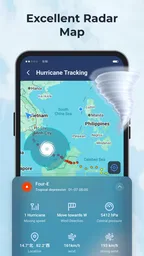
The main tradeoff is the one I expect from a simple daily-weather approach: ease of checking versus the depth some situations require. A quick forecast can be enough for errands and everyday clothing decisions, but someone who wants radar interpretation, highly granular planning, or detailed comparisons should look for an app that explicitly serves those needs. I would not choose Daily Weather on the assumption that a concise daily focus automatically covers every specialist use case.
Another point to keep in mind is that a forecast is not a promise. Even a useful daily outlook can leave uncertainty about the exact timing or local experience of changing conditions. I recommend checking close to the time of an outdoor plan when the weather matters, and keeping a backup option for activities that are difficult to reschedule. That advice is not a criticism unique to this app; it is the sensible way to use a forecast without leaning on it too heavily.
There is a difference between an app being easy to understand and being sufficiently detailed for every user. If I only want a quick sense of the day, simplicity is a benefit. If I want to inspect how conditions may evolve across a route or make a decision where safety is central, simplicity can become a limitation. In that case, a dedicated forecast or alert service is a better match, and I would use Daily Weather only as an additional everyday check.
I would also avoid judging it solely by the number of ratings or installs. A weather app can be popular and still be a poor fit for a person whose plans depend on precise local detail. The more useful question is whether its daily focus matches the decisions I make. A commuter, a parent organizing outdoor time, or someone who likes a quick morning check may value that focus more than a weather enthusiast who wants to dig into technical information.
Who I would recommend it to
I would suggest Daily Weather to people who want a straightforward way to keep the day’s weather in mind and make ordinary plans with a little more confidence. Its free access and Everyone age rating make trying it uncomplicated, while its daily orientation keeps the use case easy to understand. For a simple routine—check, decide what to wear, and adjust an outdoor plan if needed—it has a clear purpose.
I would skip it as my only weather tool if I routinely make decisions that require detailed local analysis or need to track developing severe conditions closely. In those cases, I would choose an alternative built around specialist forecasts or alert monitoring. I would also be cautious about expecting any app to remove uncertainty: checking at a useful time and having a backup plan still matter.
My overall view is that Daily Weather is best approached as a practical daily companion rather than a complete weather workstation. Its value lies in supporting the small decisions that shape an ordinary day, and its limits become clear when a plan demands more depth than a quick forecast can offer. If that balance matches what I need, it is an easy app to consider; if I want to investigate the weather in detail, I would reach for a more specialized option.
What we like
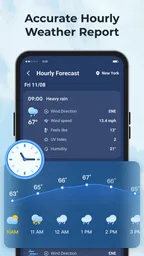
- Hourly forecasts make it easier to plan around changing conditions.
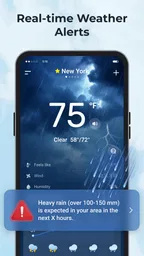
- Severe weather alerts can help users prepare for hazardous conditions.
- A home-screen widget offers quick access to current weather details.
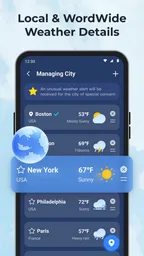
- Multiple locations are useful for checking weather while traveling.
- The interface presents key forecast information in an easy-to-scan format.
What could be better
- Some forecast details may vary in accuracy by location.
- Frequent alerts can become distracting if settings are not adjusted.
- Location access may be needed for automatic local forecasts.
- Some features may require an internet connection to stay current.
- Advertising or optional purchases may affect the app experience.





