Daily Weather Alarm - Radar review
 Analysis by Appsdrops
I’d treat Daily Weather Alarm - Radar as a weather app to try for a straightforward daily check, not as a replacement for a specialist forecasting tool. Its appeal is easy to understand: it is free, aimed at everyday weather use, and has reached more than one hundred thousand installs. But a modest average rating of three out of five suggests it may not satisfy everyone. My recommendation is therefore cautious: it could suit someone who wants a simple weather companion, while people making plans that depend on detailed or highly dependable forecasts should compare it with established alternatives before relying on it.
A practical idea, with a modest track record
The app comes from X5 Network Area and sits in the weather category. Its brief description promises a daily-weather focus, which points to a familiar need: checking conditions before getting dressed, commuting, or deciding whether to take an umbrella. That focused role can be useful. A weather app does not have to become a dashboard full of specialist tools if all I need is a quick answer to “What should I expect today?”
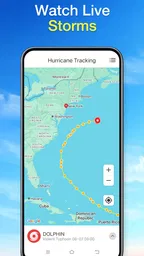
The title combines “Alarm” and “Radar,” so I would approach those words as clues to the app’s intended identity rather than proof of a particular workflow. The name alone does not tell me how alerts are presented or what radar controls are available. I would install it with a clear first check in mind: can I quickly find the local outlook I need, and can I understand it without tapping through several layers? That is a more useful test than judging it by its name.
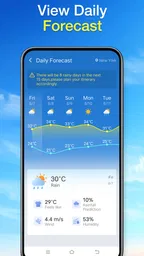
There is a real audience for that kind of uncomplicated routine. If you already check the weather once in the morning and mainly want to decide between a light jacket and a heavier one, a daily-oriented app may be enough. It is less compelling as a single source of truth for a long drive, an outdoor event, or a workday that depends on precise changes in conditions. In those cases, I would want to compare its guidance with another forecast rather than assume that a radar reference means complete coverage of every planning need.
What the rating and reach suggest
The app has an average rating of three out of five from 294 ratings, alongside 49 written reviews. That is neither a strong endorsement nor a reason to dismiss it outright. It tells me to keep expectations measured and to pay attention to whether the app fits my own routine. A rating can reflect different devices, locations, and expectations; it cannot settle whether the basic daily check works well for a particular person.
Its reach is notable for a focused weather app, with over one hundred thousand installs, but popularity is not the same as forecast quality. I would use that figure as evidence that people have tried it, not as a guarantee that the app will provide the detail or reliability every user expects. The more useful question is whether its presentation makes a quick decision easier than opening a general-purpose weather service already on your phone.
Because it is free, the cost of trying it is low in the ordinary sense: you can assess whether it suits you without paying for the download. That does not automatically make it the best choice. Your time and confidence matter too. If you find yourself repeatedly checking another app because you are unsure about what Daily Weather Alarm - Radar is telling you, the extra step cancels out much of the convenience.
How I would judge it in a real routine
For a realistic morning test, I would check the app before leaving home, note the day’s overall expectation, and then revisit it shortly before an outdoor commitment. The first check answers a basic clothing question; the second helps decide whether to walk, cycle, or bring rain protection. This workflow tests practical value without demanding that the app serve as a professional forecasting instrument.
I would also compare its guidance with the weather app I already use over several ordinary days, rather than deciding after one glance. Weather varies by place and timing, so a single difference may not tell me much. What matters is whether the app gives me a usable picture often enough to earn a place in my routine. If it helps me make the same everyday decision faster, that is a genuine strength. If it leaves me unsure what to do, a more established alternative may be a better fit.
A useful habit is to separate “I want a quick overview” from “I need to make a consequential plan.” For the first, a compact daily app can be convenient. For the second, I would check a source that clearly supports the level of detail I need and, where appropriate, consult more than one forecast. That is not a knock unique to this app; it is sensible weather practice, especially when a decision affects travel, work, or an event that cannot easily be moved.
Where the experience may fall short
The clearest caution is the middling average rating. I would not translate that into a specific technical flaw, because ratings alone do not reveal why people were dissatisfied. Still, it gives me reason to avoid describing the app as a sure bet. A user who expects polished, richly detailed forecasting may be disappointed if the experience feels more basic than expected, while someone seeking only a daily glance may judge it more generously.
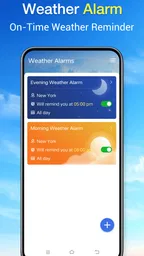
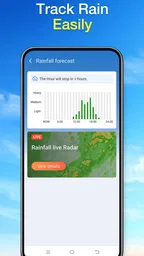
The app’s name also creates a potentially high bar. “Radar” can lead people to expect a map they can inspect closely, while “Alarm” may suggest timely notifications. I would verify that the actual screens and settings match what I want before making either function central to my plans. If radar detail or dependable alerts are essential, I would not rely on an assumption drawn from the title; I would test the relevant function directly and keep an alternative available until I trust it.
That distinction matters because weather tools are not interchangeable. Some mainstream weather apps emphasize broad forecasts and quick summaries; specialist services may be better for users who want more control over radar or closer attention to changing conditions. Daily Weather Alarm - Radar appears best approached as a daily companion, not automatically as the most detailed option in the category. If your needs are advanced, compare the actual information and controls in each app rather than choosing by a feature word in the name.
Another practical trade-off is confidence. A forecast is only useful when its information is clear enough to act on. If you have to interpret ambiguous icons or keep reopening screens to find the answer you need, the app may add friction to a task that should take seconds. During your first few uses, notice whether the main daily view answers your own questions directly. That simple test is more revealing than installing several weather apps and judging them by the number of panels they display.
Who is most likely to appreciate it?
I would suggest giving it a try if you want a free app for a regular, low-stakes weather check and are comfortable judging it against your existing routine. It may suit someone who wants to see what a dedicated daily-weather option feels like without committing to a paid download. It is also a reasonable candidate for a person who prefers a focused app over a broad service, provided the information shown meets their needs.
I would be more hesitant to recommend it as the only weather source for people who plan outdoor work, coordinate events, travel long distances, or need detailed radar decisions. Those users should first confirm that the app’s actual forecasts and any relevant tools are clear and dependable for their location. If they are not, a specialist or a well-established general weather service is the more sensible choice, even if it takes a little longer to set up.
It is rated for Everyone, so its content rating does not present an age restriction for ordinary users. The current release is version 1.4.0, and it supports Android 8.0 or later. That makes the compatibility check straightforward: before installing, confirm your device meets the minimum operating-system requirement. The app is free, so there is no purchase decision to make upfront, though I would still consider whether its everyday usefulness justifies keeping it installed.
A measured recommendation
My bottom line is that Daily Weather Alarm - Radar has a sensible everyday premise, but its moderate reception calls for a trial rather than an enthusiastic recommendation. I like the idea of keeping a weather check focused on the decisions people make before stepping outside. The strongest case for it is convenience: if its daily presentation gives you a clear answer quickly, it can earn a small but useful place on your phone.
Before relying on it, I would test the exact parts that matter to me over several normal days: whether the local outlook is easy to find, whether the radar experience is useful for my plans, and whether any alert-related behavior matches my expectations. If those checks go well, keep it as a handy daily option. If you still need another app to feel confident, choose the alternative that supplies the detail you actually use. For casual daily planning, it is worth a careful try; for decisions where forecast detail is critical, I would not make it my sole source.
What we like
- Combines weather forecasts with a practical alarm feature.
- Radar maps help visualize approaching precipitation.
- Useful for planning outdoor activities around the forecast.
- Alarm notifications can help keep weather updates timely.
- Daily forecasts make it easy to check conditions at a glance.
What could be better
- Weather accuracy can vary by location and data source.
- Radar coverage may be limited in some regions.
- Frequent alerts may become distracting.
- Some features may require an internet connection.
- Battery use may increase if location access stays enabled.





